

PDFGenius 4
PDFGenius 4 is made and published by RootRise Technologies Pvt. Ltd. AppBrain is an independent app data site and isn't affiliated with RootRise Technologies Pvt. Ltd. The app name, icon, screenshots and description belong to RootRise Technologies Pvt. Ltd. and are shown as published on the App Store.
AppBrain's verdict
- Last updated
- January 17, 2026
- Size
- 6.92 MB
User feedback
Ratings and reviews on the App StoreComments on PDFGenius 4 for iOS
We don't have enough comments to show example comments. Please check back later.
Store listing
By RootRise Technologies Pvt. Ltd., from the App Store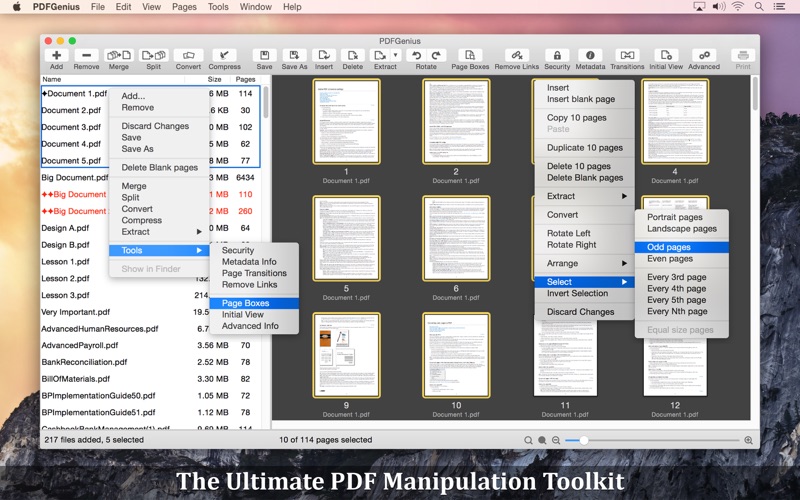
Description by RootRise Technologies Pvt. Ltd. Written by the developer, not by AppBrain. Click to read.
PDFGenius: The ultimate PDF manipulation toolkit is intuitive and powerful PDF utility that you will ever need. It offers features like creating and combining PDFs, splitting PDFs into multiple files, PDF compression to reduce file size, Batch convert and extract PDFs into images and text documents. PDFGenius also allows you to copy/paste, insert, delete, duplicate, rotate and reorder PDF pages. You can drag and drop PDF files and PDF pages between PDF files to create new PDF or insert pages. In addition, you can crop PDF pages, remove links, modify metadata, add/remove password security, add page transitions, change initial view and other advance PDF document properties.
PDFGenius do perform all manipulations on PDF by preserving original contents (i.e. structure of the file, color profiles, fonts, links, bookmarks) without losing document’s integrity and does it very fast.
KEY FEATURES:
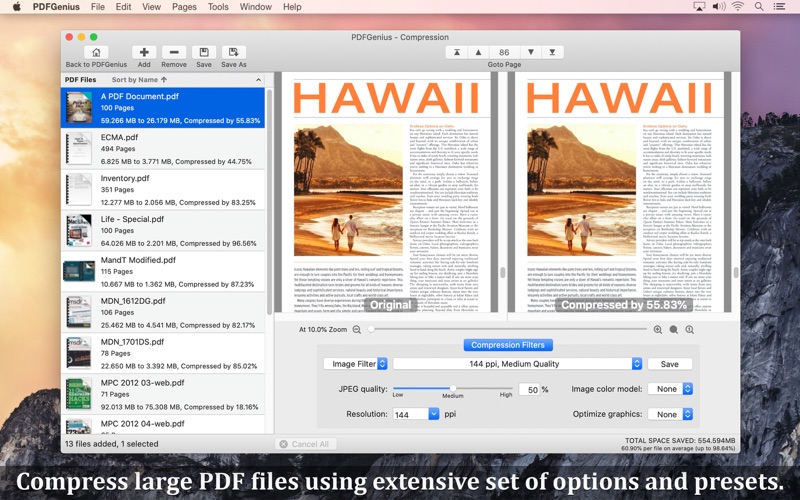
◆ COMPRESSION : Compress PDF documents using Quartz and Image compression methods. ompress large image and graphics heavy PDF using extensive set of options and presets.
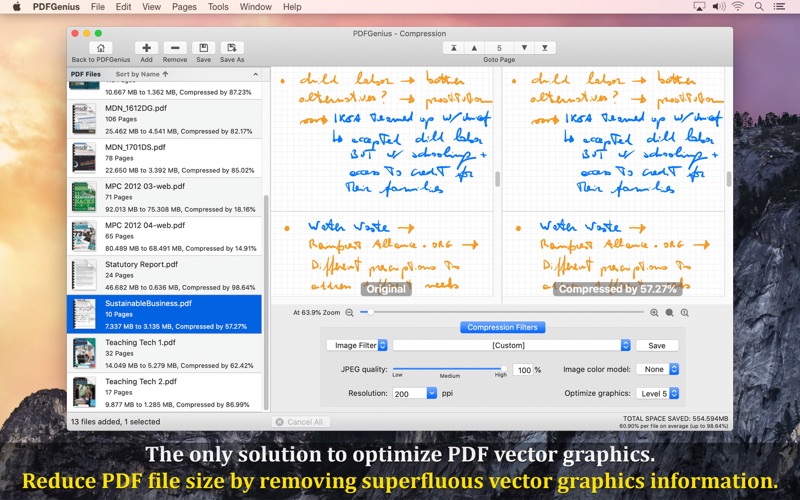
- Controls to change JPEG quality, color model, image resolution and Optimise graphics level to decrease the file size dramatically. New Optimize graphics option removes superfluous information to reduce vector graphics heavy PDF.
- Inbuilt most useful default set of compression filter presets. Preserves your favorite compression options.
- Real time side-by-side quality comparison of compressed PDF to original PDF.
◆ MERGE : Combine multiple files into single PDF document. Can merge PDF bookmarks. Alternate page merge supported.
◆ CONVERT : Batch convert PDF into each page as images (JPG, JP2, PNG, PSD, TIFF, BMP).
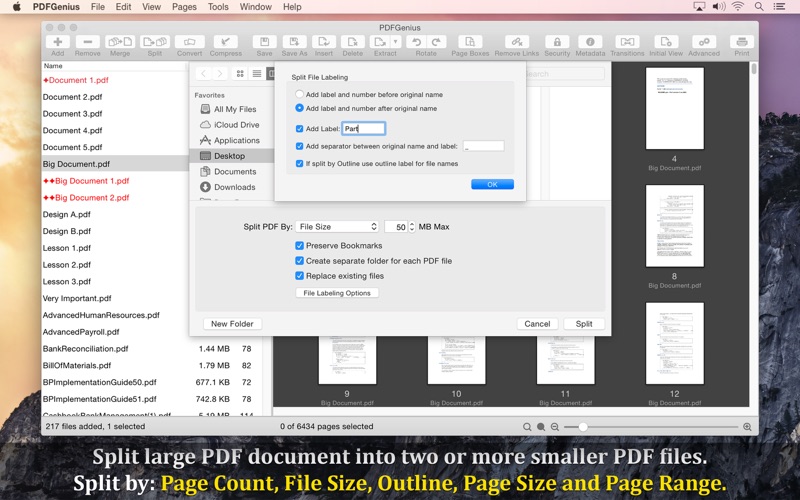
◆ SPLIT : Split PDF into multiple PDF files. Five divide criteria along with file labelling options. Split by page count, file size, outline levels, page size and comma separated page range. Split bu Outline level has option to have outline titles as PDF filenames.
◆ CUT/COPY/PASTE PDF pages between PDF documents. Added option to duplicate selected pages within PDF.
◆ Intuitive feature to drag and drop PDF files and PDF pages between PDF list view and PDF page browser view. You can create new PDF file, insert pages from one file to another, insert entire PDF file(s) into another file just within the application.
◆ EXTRACT PAGES: Reuse selected pages from one PDF document to create new PDF document.
◆ INSERT: Insert new pages into existing PDF by inserting images and pages from another PDF file. Feature to add blank page.
◆ DELETE: Delete pages from PDF file. Feature to delete blank pages.
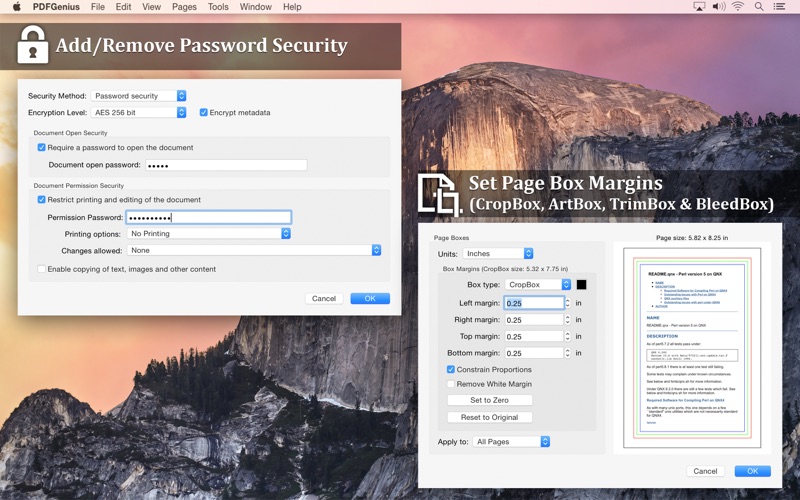
◆ PASSWORD SECURITY: Add or remove password security. Allow to set PDF open document password and permission password with file restriction controls. You can define encryption level with key size.
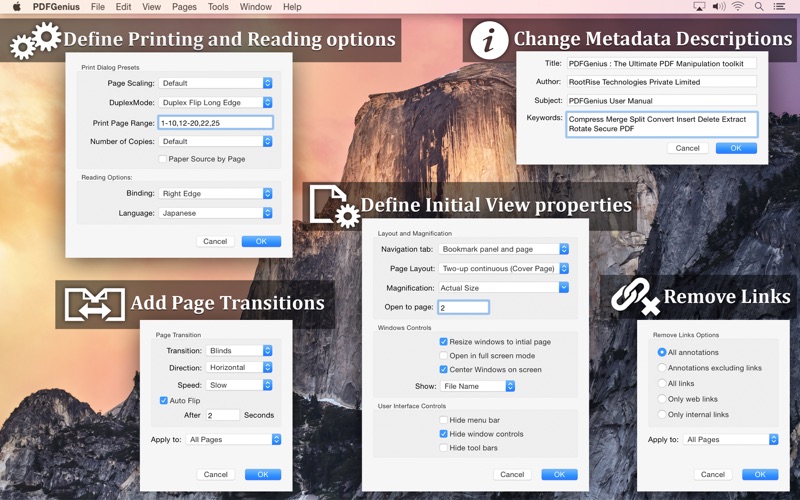
◆ REMOVE LINKS: Remove annotations, internal links, external hyperlinks.
◆ PAGE BOXES: Set CropBox, ArtBox, TrimBox & BleedBox margins of the PDF documents. Options to remove white margins.
◆ CREATE and EDIT PDF OUTLINE
- Auto Magic to generate a new TOC by analysing the range of fonts used in the PDF to tease out a hierarchy of headings.
- Auto Match to generate a new TOC from your selected text in PDF file.
- Add new outline. Drag and drop selected text to create outline.
- Shuffle and arrange outlines. Copy/Paste to reuse outline.
- Change outline destination.
- Rename outline title.
◆ CREATE AND EDIT LINKS
◆ PAGE SELECTION : Most helpful page selection variations to speed up page manipulations.
◆ ARRANGE, SHUFFLE, REORDER and ROTATE PAGES
◆ CREATE PDF document from images and capturing screen, window or screen area selection.
- Change METADATA, PDF INITIAL VIEW, page TRANSITION and Advanced PDF properties.
Much more…
Note: PDFGenius is standalone application running natively to manipulate PDF documents securely on your iOS device.
Safety and technology
Found in the app by AppBrain- Price
- $9.99
- App size
- 6.92 MB
- Content rating
- Everyone
Technologies used by PDFGenius 4
Releases
Updates seen on the App Store- Version
- 4.16
- Launched
- May 2012
No changelog data
Alternatives
Similar apps and more from RootRise Technologies Pvt. Ltd.More from RootRise Technologies Pvt. Ltd.


Rankings
App Store top chartsApp Store Rankings for PDFGenius 4
About the app and developer
About PDFGenius 4
PDFGenius 4 is a productivity app developed by RootRise Technologies Pvt. Ltd.
User Ratings
The app has no ratings yet.
App Information
PDFGenius 4 costs $9.99. The app size is 6.92 MB. The latest version available is 4.16. The last update was on January 17, 2026.
Technical Requirements
The app has a content rating of Everyone. The app has been available on the App Store since May 2012.
Developer information for RootRise Technologies Pvt. Ltd.
RootRise Technologies Pvt. Ltd.
Address:
Frequently asked questions about PDFGenius 4
Is PDFGenius 4 free?
No. PDFGenius 4 costs $9.99 on the App Store.
Is PDFGenius 4 still available?
Yes. PDFGenius 4 is on the App Store, and the last update we saw was on January 17, 2026.
How large is PDFGenius 4?
PDFGenius 4 is 6.92 MB.
Is PDFGenius 4 suitable for children?
App Store rates the content of PDFGenius 4 as suitable for everyone.
Who made PDFGenius 4?
PDFGenius 4 was developed by RootRise Technologies Pvt. Ltd. It is listed in the productivity category on the App Store.