



AppBrain's verdict
- Last updated
- July 1, 2026
- Size
- 36.2 MB
User feedback
Ratings and reviews on the App StoreComments on PDFify: PDF Converter & Scan for iOS
We don't have enough comments to show example comments. Please check back later.
Store listing
By SAILFISH PTE. LTD., from the App StoreDescription by SAILFISH PTE. LTD. Written by the developer, not by AppBrain. Click to read.
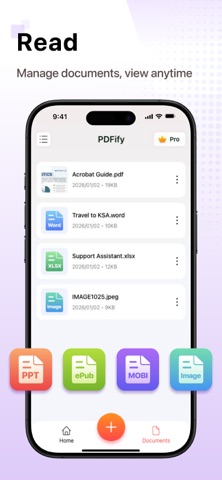
Turn photos into PDFs, convert PDF files to Word, JPG, Excel, or PowerPoint, scan documents with your camera, add signatures, organize pages, and share files quickly from your iPhone.
Whether you need a PDF converter for work, a document scanner for receipts, or a simple PDF maker for everyday files, PDFify gives you the essential tools in one clean and easy-to-use app.
PDF Converter
Convert documents between popular formats in just a few taps:
• PDF to Word
• Word to PDF
• PDF to Excel
• Excel to PDF
• PDF to PowerPoint
• PowerPoint to PDF
• PDF to JPG
• JPG to PDF
• Photos to PDF
• Scan to PDF
Supported formats include PDF, DOC, DOCX, PPT, PPTX, XLS, XLSX, JPG, PNG, TXT, HTML, RTF, ePub, MOBI, and more.
PDF Maker from Photos
Create PDF files from your photos, images, and scanned pages.
• Convert photos to PDF
• Turn JPG and PNG images into PDF files
• Create multi-page PDFs
• Combine multiple images into one document
• Save and share PDFs easily
Perfect for receipts, notes, ID copies, homework, invoices, contracts, and business documents.
Document Scanner
Use your iPhone as a portable PDF scanner.
• Scan documents with your camera
• Convert scans into high-quality PDFs
• Create multi-page scan files
• Enhance scanned documents automatically
• Save, organize, and share scanned files
Great for office documents, paper forms, receipts, handwritten notes, and study materials.
Sign PDF Documents
Add electronic signatures to your PDF files quickly.
• Sign PDF documents
• Add signatures to contracts and forms
• Draw directly on PDF pages
• Save signed documents
• Share signed files with others
PDFify makes it easy to sign documents without printing or scanning again.
PDF Tools
Manage PDF files with useful tools for daily work:
• Merge PDF files
• Compress PDF size
• Add watermarks
• Protect PDFs with passwords
• Draw and annotate PDFs
• Highlight important content
• Organize and manage pages
• Rename and manage documents
Everything you need to handle common PDF tasks in one app.
File Management & Sharing
Keep your documents organized and easy to access.
• Rename and organize files
• Manage PDF, Office, and image documents
• Quickly access recent files
• Share PDFs by email, messages, or other apps
• Store documents securely on your device
AI Resume Enhancer
Upgrade your resume with AI-powered tools:
• Improve resume formatting
• Enhance CV layouts
• Use professional resume templates
• Create polished resumes for job applications
Why Choose PDFify?
• Easy PDF converter for everyday use
• Fast document scanner and PDF maker
• Supports PDF, Word, Excel, PowerPoint, JPG, and more
• Useful tools for signing, merging, compressing, and watermarking PDFs
• Clean interface with simple workflows
• Great for work, school, business, travel, and personal documents
PDFify is designed for people who need a simple, reliable way to handle PDF and document tasks on iPhone.
VIP Membership
Upgrade to PDFify VIP to unlock more powerful features:
• Convert larger files and documents
• Access advanced tools including Sign, Merge, Watermark, and more
• Use batch processing for faster workflows
• Get priority processing for quicker results
• Enjoy an ad-free experience
Subscription Information
• Payment will be charged to your Apple ID account at confirmation of purchase.
• Subscription automatically renews unless auto-renewal is turned off at least 24 hours before the end of the current period.
• Your account will be charged for renewal within 24 hours before the end of the current period.
• You can manage or cancel your subscription in your App Store account settings after purchase.
Privacy Policy: https://pdfkit.co/privacy-policy.html
Terms of Service: https://pdfkit.co/terms-of-service.html
Support: support@pdfkit.co
Safety and technology
Found in the app by AppBrain- Price
- Free
- App size
- 36.2 MB
- Content rating
- Everyone
Technologies used by PDFify: PDF Converter & Scan
Releases
Updates seen on the App Store- Version
- 2.5.5
- Launched
- November 2025
No changelog data
Alternatives
Similar apps and more from SAILFISH PTE. LTD.Alternatives to PDFify: PDF Converter & Scan





 JPG to PDF - PDF Convertor


More from SAILFISH PTE. LTD.


Rankings
App Store top chartsApp Store Rankings for PDFify: PDF Converter & Scan
About the app and developer
About PDFify: PDF Converter & Scan
PDFify: PDF Converter & Scan is a productivity app developed by SAILFISH PTE. LTD.
User Ratings
The app has no ratings yet.
App Information
PDFify: PDF Converter & Scan is freely available from the App Store. The app size is 36.25 MB. The latest version available is 2.5.5. The last update was on July 1, 2026.
Technical Requirements
The app has a content rating of Everyone. The app has been available on the App Store since November 2025.
PDFify: PDF Converter & Scan is made and published by SAILFISH PTE. LTD. AppBrain is an independent app data site and isn't affiliated with SAILFISH PTE. LTD. The app name, icon, screenshots and description belong to SAILFISH PTE. LTD. and are shown as published on the App Store.
Developer information for SAILFISH PTE. LTD.
Address: