

PDFiles: Document Scanner
PDFiles: Document Scanner is made and published by Lukas Daniel Kofler. AppBrain is an independent app data site and isn't affiliated with Lukas Daniel Kofler. The app name, icon, screenshots and description belong to Lukas Daniel Kofler and are shown as published on the App Store.
AppBrain's verdict
- Last updated
- June 17, 2026
- Size
- 3.48 MB
User feedback
Ratings and reviews on the App StoreComments on PDFiles: Document Scanner for iOS
We don't have enough comments to show example comments. Please check back later.
Store listing
By Lukas Daniel Kofler, from the App Store



Description by Lukas Daniel Kofler Written by the developer, not by AppBrain. Click to read.
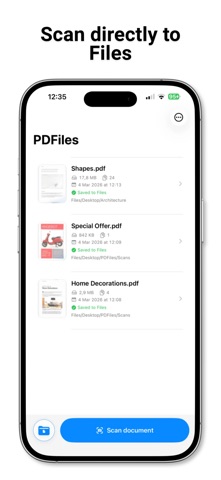
What makes PDFiles different is the workflow. Choose a Files folder once, then every scan lands there automatically. No export maze, no repeated folder picking, no account and no cloud upload required.
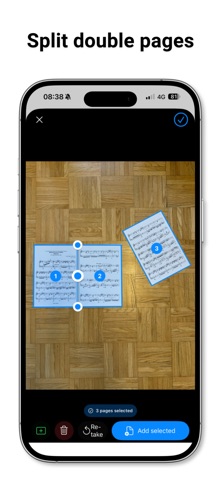
New in 2.0: faster batch scanning for real documents. Detect several documents in one camera image, choose the pages you want and set the final PDF order by the order you tap them.
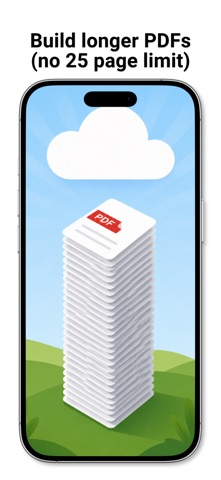
Scan multiple pages without an artificial 25-page limit. Keep the camera open, collect pages in a scan stack and save one multi-page PDF when you're done.
Need to scan book pages, sheet music or two A4 pages side by side? Double Page Mode splits one photo into separate PDF pages. Move or delete the divider before saving.
PDFiles also lets you fine-tune every scan. Adjust corners and edges, use the magnifier for precise placement or add a manual scan area when automatic detection misses something.
Use PDFiles for:
• documents
• receipts
• invoices
• contracts
• forms
• notes
• letters
• sheet music
• book pages
Features:
• Scan documents to PDF
• Save PDFs directly to the Files app
• Choose a default Files folder
• Detect multiple documents in one photo
• Create several PDF pages from one camera image
• Scan longer documents without a 25-page limit
• Keep scanning and save one multi-page PDF at the end
• Split double-page scans into separate pages
• Reorder pages before saving
• Merge documents into one PDF
• Compress PDFs to reduce file size
• Adjust corners and edges manually
• Add a manual scan area
• Use A4, A3 and US Letter paper formats
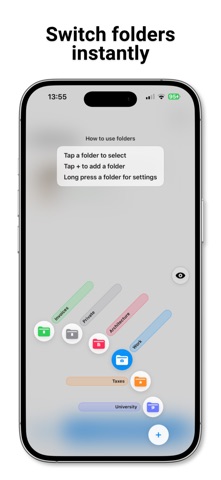
• Organize folders with colors
• Switch target folders quickly
Privacy first:
Scans are processed locally on your iPhone with iOS and Apple frameworks. No account is required. No cloud upload is required. Your documents stay under your control.
PDFiles is made for people who want a simple PDF scanner that gets documents into the right folder fast.
Safety and technology
Found in the app by AppBrain- Price
- Free
- App size
- 3.48 MB
- Content rating
- Everyone
Technologies used by PDFiles: Document Scanner
Releases
Updates seen on the App Store- Version
- 2.0
- Launched
- February 2026
No changelog data
Alternatives
Similar apps and more from Lukas Daniel KoflerAlternatives to PDFiles: Document Scanner

 Chaticon: Chatbot AI Assistant


Rankings
App Store top chartsApp Store Rankings for PDFiles: Document Scanner
About the app and developer
About PDFiles: Document Scanner
PDFiles: Document Scanner is a productivity app developed by Lukas Daniel Kofler.
What is the rating of PDFiles: Document Scanner?
PDFiles: Document Scanner has no ratings yet.
Is PDFiles: Document Scanner free?
PDFiles: Document Scanner is free. The app size is 3.48 MB. The latest version available is 2.0. The last update was on June 17, 2026.
What are the requirements for PDFiles: Document Scanner?
The app has a content rating of Everyone. The app has been available on the App Store since February 2026.
Developer information for Lukas Daniel Kofler
Address: