Download Android Apps and Games
AppBrain
  • Apps
  • Apps being viewed right now Trending apps today Most popular apps All-time most downloaded apps Top rated apps iPhone and iPad apps
  • Intelligence ▾
    Intelligence overview → Track any Android app or your whole market
    Track & analyze
    Keyword Tracker & OptimizerTrack & improve Play rankings App Performance ReportOne-off PDF for any app StatisticsFree Android & Play market stats
    Promote your app
    Featured Apps App Links
  • Intelligence
  • Pricing
  • Dashboard
  • Sign up
  • Log in
Last updated on: 2026-09-29
App Store Apps > Utilities > Pdfino: Compress PDF File Size
Pdfino: Compress PDF File Size icon

Pdfino: Compress PDF File Size

1.56
Darius Cirjan
0.00
0 reviews
Free

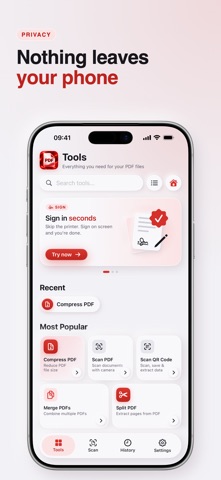
Pdfino: Compress PDF File Size Screenshot 1 of 6
Pdfino: Compress PDF File Size Screenshot 2 of 6
Pdfino: Compress PDF File Size Screenshot 3 of 6
Pdfino: Compress PDF File Size Screenshot 4 of 6
Pdfino: Compress PDF File Size Screenshot 5 of 6
Pdfino: Compress PDF File Size Screenshot 6 of 6
Download from the App Store

About Pdfino: Compress PDF File Size

Pdfino: Compress PDF File Size is an utilities app developed by Darius Cirjan.

User Ratings

The app has no ratings yet.

App Information

Pdfino: Compress PDF File Size is FREE to download. The download size is 61.89 MB. The latest version available is 1.56. The last update was on September 17, 2026.

Technical Requirements

The app has a content rating of Everyone. The app has been available on the App Store since November 2025.

Description
Pdfino shrinks a PDF that is too big to email, then does the other 38 jobs too: scan, merge, split, sign, fill, protect, redact and convert. Every job runs on your device. No file is uploaded, and there is no account to create.

Scan paper into a clean PDF, pull out only the pages you need, merge a stack into one document, sign it and send it, without leaving the app.

COMPRESS AND SEND
Import your PDFs and reduce the file size, with five quality levels and a whole batch at a time. You can also ask Siri to compress a PDF for you.

SCAN AND CONVERT IN SECONDS
Scan with the camera, with edge detection, multi page capture and four filters. Turn images into a PDF, export any PDF back out as PNG or JPEG, and convert Word documents, Markdown, HTML and live web pages into clean PDFs.

MERGE, SPLIT AND REARRANGE
Combine several PDFs into one, pull out only the pages you need, then reorder, rotate, crop, resize, replace or delete pages, and add page numbers, headers, footers and bookmarks.

SIGN, FILL AND PROTECT
Draw your signature, keep up to five saved, and place one anywhere on the page. Fill in existing form fields, add a text or image watermark, then flatten the result. Password protect a PDF, set printing and copying permissions, unlock one you own, or strip the metadata out. Redaction rebuilds the page from the blacked out image, so the text underneath leaves the file instead of hiding behind a rectangle anyone can drag away.

ALSO IN THE BOX
Highlight, underline and leave sticky notes. Pull the plain text out of a scan, or run OCR on a PDF in nine languages. Translate the text inside a PDF. Scan a QR code and save the contact card. Repair a damaged PDF, optimize a heavy one, or compare two by page count and size. A History tab remembers every job, and search covers every tool. Works on iPhone and iPad.

PRIVATE BY DEFAULT
Your documents never leave your device. Scanning, OCR, compression and redaction all happen locally, there is no Pdfino server, and there is nothing to sign into. Two tools fetch a web address you typed in yourself, and that is the only time a document you are working on involves the network. The app itself uses ads and, if you allow it, analytics.

TRY EVERYTHING BEFORE YOU PAY
Every tool is free once a day, and Annotate, Fill Forms, Redact, Translate and Compare have no daily limit at all. Compression works from its own allowance of ten, and a short video adds three more or unlocks everything for 24 hours. Nothing is hidden behind a wall you cannot look over first.

Download Pdfino and put all 39 tools in your pocket.

Pdfino is free to use, with one use of every tool each day, ten compressions in total, and ads. The subscription removes the daily limit, the compression allowance and the ads. It is an auto renewing subscription offered weekly at the price shown in the app for your region, charged to your Apple Account when you confirm the purchase. New subscribers whose Apple Account is eligible start with a 3 day free trial, and any unused part of a trial is forfeited on purchase. It renews for the same period and price unless auto renew is turned off at least 24 hours before the current period ends. Manage or cancel it in Settings, tap your name, then Subscriptions.

Terms of Use: https://pdfino.com/terms.html
Privacy Policy: https://pdfino.com/privacy.html
Standard License Agreement (EULA): https://www.apple.com/legal/internet-services/itunes/dev/stdeula/
Show more Show less

More data about Pdfino: Compress PDF File Size

Price Free to download
Rating No ratings
Ranking Not ranked
Version 1.56
App download size 61.9 MB
Suitable for Everyone

More from Darius Cirjan

Kipply: Smart Phone Cleaner icon Kipply: Smart Phone Cleaner
Darius Cirjan
4.0
Free
1 ratings
TopoXY: Coordinate Converter icon TopoXY: Coordinate Converter
Darius Cirjan
0.0
Free
AppsRank: Ranking Tracker icon AppsRank: Ranking Tracker
Darius Cirjan
0.0
Free

Changelog of Pdfino: Compress PDF File Size

No changelog data

Developer information for Darius Cirjan

Darius Cirjan

Address:

Share Pdfino: Compress PDF File Size

Comments on Pdfino: Compress PDF File Size for iOS

We don't have enough comments to show example comments. Please check back later.

App Store Rankings for Pdfino: Compress PDF File Size

This app is not ranked

Technologies used by Pdfino: Compress PDF File Size

Frequently asked questions about Pdfino: Compress PDF File Size

Is Pdfino: Compress PDF File Size free?

Yes. Pdfino: Compress PDF File Size is free to download from the App Store.

Is Pdfino: Compress PDF File Size still available?

Yes. Pdfino: Compress PDF File Size is on the App Store, and the last update we saw was on September 17, 2026.

How large is the Pdfino: Compress PDF File Size download?

Pdfino: Compress PDF File Size is 61.89 MB to download.

Is Pdfino: Compress PDF File Size suitable for children?

App Store rates the content of Pdfino: Compress PDF File Size as suitable for everyone.

Who made Pdfino: Compress PDF File Size?

Pdfino: Compress PDF File Size was developed by Darius Cirjan. It is listed in the utilities category on the App Store.

Apps other people are watching Today's trending apps Apps on sale Top new apps Popular Utilities Apps
Overview Reviews Rankings Technology
More hot apps 🔥
AppBrain Intelligence premium content

Subscribe now to get full and unlimited access to AppBrain Intelligence. You'll have access to:

  • App Intelligence dashboard (performance timeline, competitor comparison, country rankings, insight cards)
  • Detailed ranking data per app
  • Full timeline per developer
  • Device market shares data per country
  • Unlimited keyword tracking
1 Month

$75/mo
(billed every month)

SAVE 0%
Subscribe
3 Months

$65/mo
($195 billed every 3 months)

SAVE 13%
Subscribe
1 Year

$57.50/mo
($690 billed every year)

SAVE 23%
Subscribe
Each subscription will automatically renew 3 days before the expiration date for the same time period. Subscriptions can be cancelled at any time before the renewal.

AppBrain is a directory focused on discovering great apps and games. We give statistics, rankings and search options that Google Play and the App Store don't have. All trademarks are owned by their respective owners. AppBrain doesn't offer APKs or binaries, and always lets users install the official version from Google Play or the App Store.

More apps

  • Top Android apps being viewed
  • FCB Banks - Business
  • Miniso X33 AI Earbuds Guide stats
  • View SARASWATI DHAAM JAIPUR

App statistics

  • Android statistics
  • Google Play Developer stats
  • Trending Android Apps
  • Trending iOS apps
  • Top popular Apps
  • Buy the best Android phone

About AppBrain

  • Contact
  • Privacy
  • Documentation
  • DMCA takedowns
  • Articles
  • Blog
  • Monetization tips: Understanding your eCPM
© 2010-2026 - AppBrain