

PDFtor-W
PDFtor-W is made and published by RootRise Technologies Pvt. Ltd. AppBrain is an independent app data site and isn't affiliated with RootRise Technologies Pvt. Ltd. The app name, icon, screenshots and description belong to RootRise Technologies Pvt. Ltd. and are shown as published on the App Store.
AppBrain's verdict
- Last updated
- January 22, 2026
- Size
- 124.1 MB
User feedback
Ratings and reviews on the App StoreComments on PDFtor-W for iOS
We don't have enough comments to show example comments. Please check back later.
Store listing
By RootRise Technologies Pvt. Ltd., from the App Store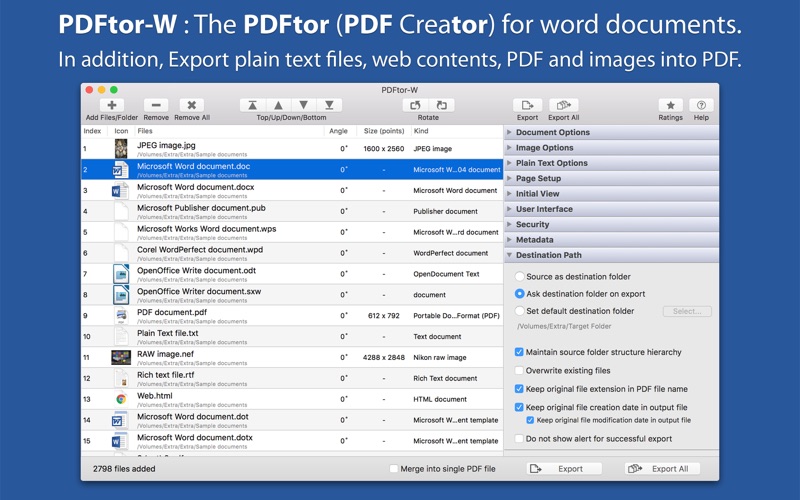
Description by RootRise Technologies Pvt. Ltd. Written by the developer, not by AppBrain. Click to read.
◆ SUPPORTED FILE TYPES
• Microsoft Word documents (.doc, .docx, .dot, .dotx, to name a few) and Works Word (.wps).
• OpenOffice Writer documents (.odt, .ott, .fodt, .sxw, .stw, .sxg)
• Text documents like
- Plain text files (.txt, .text, .log, .xml and more)
- Source code files (.m, .mm, .c, .cpp, .h, .java and more)
- Script code text files (.sh, csh, .py, .php and more)
• Image files
- Digital image types JPEG, JPEG 2000, PSD, PNG, TIFF, BMP, GIF and all other Mac OS supported image formats.
- RAW image formats (.crw, .cr2, .nef, .nrw, .srf, .sr2, .dcr, .kdc, .raw, .rw2, .srw, to name a few)
• Other documents like PDF, RTF, RTFD, HTML, WordPerfect 1-11 (.wpd, .wp), Lotus Word and AbiWord document and many more…
FEATURES:
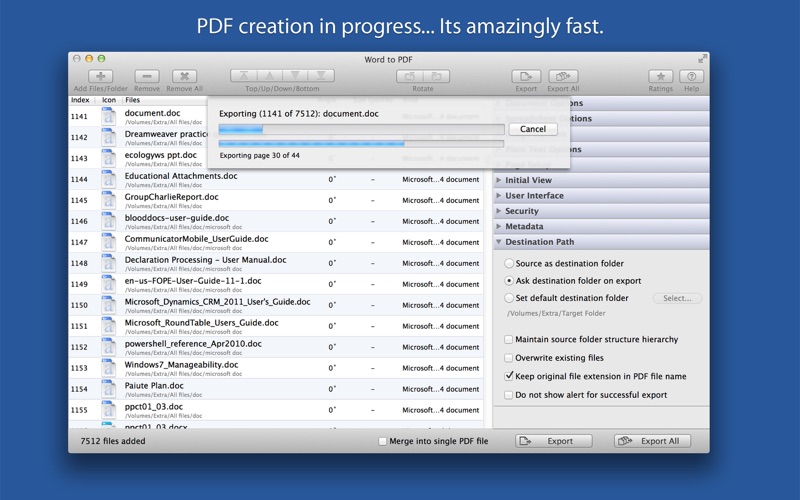
◆ Batch export at once. Create separate PDF files or merge them into single PDF.
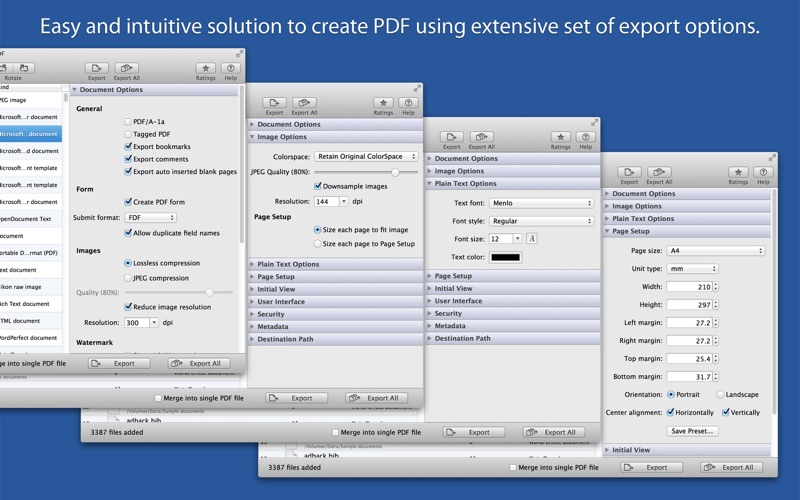
◆ Document options to use for exporting word documents, rtf and text files into PDF.
- Option to export as PDF/A-1a and tagged PDF.
- Specify to export document bookmarks, comments and auto inserted pages into PDF.
- Specify to create PDF form with submit format FDF, PDF, HTML and XML.
- Specify image quality and down-sample resolution.
- Apply text watermark to export as personalise PDF.
◆ Image export options are used while creating PDF from digital images. Allows you to provide image color space model, quality, down sampling resolution and output PDF page size for each exported images.
◆ Export plain text documents by applying font, size and color text attributes.
◆ Define output PDF page layout by specifying page size, margins, page orientation and content alignment. Specified page setup can be only used while exporting images and plain text files.
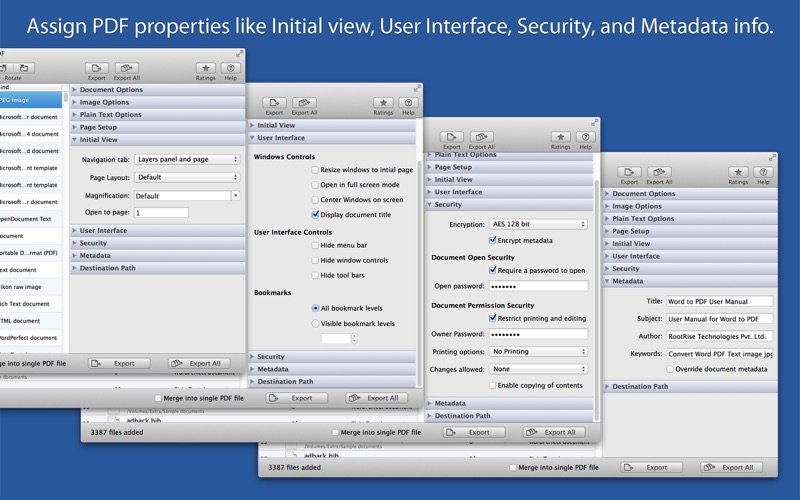
◆ Define an initial view options to set magnification level, page, and page layout.
◆ Define an user interface controls which parts of PDF reader own user interface should be hidden when this document is displayed. It includes Window Controls, User Interface Options, Bookmarks and Transitions.
◆ Set security options to encrypt output PDF by setting open document password and permission password with file restriction controls. Define encryption level and key size for document encryption.
◆ Assign Title, Author, Subject and Keywords metadata info to PDF.
◆ Sort and shuffle files in list. Very useful while merging multiple files into single PDF.
◆ Rotate document pages.
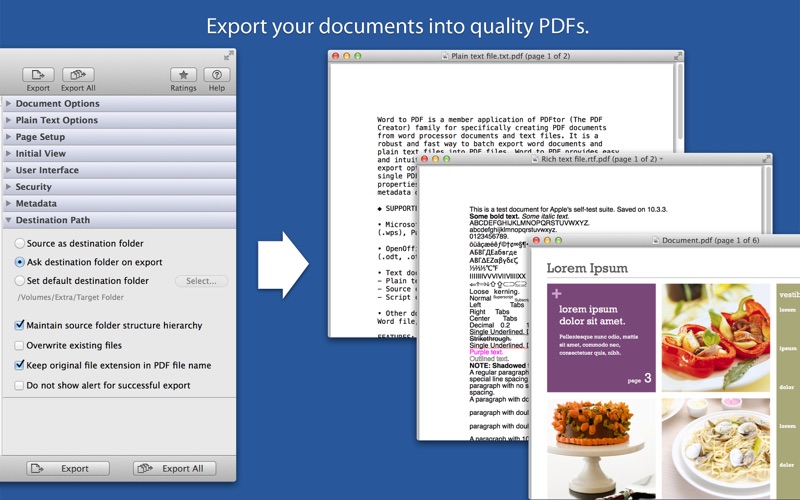
◆ Option to export PDF beside source file location. Maintain exact source folder's storage hierarchy at destination and other flexible option for easy conversion.
Note: PDFtor-W is a standalone application running natively to export documents into PDF securely right on your computer, you don’t have to install any third party application or plugin to convert a file to PDF and you don’t even have to open the authoring application to convert a file to PDF.
Safety and technology
Found in the app by AppBrain- Price
- $12.99
- App size
- 124.1 MB
- Content rating
- Everyone
Technologies used by PDFtor-W
Releases
Updates seen on the App Store- Version
- 5.0
- Launched
- February 2013
No changelog data
Alternatives
Similar apps and more from RootRise Technologies Pvt. Ltd.More from RootRise Technologies Pvt. Ltd.


Rankings
App Store top chartsApp Store Rankings for PDFtor-W
About the app and developer
About PDFtor-W
PDFtor-W is a business app developed by RootRise Technologies Pvt. Ltd.
User Ratings
The app has no ratings yet.
App Information
PDFtor-W costs $12.99. The app size is 124.11 MB. The latest version available is 5.0. The last update was on January 22, 2026.
Technical Requirements
The app has a content rating of Everyone. The app has been available on the App Store since February 2013.
Developer information for RootRise Technologies Pvt. Ltd.
RootRise Technologies Pvt. Ltd.
Address:
Frequently asked questions about PDFtor-W
Is PDFtor-W free?
No. PDFtor-W costs $12.99 on the App Store.
Is PDFtor-W still available?
Yes. PDFtor-W is on the App Store, and the last update we saw was on January 22, 2026.
How large is PDFtor-W?
PDFtor-W is 124.11 MB.
Is PDFtor-W suitable for children?
App Store rates the content of PDFtor-W as suitable for everyone.
Who made PDFtor-W?
PDFtor-W was developed by RootRise Technologies Pvt. Ltd. It is listed in the business category on the App Store.