

PDFWiz: PDF Scanner
PDFWiz: PDF Scanner is made and published by Bodrya Hardikkummar Vinodbhai. AppBrain is an independent app data site and isn't affiliated with Bodrya Hardikkummar Vinodbhai. The app name, icon, screenshots and description belong to Bodrya Hardikkummar Vinodbhai and are shown as published on the App Store.
AppBrain's verdict
- Rating on App Store
- 5.00
- 1 ratings
- Last updated
- May 9, 2026
It doesn't have enough ratings yet to judge what users think.
Rankings
App Store top chartsApp Store Rankings for PDFWiz: PDF Scanner
Competitors
Similar apps and more from Bodrya Hardikkummar VinodbhaiMore from Bodrya Hardikkummar Vinodbhai


Releases
Updates seen on the App Store- Version
- 1.7.4
- Launched
- August 2025
No changelog data
User feedback
Ratings and reviews on the App StoreComments on PDFWiz: PDF Scanner for iOS
We don't have enough comments to show example comments. Please check back later.
Technology
Found in the app by AppBrain- Price
- Free
- App size
- 68.8 MB
- Content rating
- Everyone
Technologies used by PDFWiz: PDF Scanner
About the app and developer
About PDFWiz: PDF Scanner
PDFWiz: PDF Scanner is a productivity app developed by Bodrya Hardikkummar Vinodbhai.
What is the rating of PDFWiz: PDF Scanner?
PDFWiz: PDF Scanner is rated 5.00 out of 5 stars, based on one rating ratings.
Is PDFWiz: PDF Scanner free?
PDFWiz: PDF Scanner is free. The app size is 68.82 MB. The latest version available is 1.7.4. The last update was on May 9, 2026.
What are the requirements for PDFWiz: PDF Scanner?
The app has a content rating of Everyone. The app has been available on the App Store since August 2025.
Developer information for Bodrya Hardikkummar Vinodbhai
Address:
Store listing
By Bodrya Hardikkummar Vinodbhai, from the App Store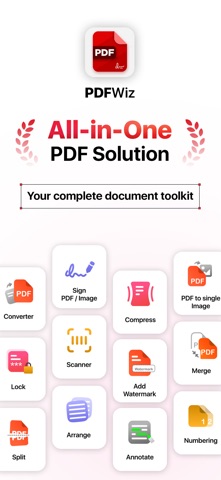


Description by Bodrya Hardikkummar Vinodbhai Written by the developer, not by AppBrain. Click to read.
Whether you're editing a contract, scanning a receipt, converting a report, or securing sensitive files, PDFWiz gives you the tools to do it all, efficiently and reliably.
Built for speed, simplicity, and flexibility, PDFWiz is ideal for students, business professionals, freelancers, and anyone who works with documents regularly.
Features:
1. Advanced PDF Editor
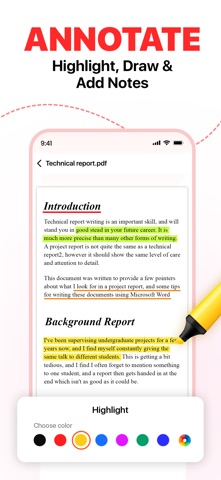
Edit any PDF file with ease. Highlight key sections, underline important text, and annotate freely. Add comments or markups directly on the document. Perfect for reviewing, proofreading, or teaching.
2. Smart Scanner to PDF
Turn your phone into a portable scanner. Capture documents, forms, books, receipts, and more with automatic edge detection and image enhancement. Save as crystal-clear PDFs or images.
3. OCR (Text Recognition)
Extract and recognize text from scanned images or PDF documents. Copy, edit, and reuse text instantly—ideal for digitizing notes, receipts, or printed documents.
4. PDF Compressor
Reduce PDF file size without compromising quality. Optimize large files for easy sharing via email, messaging, or cloud upload.
5. Convert PDFs with Accuracy
Convert PDF files to Word, Excel, PowerPoint, images (JPG/PNG), and more. Need a single image output from a full PDF? PDFWiz handles that too with high fidelity.
6. Page Management Made Simple
Add, delete, duplicate, rotate, or reorder pages with intuitive controls. Organize your PDF the way you want without needing a computer.
7. Split & Merge PDFs
Combine multiple PDFs into one seamless document or split large files into smaller, more manageable sections. Great for organizing chapters, invoices, or presentations.
8. Add Watermarks
Customize your documents with watermarks to protect intellectual property or brand your files. Set transparency, size, and positioning to your preference.
9. Page Numbering with Customization
Add page numbers to PDFs with full control over format, font, and position—useful for reports, eBooks, and academic files.
10. PDF Signing
Digitally sign PDFs with stored or handwritten signatures. Fill and sign forms, contracts, or agreements quickly and securely—no printing required.
11. Secure PDFs
Lock confidential files with a password or unlock secured PDFs with ease. Your data stays private and protected on your device.
Why Choose PDFWiz?
- Comprehensive toolkit for all PDF needs
- Fast, intuitive interface designed for productivity
- Offline support — work without an internet connection
- No data tracking — privacy-focused and secure
- Trusted by professionals, students, and everyday users worldwide
Ideal For:
- Signing legal documents and filling out forms
- Scanning receipts, notes, and printed papers
- Compressing PDFs for uploads or emails
- Creating course packs, manuals, or branded PDFs
- Extracting text from physical documents
- Merging reports and organizing business files
Discover PDFWiz Today
Stop juggling between apps. PDFWiz gives you all the essential tools in one unified experience. Download now and streamline your document workflow like never before.
Go Pro with PDFWiz
Unlock premium tools like OCR, watermarking, secure file locking, advanced conversions, annotation, PDF highlighting, page management, and much more. Your iTunes account will be charged upon confirmation. Subscription auto-renews unless canceled at least 24 hours before the end of the current period. You can manage or cancel your subscription anytime in your iTunes account settings.
Read our Terms of Service and Privacy Policy here:
https://bodrya-hardik.blogspot.com/2025/05/terms-of-service-for-pdfwiz-app.html
https://bodrya-hardik.blogspot.com/2025/05/privacy-policy-for-pdfwiz-app.html
Questions or feedback? Reach out anytime at sundaylab.apps@gmail.com.