

PearTune: Self-Hosted Music
PearTune: Self-Hosted Music is made and published by Timothy Hudgins. AppBrain is an independent app data site and isn't affiliated with Timothy Hudgins. The app name, icon, screenshots and description belong to Timothy Hudgins and are shown as published on the App Store.
AppBrain's verdict
- Last updated
- October 2, 2026
Rankings
App Store top chartsApp Store Rankings for PearTune: Self-Hosted Music
Competitors
Similar apps and more from Timothy HudginsAlternatives to PearTune: Self-Hosted Music


More from Timothy Hudgins


Releases
Updates seen on the App Store- Version
- 1.1.13
- Launched
- August 2026
No changelog data
User feedback
Ratings and reviews on the App StoreComments on PearTune: Self-Hosted Music for iOS
We don't have enough comments to show example comments. Please check back later.
Technology
Found in the app by AppBrain- Price
- Free
- App size
- 88.8 MB
- Content rating
- Everyone
Technologies used by PearTune: Self-Hosted Music
About the app and developer
About PearTune: Self-Hosted Music
PearTune: Self-Hosted Music is a music app developed by Timothy Hudgins.
What is the rating of PearTune: Self-Hosted Music?
PearTune: Self-Hosted Music has no ratings yet.
Is PearTune: Self-Hosted Music free?
PearTune: Self-Hosted Music is free. The app size is 88.84 MB. The latest version available is 1.1.13. The last update was on October 2, 2026.
What are the requirements for PearTune: Self-Hosted Music?
The app has a content rating of Everyone. The app has been available on the App Store since August 2026.
Developer information for Timothy Hudgins
Address:
Store listing
By Timothy Hudgins, from the App Store


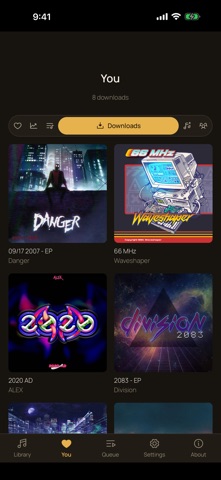
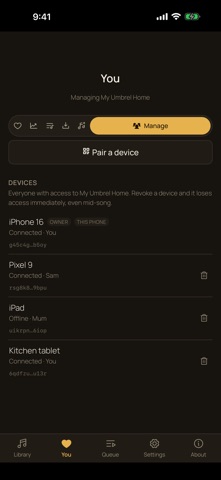
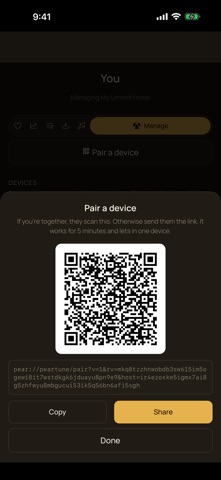
Description by Timothy Hudgins Written by the developer, not by AppBrain. Click to read.
No port forwarding, no VPN, no dynamic DNS, no account, and no copy of your library in anyone's cloud. The music never leaves your hardware: it streams through the live connection while it plays.
PLEASE READ FIRST
PearTune needs that machine running the free PearTune host, which is the source of the music. It is not a player for files stored on your phone. If you do not have a server yet, setup offers "I don't have one yet", which plays a small built-in demo library so you can look around before you have a library to connect to.
READS THE LIBRARY YOU ALREADY HAVE
Point the host at a music server you already run and PearTune uses its library, its artwork and its transcoding. It speaks the Subsonic API, so Navidrome, Gonic, LMS, Ampache, Funkwhale, Koel, Nextcloud Music, Supysonic and Airsonic all work, and it reads Jellyfin and Emby servers directly. Point it at a plain folder of files instead and PearTune reads the tags itself - artist, album, track number, year and embedded cover art - so a folder is a real library, not a list of filenames.
IN THE APP
- Browse by artist, album, genre or track, with artwork
- Search the whole library
- Gapless playback, shuffle and repeat, a sleep timer
- Background and lock screen audio
- Playlists you make on your phone, plus the read-only ones your server already has
- Favourites and resume points that follow you between your own devices
- Playback hands over rather than doubling up - start on one device and the other pauses
- Downloads: pin an album to keep it on the phone, for a flight or a tunnel
- Ask the owner for music you cannot find, and see what they did with it
THE LIBRARY DOES NOT HAVE TO BE YOURS
Someone can let a friend or a family member in, each as their own person with their own devices, their own favourites and their own resume points, and no login to pass around. The owner sees every device and can revoke one, or everything one person holds, in a second - mid-song, not on next login. Nobody who is let in ever receives a copy of a file.
PAIRING IS ONE SCAN
Scan a QR code and you are in. There is no password, no server address and no account to create. The connection itself proves which device is calling, so there is no token to leak, copy or forget to rotate.
WHEN A DIRECT CONNECTION IS NOT POSSIBLE
Some mobile networks and locked-down wifi refuse a direct connection between two devices. When that happens PearTune can fall back to a relay run by PeerLoom, which forwards encrypted data it cannot read and keeps no copy of it. Your phone always tries a direct connection first, PearTune asks before streaming a library's music through the relay, and one switch in Settings turns it off entirely.
OPEN SOURCE
PearTune is MIT licensed and developed in the open. The host you run on your own machine is free, and so is the app.