

Pebble - Quick Memo
Pebble - Quick Memo is made and published by Takahiro Machida. AppBrain is an independent app data site and isn't affiliated with Takahiro Machida. The app name, icon, screenshots and description belong to Takahiro Machida and are shown as published on the App Store.
AppBrain's verdict
- Last updated
- April 10, 2026
Rankings
App Store top chartsApp Store Rankings for Pebble - Quick Memo
Competitors
Similar apps and more from Takahiro MachidaAlternatives to Pebble - Quick Memo


More from Takahiro Machida


Releases
Updates seen on the App Store- Version
- 1.0.3
- Launched
- March 2026
No changelog data
User feedback
Ratings and reviews on the App StoreComments on Pebble - Quick Memo for iOS
We don't have enough comments to show example comments. Please check back later.
Technology
Found in the app by AppBrain- Price
- Free
- App size
- 5.69 MB
- Content rating
- Everyone
Technologies used by Pebble - Quick Memo
About the app and developer
About Pebble - Quick Memo
Pebble - Quick Memo is a productivity app developed by Takahiro Machida.
User Ratings
The app has no ratings yet.
App Information
Pebble - Quick Memo is freely available from the App Store. The app size is 5.69 MB. The latest version available is 1.0.3. The last update was on April 10, 2026.
Technical Requirements
The app has a content rating of Everyone. The app has been available on the App Store since March 2026.
Developer information for Takahiro Machida
Address:
Store listing
By Takahiro Machida, from the App Store


Description by Takahiro Machida Written by the developer, not by AppBrain. Click to read.
**Capture in 3 Seconds**
Open, write, done. Ask Siri. Tap the Lock Screen widget. Pebble catches your thought before it slips away. No folders, no setup — just write.
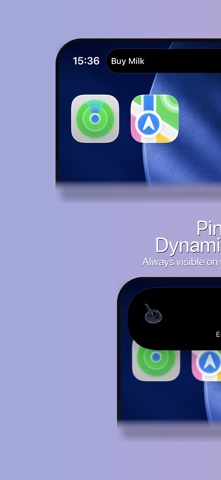
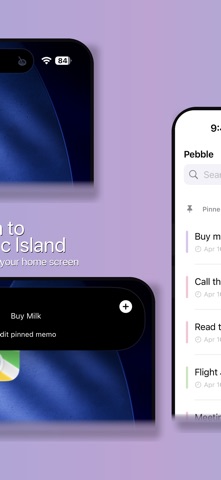
**Keep One Note Always Visible**
Pin a memo to the Dynamic Island, widgets, and the top of your list. No need to dig through notes. Your most important thought stays right where you can see it.
**Think It, Save It**
Ideas don't wait. Neither does Pebble. Save from the app, widgets, Siri, or Shortcuts — in under 3 seconds.
**Dynamic Island Quick Capture**
Your pinned memo lives in the Dynamic Island. Tap to create a new memo instantly — no hunting for the app.
**Widgets & Lock Screen**
Place Pebble on your Home Screen and Lock Screen. Your memos are always one glance away.
**Siri & Shortcuts**
"Hey Siri, memo with Pebble" — hands-free memo creation. Works with Shortcuts and the Action Button too.
**Quick Delete**
Pebble is for fleeting thoughts. Turn on Quick Delete to clear memos with one tap.
**Pastel Design**
Soft pastel colors. A calm, minimal design. Memos should feel light.
**Pebble Pro**
One-time purchase to remove all ads.
Pebble: Don't pile up notes — let them float.