It doesn't have enough ratings yet to judge what users think.
Pebl Assistant is made and published by
Aaron Pinto.
AppBrain is an independent app data site and isn't affiliated with Aaron Pinto.
The app name, icon, screenshots and description belong to Aaron Pinto and are shown as
published on the App Store.
About Pebl Assistant
Pebl Assistant is a lifestyle app developed by Aaron Pinto.
User Ratings
Pebl Assistant is rated 4.60 out of 5 stars. The rating is based on 10 ratings.
App Information
Pebl Assistant is freely available from the App Store. The app size is 22.84 MB. The latest version available is 1.3. The last update was on April 2, 2026.
Technical Requirements
The app has a content rating of Everyone. The app has been available on the App Store since September 2025.
Description by Aaron Pinto(from the App Store)
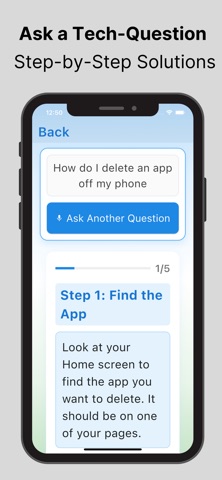
Pebl is a senior-friendly tech help app built to make everyday Apple device questions easier to solve. It is designed for people who want clear guidance without complicated menus, account setup, or technical language. Instead of giving one long wall of text, Pebl turns help into simple, step-by-step instructions you can follow at your own pace.
You can ask for help in the way that feels most comfortable to you. Pebl supports both voice and typed questions. If you prefer speaking, you can use the microphone flow and then review/edit your transcribed question before sending. If you prefer typing, you can use the keyboard flow with a focused, simple input screen. In both paths, you can optionally attach a screenshot from your photo library to provide extra context, which helps Pebl generate more relevant guidance.
After you ask a question, Pebl presents responses as guided learning steps. Each step is shown in a clean card format with large text and straightforward action language. The flow is interactive: you can move through steps one at a time, confirm completion, and continue only when you’re ready. When a step includes a checkpoint, Pebl can show confirmation-style prompts so users can stay oriented and avoid getting lost in the process.
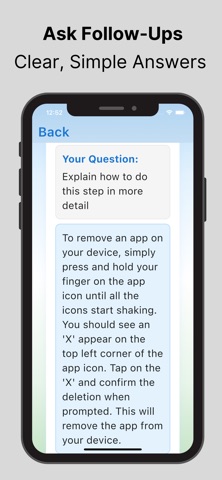
Pebl also includes follow-up help directly inside the guided experience. If you need clarification on a step, you can ask an additional question in context and receive a focused follow-up answer. This allows users to keep moving without starting over or retyping everything from scratch.
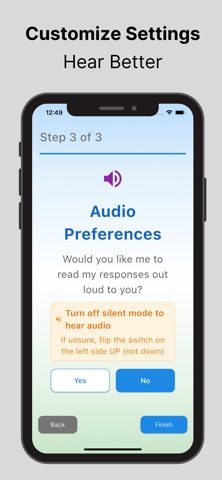
For users who prefer audio, Pebl includes text-to-speech narration throughout key flows. Step content and important results can be read aloud. Audio can be enabled or disabled based on user preference, and Pebl is configured with slower, clearer speech settings intended to improve comprehension.
A dedicated Scam Analyzer is included for suspicious messages. Users can pick a screenshot of a text, email, or pop-up and receive a simple safety result with clear next actions. Results are categorized into understandable statuses (such as safe, suspicious, or likely dangerous), and Pebl explains why the message was flagged in plain language, followed by one concrete recommendation for what to do next.
Pebl keeps a Past Questions history so users can quickly revisit previous help sessions. Recent question/answer sessions are saved locally on the device and can be reopened later, including the same guided steps shown originally. This is useful when users need to repeat a task after a few days without asking the same question again.
To reduce friction for common iPhone tasks, Pebl supports guided shortcuts from certain help steps that can open relevant iOS areas or apps when available. This helps users move from instructions to action faster, especially in settings-related troubleshooting.
Accessibility is a core part of the app experience. Pebl supports larger text scaling, including extra-large usage across screens, and UI components are designed to wrap and remain readable rather than clipping. There is also an accessibility setup flow where users can choose preferred text size and audio behavior, and these preferences persist for future sessions.
For first-time users and reviewers, Pebl includes an in-app tutorial path and a separate demo mode that showcases the step-by-step guidance experience without requiring microphone access or live network-based question handling. This makes it easy to understand how the app works before using full assistance features.
Overall, Pebl focuses on practical, day-to-day tech support for seniors: clear instructions, calmer pacing, optional voice support, screenshot-assisted help, scam checking, and quick access to previous answers—all in one straightforward app experience.
Each subscription will automatically renew 3 days before the expiration date for
the same time period. Subscriptions can be cancelled at any time before the renewal.