

Peelit: Cutout Sticker Maker
Peelit: Cutout Sticker Maker is made and published by 宗泉 赵. AppBrain is an independent app data site and isn't affiliated with 宗泉 赵. The app name, icon, screenshots and description belong to 宗泉 赵 and are shown as published on the App Store.
AppBrain's verdict
- Last updated
- October 21, 2026
Rankings
App Store top chartsApp Store Rankings for Peelit: Cutout Sticker Maker
Competitors
Similar apps and more from 宗泉 赵Alternatives to Peelit: Cutout Sticker Maker


More from 宗泉 赵

Releases
Updates seen on the App Store- Version
- 1.4.4
- Launched
- July 2026
No changelog data
User feedback
Ratings and reviews on the App StoreComments on Peelit: Cutout Sticker Maker for iOS
We don't have enough comments to show example comments. Please check back later.
Technology
Found in the app by AppBrain- Price
- Free
- App size
- 26.4 MB
- Content rating
- Everyone
Technologies used by Peelit: Cutout Sticker Maker
About the app and developer
About Peelit: Cutout Sticker Maker
Peelit: Cutout Sticker Maker is a photo & video app developed by 宗泉 赵.
What is the rating of Peelit: Cutout Sticker Maker?
Peelit: Cutout Sticker Maker has no ratings yet.
Is Peelit: Cutout Sticker Maker free?
Peelit: Cutout Sticker Maker is free. The app size is 26.41 MB. The latest version available is 1.4.4. The last update was on October 21, 2026.
What are the requirements for Peelit: Cutout Sticker Maker?
The app has a content rating of Everyone. The app has been available on the App Store since July 2026.
Developer information for 宗泉 赵
Address:
Store listing
By 宗泉 赵, from the App Store




Description by 宗泉 赵 Written by the developer, not by AppBrain. Click to read.
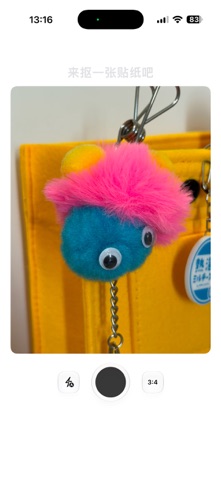
When you see a photo you like, press and hold. Peelit helps you cut out a person, pet, food or everyday object and turn it into a transparent sticker. Drag it onto a canvas, rotate it, resize it and create a scrapbook page, moodboard, wallpaper or a small scene that simply makes you happy.
Take a photo or import one from your library. If a photo contains several subjects, choose the one you want to keep. As your collection grows, use tags, search and batch organization. If you record where a sticker was created, you can also revisit its location on a map.
A canvas is more than a single image. Create multiple canvases, add text stickers and try outlines, dashed lines and holographic effects. Save a favorite arrangement as a Home Screen widget, or export, copy and save stickers and canvases to your photo library.
Peelit does not require an account. Your photos, stickers, tags and canvases stay on your device and are not uploaded to the cloud.
Use Peelit for digital scrapbooking, photo collages, collecting inspiration, family cards and wallpapers, or simply to keep the little things you love.