AppBrain
AppBrain
  • Apps
  • Apps being viewed right now Trending apps today Most popular apps All-time most installed apps Top rated apps iPhone and iPad apps
  • Intelligence ▾
    Intelligence overview → Track any Android app or your whole market
    Track & analyze
    Keyword Tracker & OptimizerTrack & improve Play rankings App Performance ReportOne-off PDF for any app StatisticsFree Android & Play market stats
    Promote your app
    Featured Apps App Links
  • Intelligence
  • Pricing
  • Dashboard
  • Sign up
  • Log in
App Store Apps > Productivity > PeerPause: Screen Time Control
App profile & analytics · Productivity · Data updated 2026-10-09
PeerPause: Screen Time Control icon

PeerPause: Screen Time Control

by Andrei Tarce · Free · Version 1.2.4
Availability On the App Store since May 2026 ↗
Rating on App Store
5.00/5
2 ratings
Rating
5.00
2 reviews
Best rank
–
not in the top lists
Last updated
October 1, 2026
1.2.4
AppBrain's verdict

It doesn't have enough ratings yet to judge what users think.

PeerPause: Screen Time Control is made and published by Andrei Tarce. AppBrain is an independent app data site and isn't affiliated with Andrei Tarce. The app name, icon, screenshots and description belong to Andrei Tarce and are shown as published on the App Store.

About PeerPause: Screen Time Control

PeerPause: Screen Time Control is a productivity app developed by Andrei Tarce.

What is the rating of PeerPause: Screen Time Control?

PeerPause: Screen Time Control is rated 5.00 out of 5 stars, based on 2 ratings.

Is PeerPause: Screen Time Control free?

PeerPause: Screen Time Control is free. The app size is 99.73 MB. The latest version available is 1.2.4. The last update was on October 1, 2026.

What are the requirements for PeerPause: Screen Time Control?

The app has a content rating of High Maturity. The app has been available on the App Store since May 2026.

Description by Andrei Tarce (from the App Store)
Screen time limits only work when you can't quietly undo them. PeerPause fixes that by putting one person you trust between you and the "just five more minutes" button.

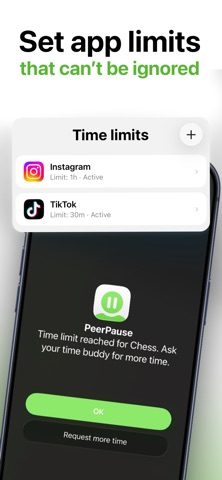
Set a daily limit for the apps that eat your day. When the time is gone, the app locks. If you genuinely need longer, you send a request to your Time Buddy — a friend, partner, or sibling who taps accept or deny. No secret override, no deleting the limit at 1am.

HOW IT WORKS

1. Pick the app that distracts you most.
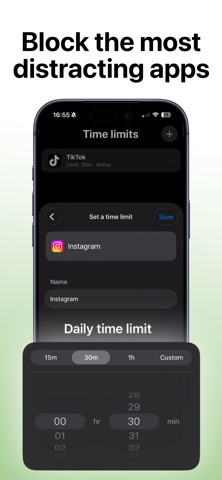
2. Set its daily limit.
3. Add a Time Buddy.
4. When you hit the limit, the app locks.
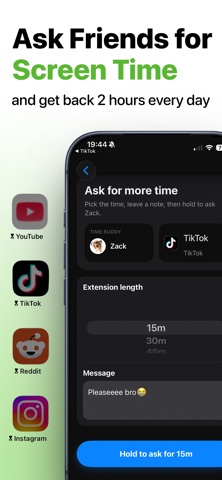
5. Ask for more time, with a note if you want.
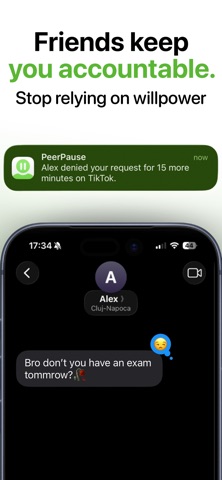
6. Your Time Buddy decides.

WHAT YOU GET

• Blocking for social, video, game, dating, and shopping apps
• Daily limits built on Apple's Screen Time
• Time extension requests, answered by a real person
• Buddy confirmation before a limit is changed or removed
• Streaks and insights that show what's actually improving
• No instant self-override when you hit the limit

WHY A BUDDY BEATS WILLPOWER

Every other blocker lets you turn it off. That is the whole problem — the moment you want to break the limit is exactly the moment you are least able to argue with yourself. Handing that one decision to someone else takes about two seconds and changes the outcome.

Your Time Buddy is not a parent or a monitor. They see the app name, how much time you asked for, and any note you send. They cannot see your messages, your browsing, your photos, or what you do inside any app. Your Screen Time data stays on your device.

BEING SOMEONE'S TIME BUDDY

Answering requests for a friend costs nothing — install PeerPause, get added, and tap accept or deny when they ask. A PeerPause Pro subscription is what lets you create and manage your own limits.

Pause first. Scroll less. Take your time back.

TERMS OF USE

https://www.apple.com/legal/internet-services/itunes/dev/stdeula/
Show more Show less

Screenshots

PeerPause: Screen Time Control Screenshot 1 of 6
PeerPause: Screen Time Control Screenshot 2 of 6
PeerPause: Screen Time Control Screenshot 3 of 6
PeerPause: Screen Time Control Screenshot 4 of 6
PeerPause: Screen Time Control Screenshot 5 of 6
PeerPause: Screen Time Control Screenshot 6 of 6
Screenshots by Andrei Tarce, from the the App Store listing
Official page on the App Store

Alternatives to PeerPause: Screen Time Control

SoFocus: Focus Friend icon SoFocus: Focus Friend
Kenroy McLeish
0.0
Free
Vault: App Blocker - QR Unlock icon Vault: App Blocker - QR Unlock
Yarra Park Pty Ltd
0.0
Free
Reduce Scrolling: Blockwise icon Reduce Scrolling: Blockwise
Ko LiChung
5.0
Free
4 ratings
Time Bandit: Tasks & Habits icon Time Bandit: Tasks & Habits
Coterie Solutions, LLC
4.5
Free
4 ratings
My OKR - Achieve What Matters icon My OKR - Achieve What Matters
Thuy Nguyen
5.0
Free
1 ratings
Text to Speech with AI Voices. icon Text to Speech with AI Voices.
Abdul Haseeb
0.0
Free
DictaWiz: AI Keyboard & Notes icon DictaWiz: AI Keyboard & Notes
CORDOC LLC
4.8
Free
21 ratings
SinceWhen - Anti Habit Tracker icon SinceWhen - Anti Habit Tracker
Basharath Shaik
4.3
Free
13 ratings

Changelog of PeerPause: Screen Time Control

No changelog data

Developer information for Andrei Tarce

Andrei Tarce

Address:

Share PeerPause: Screen Time Control

Comments on PeerPause: Screen Time Control for iOS

We don't have enough comments to show example comments. Please check back later.

App Store Rankings for PeerPause: Screen Time Control

This app is not ranked

Technologies used by PeerPause: Screen Time Control

Frequently asked questions about PeerPause: Screen Time Control

Is PeerPause: Screen Time Control free?

Yes. PeerPause: Screen Time Control is free on the App Store.

Is PeerPause: Screen Time Control still available?

Yes. PeerPause: Screen Time Control is on the App Store, and the last update we saw was on October 1, 2026.

How large is PeerPause: Screen Time Control?

PeerPause: Screen Time Control is 99.73 MB.

Is PeerPause: Screen Time Control suitable for children?

App Store gives PeerPause: Screen Time Control a high maturity rating. It is meant for adults.

How do people rate PeerPause: Screen Time Control?

PeerPause: Screen Time Control scores 5.00 out of 5 stars, from 2 ratings on the App Store.

Who made PeerPause: Screen Time Control?

PeerPause: Screen Time Control was developed by Andrei Tarce. It is listed in the productivity category on the App Store.

What are the best alternatives to PeerPause: Screen Time Control?

People looking at PeerPause: Screen Time Control also look at these productivity apps: SoFocus: Focus Friend, Vault: App Blocker - QR Unlock, Reduce Scrolling: Blockwise, Time Bandit: Tasks & Habits, My OKR - Achieve What Matters.

Popular Productivity Apps Today's trending apps Price drops on Google Play Top new apps Apps other people are watching
SoFocus: Focus Friend icon SoFocus: Focus Friend
Vault: App Blocker - QR Unlock icon Vault: App Blocker - QR Unlock
Reduce Scrolling: Blockwise icon Reduce Scrolling: Blockwise
Time Bandit: Tasks & Habits icon Time Bandit: Tasks & Habits
My OKR - Achieve What Matters icon My OKR - Achieve What Matters
Text to Speech with AI Voices. icon Text to Speech with AI Voices.
DictaWiz: AI Keyboard & Notes icon DictaWiz: AI Keyboard & Notes
SinceWhen - Anti Habit Tracker icon SinceWhen - Anti Habit Tracker
Overview Alternatives Reviews Rankings Technology
AppBrain Intelligence premium content

Subscribe now to get full and unlimited access to AppBrain Intelligence. You'll have access to:

  • App Intelligence dashboard (performance timeline, competitor comparison, country rankings, insight cards)
  • Detailed ranking data per app
  • Full timeline per developer
  • Device market shares data per country
  • Unlimited keyword tracking
1 Month

$75/mo
(billed every month)

SAVE 0%
Subscribe
3 Months

$65/mo
($195 billed every 3 months)

SAVE 13%
Subscribe
1 Year

$57.50/mo
($690 billed every year)

SAVE 23%
Subscribe
Each subscription will automatically renew 3 days before the expiration date for the same time period. Subscriptions can be cancelled at any time before the renewal.

AppBrain is an app data site, we track rankings, ratings, installs for all apps and games on Google Play and the App Store. AppBrain doesn't host app files or APKs, all install links go directly to the official store. All trademarks are owned by their respective owners.

More apps

  • Top Android apps being viewed
  • Who is it? Celeb Quiz Trivia
  • OG Trail - Travel to Oregon
  • View OTA

App statistics

  • Android statistics
  • Google Play Developer stats
  • Trending Android Apps
  • Trending iOS apps
  • Top popular Apps
  • Buy the best Android phone
  • Buy & sell app businesses

About AppBrain

  • Contact
  • Privacy
  • Documentation
  • DMCA takedowns
  • Articles
  • Blog
  • Free App-Ads.Txt Validation
© 2010-2026 - AppBrain