

PenDate Notes
PenDate Notes is made and published by SAMUEL NANA ESHUN. AppBrain is an independent app data site and isn't affiliated with SAMUEL NANA ESHUN. The app name, icon, screenshots and description belong to SAMUEL NANA ESHUN and are shown as published on the App Store.
AppBrain's verdict
- Last updated
- September 17, 2026
Rankings
App Store top chartsApp Store Rankings for PenDate Notes
Competitors
Similar apps and more from SAMUEL NANA ESHUNAlternatives to PenDate Notes


Also available on Google Play

Releases
Updates seen on the App Store- Version
- 1.0.4
- Launched
- May 2026
No changelog data
User feedback
Ratings and reviews on the App StoreComments on PenDate Notes for iOS
We don't have enough comments to show example comments. Please check back later.
Technology
Found in the app by AppBrain- Price
- Free
- App size
- 155.9 MB
- Content rating
- Everyone
Technologies used by PenDate Notes
About the app and developer
About PenDate Notes
PenDate Notes is a productivity app developed by SAMUEL NANA ESHUN.
What is the rating of PenDate Notes?
PenDate Notes has no ratings yet.
Is PenDate Notes free?
PenDate Notes is free. The app size is 155.94 MB. The latest version available is 1.0.4. The last update was on September 17, 2026.
What are the requirements for PenDate Notes?
The app has a content rating of Everyone. The app has been available on the App Store since May 2026.
Developer information for SAMUEL NANA ESHUN
Address:
Frequently asked questions about PenDate Notes
Is PenDate Notes free?
Yes. PenDate Notes is free on the App Store.
Is PenDate Notes still available?
Yes. PenDate Notes is on the App Store, and the last update we saw was on September 17, 2026.
How large is PenDate Notes?
PenDate Notes is 155.94 MB.
Is PenDate Notes suitable for children?
App Store rates the content of PenDate Notes as suitable for everyone.
Who made PenDate Notes?
PenDate Notes was developed by SAMUEL NANA ESHUN. It is listed in the productivity category on the App Store.
What are the best alternatives to PenDate Notes?
People looking at PenDate Notes also look at these productivity apps: Aivelle, Taskcribe AI, Get It Done - Smart Tasks, Topilo Notes, Outline - Tasks & Notes.
Store listing
By SAMUEL NANA ESHUN, from the App Store


Description by SAMUEL NANA ESHUN Written by the developer, not by AppBrain. Click to read.
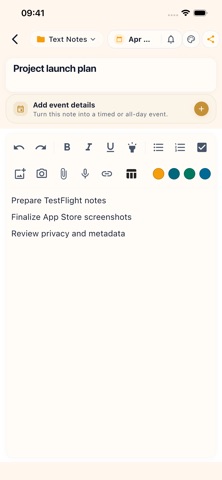
Start from the calendar when you are planning your week, open a day when you need detail, or jump into folders when a project grows. PenDate Notes supports text notes, checklist notes, canvas notes, reminders, calendar events, PDF/image export, and optional Google Drive sync.
Main features:
• Calendar views for year, month, week, and day planning
• Text notes for quick writing and structured plans
• Checklist notes with quantities and totals
• Canvas notes for handwriting, sketches, and visual planning
• Date-linked reminders and events
• Folders and covers to keep notes easy to scan
• PDF and image export for sharing or saving your work
• Recycle Bin for restoring deleted notes
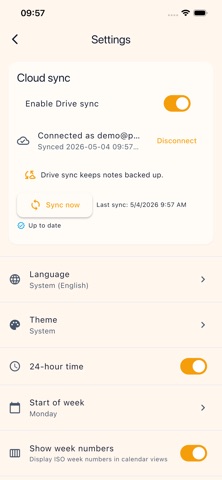
• Optional Google Drive sync for backup and continuity
PenDate Notes is built for people who think through dates: students, professionals, families, creators, and anyone who wants notes to stay connected to the day they matter.
Use it offline for everyday planning, then enable reminders or sync only when you need them.
Optional paid features
PenDate Pro includes all 11 planner families, Signature stickers and covers, selected-page PDF export with planner layouts, and PenDate library restore. Choose a monthly or yearly auto-renewable subscription, or a one-time Lifetime purchase. Individual planner families and Signature packs are also available as one-time purchases. Everyday note-taking remains free.
Subscription prices and billing periods are shown in the app before purchase. Payment is charged to your Apple Account at confirmation. Subscriptions renew automatically unless canceled at least 24 hours before the current period ends. Your account is charged for renewal within 24 hours before that period ends. Manage or cancel subscriptions in your App Store account settings. Canceling renewal keeps access until the end of the paid period.
Terms of Use (Apple Standard EULA): https://www.apple.com/legal/internet-services/itunes/dev/stdeula/
Privacy Policy: https://pendatenotes.com/privacy-policy.html