



AppBrain's verdict
- Last updated
- November 24, 2026
- Size
- 9.21 MB
User feedback
Ratings and reviews on the App StoreComments on Penna: AI Notes, PDF Markup for iOS
We don't have enough comments to show example comments. Please check back later.
Store listing
By Hwang shengyo, from the App StoreDescription by Hwang shengyo Written by the developer, not by AppBrain. Click to read.
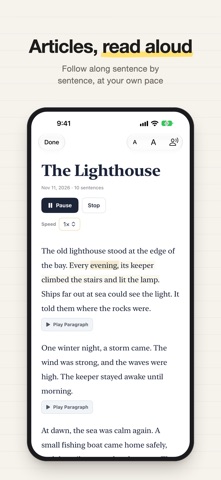
READ ARTICLES ALOUD
• Add English articles, text files, or PDFs to Articles and hear them read sentence by sentence; choose the voice and speed
• Tap any word to see its meaning and a translation of the whole sentence (translated on your device)
• Highlight and write on the article with Apple Pencil
HANDWRITTEN FUNCTION GRAPHS
• Lasso a handwritten equation and get its graph instantly
• Fractions, exponents, several lines at once, even circles; intersections, vertices, and intercepts are marked for you
• Lock a graph, then drag and pinch with your finger like a graphing calculator; double-tap to reset
• Fix any misread with the built-in math keypad
VOCABULARY FLASHCARDS
• AI turns your notes into flashcards: tap to flip, swipe to move on
• Hear each word read aloud with your device's built-in voices, offline; pick the voice and speed
• Edit or delete any card
AI NOTES
• Turn handwritten notes into clean outlines, tables, and key points
• Ask questions, make quizzes, plan study time, and ask across several notebooks
• Uses your own OpenRouter (or other provider) key, including free models; content is sent only when you tap a button
WRITING
• Pen, pencil, and highlighter with pressure and tilt
• Draw a shape and hold to snap it into a clean line, circle, rectangle, or arrow; keep holding to resize, then drag or scale it
• Lasso to move, resize, rotate, and recolor; laser pointer and ruler
• Handwritten sticky notes that fold into a small icon with one tap
• Apple Pencil Pro squeeze, double-tap, and barrel roll
• Lined, grid, and dotted paper with continuous scrolling, plus infinite canvases
• Import PDFs and write on them with smooth zooming; add photos, camera shots, and document scans
RECORDING
• Recordings sync with your ink: strokes light up in order during playback
• Tap any stroke to jump to that moment in the recording
FIND AND USE YOUR NOTES
• Search your handwriting (recognized on your device, never uploaded)
• Convert handwriting to text and beautify your handwriting
• Turn handwriting in a photo into editable ink
• To-dos in your notes appear in a Home Screen widget you can check off
• Write a time and event, then add it to your calendar with one tap
• Import notes from GoodNotes and Notability as real ink you can keep erasing and editing
• Lasso printed text on a PDF to copy it, convert it, graph it, or ask AI
IPAD AND IPHONE
• Notes sync through iCloud: write on iPad, read on iPhone a moment later
• iPhone opens notes in reading mode so scrolling never leaves marks; tap to start editing
YOUR DATA STAYS YOURS
• Notes live on your device or in your own iCloud
• Automatic backups to a folder you choose, such as Google Drive
• No accounts, no ads, no tracking
Safety and technology
Found in the app by AppBrain- Price
- Free
- App size
- 9.21 MB
- Content rating
- Everyone
Technologies used by Penna: AI Notes, PDF Markup
Releases
Updates seen on the App Store- Version
- 1.1.76
- Launched
- November 2026
No changelog data
Alternatives
Similar apps and more from Hwang shengyoAlternatives to Penna: AI Notes, PDF Markup


Rankings
App Store top chartsApp Store Rankings for Penna: AI Notes, PDF Markup
About the app and developer
About Penna: AI Notes, PDF Markup
Penna: AI Notes, PDF Markup is a productivity app developed by Hwang shengyo.
User Ratings
The app has no ratings yet.
App Information
Penna: AI Notes, PDF Markup is freely available from the App Store. The app size is 9.21 MB. The latest version available is 1.1.76. The last update was on November 24, 2026.
Technical Requirements
The app has a content rating of Everyone. The app has been available on the App Store since November 2026.
Penna: AI Notes, PDF Markup is made and published by Hwang shengyo. AppBrain is an independent app data site and isn't affiliated with Hwang shengyo. The app name, icon, screenshots and description belong to Hwang shengyo and are shown as published on the App Store.
Developer information for Hwang shengyo
Address: