

Perfect Sound is made and published by Daniil Auner. AppBrain is an independent app data site and isn't affiliated with Daniil Auner. The app name, icon, screenshots and description belong to Daniil Auner and are shown as published on the App Store.
AppBrain's verdict
- Last updated
- September 21, 2026
Rankings
App Store top chartsApp Store Rankings for Perfect Sound
Competitors
Similar apps and more from Daniil AunerMore from Daniil Auner


Releases
Updates seen on the App Store- Version
- 2.1
- Launched
- May 2026
No changelog data
User feedback
Ratings and reviews on the App StoreComments on Perfect Sound for iOS
We don't have enough comments to show example comments. Please check back later.
Technology
Found in the app by AppBrain- Price
- Free
- App size
- 34.0 MB
- Content rating
- Everyone
Technologies used by Perfect Sound
About the app and developer
About Perfect Sound
Perfect Sound is a photo & video app developed by Daniil Auner.
What is the rating of Perfect Sound?
Perfect Sound has no ratings yet.
Is Perfect Sound free?
Perfect Sound is free. The app size is 34.02 MB. The latest version available is 2.1. The last update was on September 21, 2026.
What are the requirements for Perfect Sound?
The app has a content rating of Everyone. The app has been available on the App Store since May 2026.
Developer information for Daniil Auner
Address:
Frequently asked questions about Perfect Sound
Is Perfect Sound free?
Yes. Perfect Sound is free on the App Store.
Is Perfect Sound still available?
Yes. Perfect Sound is on the App Store, and the last update we saw was on September 21, 2026.
How large is Perfect Sound?
Perfect Sound is 34.02 MB.
Is Perfect Sound suitable for children?
App Store rates the content of Perfect Sound as suitable for everyone.
Who made Perfect Sound?
Perfect Sound was developed by Daniil Auner. It is listed in the photo & video category on the App Store.
Store listing
By Daniil Auner, from the App Store


Description by Daniil Auner Written by the developer, not by AppBrain. Click to read.
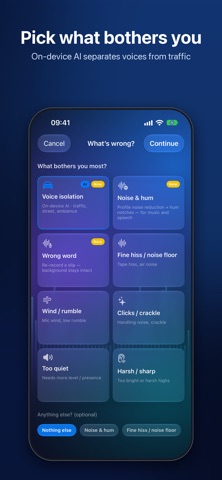
Pick what bothers you – traffic, hum, hiss, wind, crackle – and hear the difference in seconds. Hold one button to compare with the original. When you need more control, open the spectrogram workbench and repair section by section.
CLEAN UP A RECORDING IN SECONDS
• Choose the problem: matching filters are preset and the preview starts right away
• Hold to hear the original, release for the cleaned version
• Adjust the strength, clean the full take and export
AI VOICE ISOLATION – ON DEVICE
• Separates speech from traffic, crowds and room noise
• Runs entirely on your iPhone or iPad – nothing is uploaded
FIX WHAT BOTHERS YOU
• Hum and electrical buzz, hiss and noise floor, wind and rumble
• Handling noise, coughs, audience noise, applause
• Clicks, crackle and dropouts, clipping and distortion
• Too dull, too harsh, too quiet, too much reverb
PRO TOOLS WHEN YOU NEED THEM
• Interactive spectrogram with section-by-section repairs
• Repair mix: blend original and repaired sound live
• Editor repair: replace a bad passage with a clean one from another take, with crossfades
• EQ and reverb for the final polish
SUBTITLES
• Transcribe speech on device, edit and translate subtitles
• Export SRT or burn subtitles into your video
• Fix voice: re-record a wrong word while the background stays intact
IMPORT & EXPORT
• Import from Photos or Files: MP4, MOV, M4A, WAV, MP3 and more
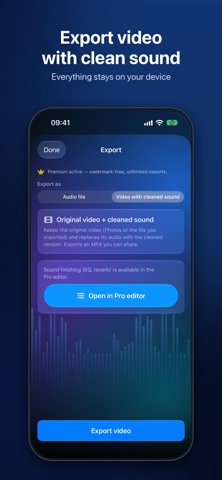
• Export your video with the repaired sound in sync with the picture
• Share via AirDrop, Files, Messages and more
• Projects are saved – continue anytime
FREE
• The full clean-up, preview and mix workflow
• 3 video exports (with a small watermark)
PERFECT SOUND PREMIUM – ONE-TIME PURCHASE
• Unlimited video exports without watermark
• Audio export: M4A, WAV, MP3
Made for vlogs, interviews, podcasts, voice-overs, lectures, phone and drone recordings, rehearsals – every clip where the picture is fine but the sound is not.