

Perfect Video
Perfect Video is made and published by Beijing Perfect Frame Technology Co., Ltd. AppBrain is an independent app data site and isn't affiliated with Beijing Perfect Frame Technology Co., Ltd. The app name, icon, screenshots and description belong to Beijing Perfect Frame Technology Co., Ltd. and are shown as published on the App Store.
AppBrain's verdict
EstablishedLoved by users- Best rank
- #45
- Top Paid, Belgium
- Rating on App Store
- 4.78
- 923 ratings
- Last updated
- March 18, 2023
Users love it: 4.8 stars from 923 ratings. Its best ranking is #45 in Top Paid, Photo & Video in Belgium.
Rankings
App Store top charts- Highest rank
- #45
- Chart
- Top Paid
- Photo & Video
- Country
- Belgium
App Store Rankings for Perfect Video
Top rankings
| Rank | Country | Category | List |
|---|---|---|---|
| 83 | Japan | Photo & Video | Top Paid |
| 45 | Belgium | Photo & Video | Top Paid |
| 96 | France | Photo & Video | Top Paid |
| 51 | Norway | Photo & Video | Top Paid |
| 52 | Russia | Photo & Video | Top Paid |
| 59 | Saudi Arabia | Photo & Video | Top Paid |
| 75 | Spain | Photo & Video | Top Paid |
| 79 | Brazil | Photo & Video | Top Paid |
| 80 | Portugal | Photo & Video | Top Paid |
| 85 | Switzerland | Photo & Video | Top Paid |
Ranking history in Japan
Competitors
Similar apps and more from Beijing Perfect Frame Technology Co., Ltd.Alternatives to Perfect Video








Releases
Updates seen on the App Store- Version
- 8.7.0
- Launched
- February 2013
No changelog data
User feedback
Ratings and reviews on the App StoreComments on Perfect Video for iOS
We don't have enough comments to show example comments. Please check back later.
Technology
Found in the app by AppBrain- Price
- $4.99
- App size
- 51.1 MB
- Content rating
- Everyone
Technologies used by Perfect Video
About the app and developer
About Perfect Video
Perfect Video is a photo & video app developed by Beijing Perfect Frame Technology Co., Ltd.
User Ratings
Perfect Video is rated 4.78 out of 5 stars. The rating is based on 920 ratings.
App Information
Perfect Video costs $4.99. The app size is 51.08 MB. The latest version available is 8.7.0. The last update was on March 18, 2023.
Technical Requirements
The app has a content rating of Everyone. The app has been available on the App Store since February 2013.
Developer information for Beijing Perfect Frame Technology Co., Ltd.
Store listing
By Beijing Perfect Frame Technology Co., Ltd., from the App Store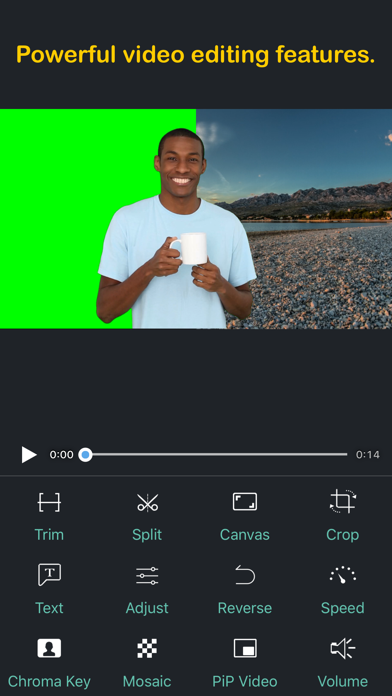

Description by Beijing Perfect Frame Technology Co., Ltd. Written by the developer, not by AppBrain. Click to read.
[PREMIUM FEATURES]
1. Keyframe animations: Various editing operations can add key points.
2. Picture in Picture Video.
3. Split Screen: Playing two videos side-by-side.
4. Chroma Key (Green/Blue Screen): Replace the video solid background with a video or photo.
5. Mosaic Video: Pixelate or blur or Highlighted a part in the video.
6. Video Color: Adjust the video color (Brightness, Contrast, Saturation, Hue,…) in a real-time manner.
7). Photo Motion: Set Ken Burns effect for photos.
[OHTER FEATURES & HOW TO USE]
1) Importing Videos or Photos: Add multiple videos or photos to a project instantly.
2) Multiple canvas ratios: Video original size, 1:1, 4:5, 16:9, 9:16, 4:3, 3:4, 19.5:9, 9:19.5, 3:2, 2:3, 2:1, 1:2, 2.39:1 .
3) Canvas background setting: Set the color or make background blur, or add a custom picture.
4) Combine: Merge multiple videos, photos or text into one video clip.
5) Split: With this feature, you can remove the middle part of the video, speed up/down part of the video.
6) Video to picture: Extract still images from video via Split feature.
7) Trim: Cut out any unwanted moments.
8) Slow Motion: Slow down or speed up video (0.25x-6x).
9) Crop & Mirror & Flip & Rotate and Angle adjustment .
10) Reverse: Reverse video playback.
11) Duplicate: Duplicate projects or create duplicates of video clips.
12) Animated Subtitles: Add animated text or images to videos.
13) Watermark: Display your own logo on video.
14) Volume: Mute the video or increase the video volume (0-500%).
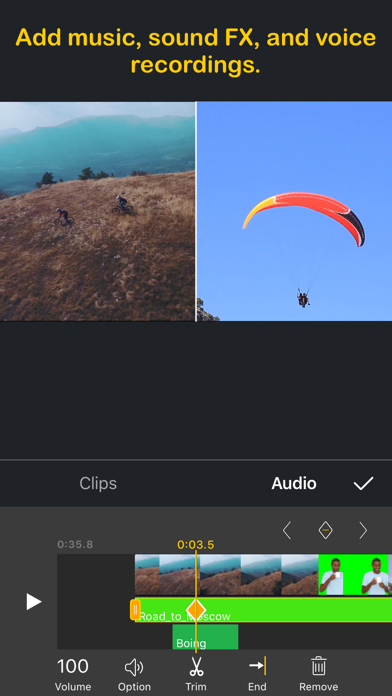
15) Music: Add multiple songs to a project. You can also choose a specific part of a song to include in your project by trimming it.
16) Sound Effects: Choose from many pre-defined sound effects.
17) Transitions: Select from a host of pre-defined video clip transitions.
18) Video Fade In/Out: Configure the fade-in and fade-out options in the Settings screen for the first and last shots.
19) Compress Video: Reduce video file size dramatically without reducing video resolution.
20) Save Storage Space: Perfect Video only saves the video location so imported videos don’t take up valuable storage space (just DON'T DELETE the original video you're editing).
21) High Resolution: Support for several formats, including 1920x1080HD, and support for up to 4K resolution on iPhone 6s, iPhone 6s Plus, iPad Air 2, iPad Pro and later.
22) Share: Save your video to your Camera Roll or share it on Instagram, Facebook, YouTube or via email.
23) Instant Actions: All actions are performed in an instant manner. No need to wait any more!
If you have a question or suggestion, please contact us. We’ll get right back to you. Thanks!
Email: PerfectVideoSupp@icloud.com