PersCrop - Perspective Crop is made and published by
Kronz LLC.
AppBrain is an independent app data site and isn't affiliated with Kronz LLC.
The app name, icon, screenshots and description belong to Kronz LLC and are shown as
published on the App Store.
About PersCrop - Perspective Crop
PersCrop - Perspective Crop is a photo & video app developed by Kronz LLC.
What is the rating of PersCrop - Perspective Crop?
PersCrop - Perspective Crop has no ratings yet.
Is PersCrop - Perspective Crop free?
PersCrop - Perspective Crop is free. The app size is 114.15 MB. The latest version available is 1.2.0. The last update was on September 26, 2026.
What are the requirements for PersCrop - Perspective Crop?
The app has a content rating of Everyone. The app has been available on the App Store since September 2026.
Description by Kronz LLC(from the App Store)
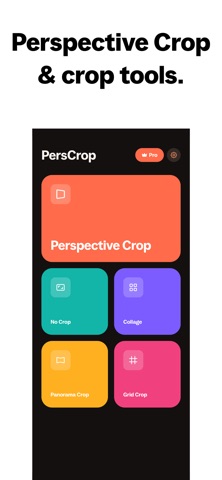
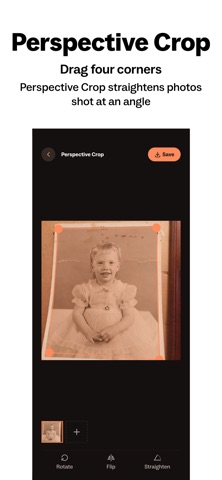
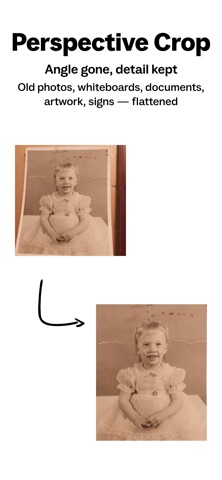
PersCrop flattens a photo shot at an angle into a straight-on rectangle. Drag the four corners onto your subject and the photo is warped square using a true projective transform — the same maths a scanner's dewarp uses — not a rotation or a stretch. Everything runs on your phone; no photo ever leaves the device.
Photograph a whiteboard, a page, a painting or a shop sign and the angle you stood at is baked in: edges lean, corners stretch, the rectangle isn't a rectangle. That is the problem PersCrop was built to solve. Around it sits a small set of tools for the rest of what you do to a photo before posting it.
PERSPECTIVE CROP — straighten a photo taken at an angle • Drag four corners onto any four-sided subject: documents, whiteboards, artwork, posters, shop signs • A real homography warp removes the keystone distortion and returns a proper rectangle • Live preview updates as you drag, so you see the result before exporting • Output resolution follows the shape you selected, so detail is kept • Export as PNG, JPEG or WebP
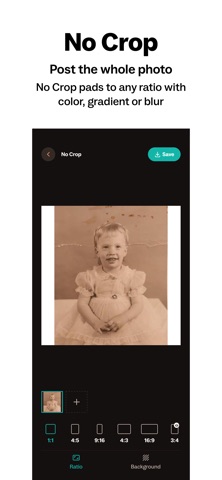
NO CROP — fit the whole photo to any aspect ratio • Post the entire photo, with nothing chopped off by a square or vertical frame • Pad to any ratio with a solid color, a gradient, or a blurred copy of the photo itself • Square 1:1, Portrait 4:5, Story 9:16, Classic 4:3, Wide 16:9, plus 3:2, 2:3, A4 paper, 21:9 cinema and 3:1 banner
COLLAGE — several photos in one frame • Column, row, grid and diagonal layouts that adapt as photos are added or removed • Adjustable gaps, corner rounding and background color • Pinch and drag inside a cell to position each photo exactly
PANORAMA CROP — one wide photo, one seamless carousel • Slice a wide shot into equal panels that line up as the carousel swipes • Choose the panel count and which part of the photo the panels cover
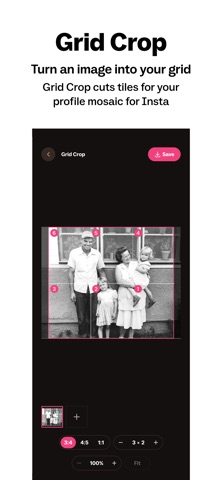
GRID CROP — turn an image into a profile mosaic • Cut one image into tiles that rebuild it across your profile grid • Three tiles wide, as many rows as you want • Tiles export in posting order, so the mosaic assembles correctly
BUILT FOR PHONES • GPU-accelerated rendering, so previews move with your finger instead of lagging behind it • Light and dark themes that follow your system setting • Save straight to your photo library, or share to any app • Batch save several results in one run
PRIVATE BY DESIGN Every crop, warp and export happens on your device. PersCrop has no account, no sign-in, no analytics profile and no server to send photos to. Photo library access is used only to read the picture you pick and to save what you make. It works with no connection at all.
WHAT PERSCROP IS NOT It is not a document scanner: there is no OCR, no text recognition and no multi-page PDF export. It straightens and exports images.
PERSCROP PRO The core tools are free. Pro is a one-time purchase — no subscription and no recurring charge — and unlocks all tools, the full set of aspect ratios and editing options, and unlimited batch saving.
Questions or feedback? Get in touch and we'll answer.
Each subscription will automatically renew 3 days before the expiration date for
the same time period. Subscriptions can be cancelled at any time before the renewal.