

Petya — Network Check
Petya — Network Check is made and published by Matrixxx VPN. AppBrain is an independent app data site and isn't affiliated with Matrixxx VPN. The app name, icon, screenshots and description belong to Matrixxx VPN and are shown as published on the App Store.
AppBrain's verdict
- Last updated
- October 27, 2026
Rankings
App Store top chartsApp Store Rankings for Petya — Network Check
Competitors
Similar apps and more from Matrixxx VPNAlternatives to Petya — Network Check


More from Matrixxx VPN

Releases
Updates seen on the App Store- Version
- 1.5.6
- Launched
- August 2026
No changelog data
User feedback
Ratings and reviews on the App StoreComments on Petya — Network Check for iOS
We don't have enough comments to show example comments. Please check back later.
Technology
Found in the app by AppBrain- Price
- Free
- App size
- 35.6 MB
- Content rating
- Everyone
Technologies used by Petya — Network Check
About the app and developer
About Petya — Network Check
Petya — Network Check is an utilities app developed by Matrixxx VPN.
What is the rating of Petya — Network Check?
Petya — Network Check has no ratings yet.
Is Petya — Network Check free?
Petya — Network Check is free. The app size is 35.65 MB. The latest version available is 1.5.6. The last update was on October 27, 2026.
What are the requirements for Petya — Network Check?
The app has a content rating of Everyone. The app has been available on the App Store since August 2026.
Developer information for Matrixxx VPN
Address:
Frequently asked questions about Petya — Network Check
Is Petya — Network Check free?
Yes. Petya — Network Check is free on the App Store.
Is Petya — Network Check still available?
Yes. Petya — Network Check is on the App Store, and the last update we saw was on October 27, 2026.
How large is Petya — Network Check?
Petya — Network Check is 35.65 MB.
Is Petya — Network Check suitable for children?
App Store rates the content of Petya — Network Check as suitable for everyone.
Who made Petya — Network Check?
Petya — Network Check was developed by Matrixxx VPN. It is listed in the utilities category on the App Store.
What are the best alternatives to Petya — Network Check?
People looking at Petya — Network Check also look at these utilities apps: WireRoute, PageX Connect, Privacy Scanner: Fingerprint, Phone Bench Info, Fleet GPU.
Store listing
By Matrixxx VPN, from the App Store

Description by Matrixxx VPN Written by the developer, not by AppBrain. Click to read.
SECURE CONNECTION
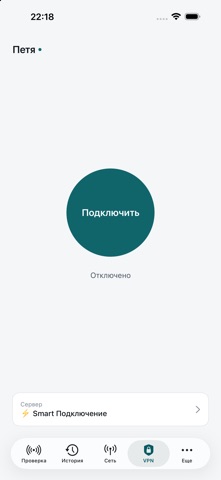
• Paste the link your provider gave you, or open it from a messenger — the app reads the server list and connects.
• vless keys and subscriptions with Xray servers: Reality, Hysteria.
• All phone traffic travels encrypted through the server you chose — on home Wi-Fi, in a café, on mobile data.
• The connection looks after itself: the app checks the link, restarts and moves to another server from the list when needed.
• The server list refreshes itself as often as your provider asks. Remove the link with one button, and the system connection profile goes with it.
• DNS is set separately: your carrier's or the configuration's, direct or through the tunnel.
• Petya has no servers and no account of its own. The connection log can be sent to support as a file.
NETWORK CHECK
One button shows which services answer from your device right now, which stay silent, and what exactly is wrong. Eight outcomes, not two: "no answer", "connection dropped", "name did not resolve", "certificate error", "address substituted" are different failures in different places.
HISTORY
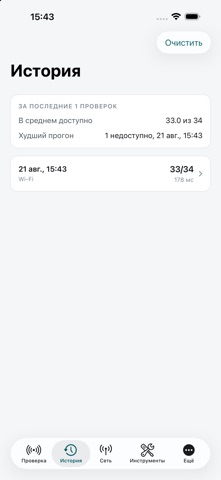
Every check is stored on the device: each service gets its share of successful checks, median response time, spread and a chart of recent runs. Export it as a table.
NETWORK AND TOOLS
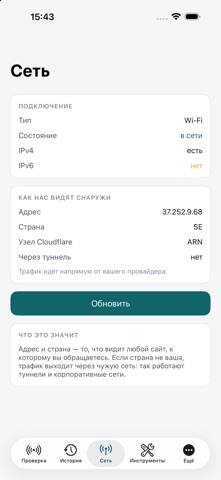
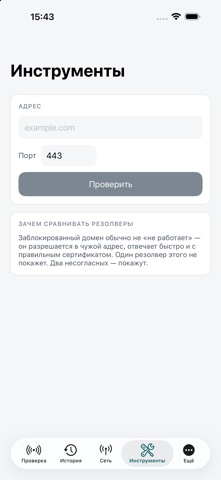
Connection type, IPv4 and IPv6, public address and country — what any website sees. System resolver compared with Cloudflare and Google, TCP port check, your own addresses in the same list.
BACKGROUND, SIRI AND SHORTCUTS
A notification when a service stops or starts answering again — changes only. "Check the network" by voice, checks in Shortcuts automations.
HONEST
Traffic goes through a server only while you turned the tunnel on, and the same button turns it off. Measurements stay on the device until you send them yourself. No accounts, no ads.
Terms of use (EULA): https://www.apple.com/legal/internet-services/itunes/dev/stdeula/