AppBrain
AppBrain
  • Apps
  • Apps being viewed right now Trending apps today Most popular apps All-time most installed apps Top rated apps iPhone and iPad apps
  • Intelligence ▾
    Intelligence overview → Track any Android app or your whole market
    Track & analyze
    Keyword Tracker & OptimizerTrack & improve Play rankings App Performance ReportOne-off PDF for any app StatisticsFree Android & Play market stats
    Promote your app
    Featured Apps App Links
  • Intelligence
  • Pricing
  • Dashboard
  • Sign up
  • Log in
App Store Apps > Utilities > Phone Mirroring - Cast to PC
Phone Mirroring - Cast to PC icon

Phone Mirroring - Cast to PC

by 世雄 雷 · Utilities · Free
On the App Store since August 2024 · Data updated 2026-11-02

Phone Mirroring - Cast to PC is made and published by 世雄 雷. AppBrain is an independent app data site and isn't affiliated with 世雄 雷. The app name, icon, screenshots and description belong to 世雄 雷 and are shown as published on the App Store.

AppBrain's verdict

Rating on App Store
1.80
5 ratings
Last updated
May 20, 2025
Size
67.1 MB

It doesn't have enough ratings yet to judge what users think.

Official page on the App Store

User feedback

Ratings and reviews on the App Store

Comments on Phone Mirroring - Cast to PC for iOS

We don't have enough comments to show example comments. Please check back later.

Store listing

By 世雄 雷, from the App Store
Phone Mirroring - Cast to PC Screenshot 1 of 5
Phone Mirroring - Cast to PC Screenshot 2 of 5
Phone Mirroring - Cast to PC Screenshot 3 of 5
Phone Mirroring - Cast to PC Screenshot 4 of 5
Phone Mirroring - Cast to PC Screenshot 5 of 5
Screenshots by 世雄 雷, from the the App Store listing
Description by 世雄 雷 Written by the developer, not by AppBrain. Click to read.
Phone Mirroring is a crystal-clear, lag-free mobile screen mirroring tool. It perfectly meets the need to screen mirror your phone to a computer with one click, bringing you more efficient remote work/study and an ultimate experience in gaming, sports, movies, and entertainment. Our team has been deeply involved in the field of intelligent screen mirroring for years and is strong and trustworthy!

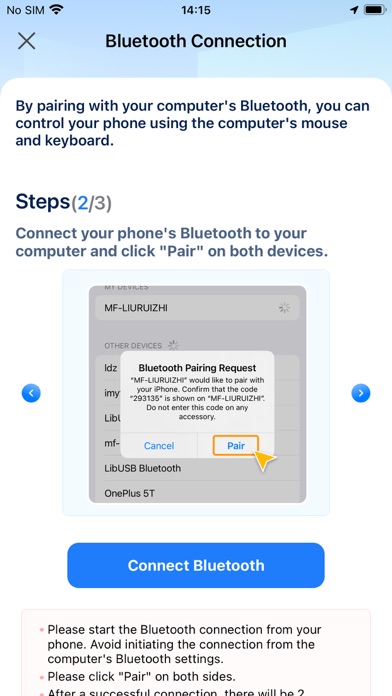
Through USB or wireless network, you can mirror the screen of devices like iPhone/iPad to a computer, including Windows and Mac, and support control from the computer.

Main Features of Phone Mirroring:
•Wired/Wireless Screen Mirroring: You can mirror your mobile screen to a computer via USB or WiFi, enjoying a larger screen and high-definition quality.
•Control Your Phone on the Computer: You can use your computer's mouse and keyboard to control your phone, easily using various apps on iPhone, such as chatting on social media and playing casual games like Candy Crush, FGO, MONOPOLY GO!, etc.
•Stream Your Phone to Live Platforms: After mirroring your device to the computer, you can choose to stream the screen to various live platforms like Youtube, TikTok Live, Twitch, etc., allowing more people to view your gaming/drawing process.
•Screen Recording: After mirroring your device to the computer, you can record your mobile screen in high-definition format. The recorded video will be stored on the computer, not taking up your phone's storage space, allowing you to record your phone's screen without limits.

Phone Mirroring is suitable for scenarios where screen mirroring is needed:
•When it's inconvenient to use a phone directly in the office/classroom
•Playing games/watching videos on a large screen
•Gaming/drawing live streaming
•Online meetings/online classes
•On-site teaching/demonstrations

Phone Mirroring also has a computer version, which works even better with the computer version! Most features require the computer version to be realized, and you can get the download method in the app.

Terms of Service:https://sites.google.com/view/phone-mirroring-eula/home
Privacy Policy:https://sites.google.com/view/phone-mirroring-privacypolicy/home
Technical Support:https://sites.google.com/view/phone-mirroring-tech-supp/home
Official page on the App Store

Safety and technology

Found in the app by AppBrain
Price
Free
App size
67.1 MB
Content rating
High

Technologies used by Phone Mirroring - Cast to PC

Releases

Updates seen on the App Store
Version
1.2.1
Launched
August 2024

No changelog data

Alternatives

Similar apps and more from 世雄 雷

Alternatives to Phone Mirroring - Cast to PC

HomeLock by Tomday icon HomeLock by Tomday
Ultimate Interfaces Corporation
0.0
Free
NFConnect WiFi icon NFConnect WiFi
Serialio Ltd.
0.0
Free
Scent Diffuser Aroma icon Scent Diffuser Aroma
Guangzhou Lanmei Computer Technology Co., Ltd.
1.5
Free
8 ratings
Ave: AI Companion & Chat icon Ave: AI Companion & Chat
Loopsh LLC
4.8
Free
31 ratings
OneLink International icon OneLink International
OneLink International
5.0
Free
4 ratings
CU Companion icon CU Companion
Commtel Ltd
0.0
Free
Pager Control icon Pager Control
T.E.L.L. Software Hungária Kft.
0.0
Free
Alarmhandler security system icon Alarmhandler security system
Compelling Software
4.0
Free
2 ratings

More from 世雄 雷

HeartVid: Create Viral Videos icon HeartVid: Create Viral Videos
世雄 雷
5.0
Free
3 ratings
Phone Clean Master - Umate Pro icon Phone Clean Master - Umate Pro
世雄 雷
0.0
Free

Rankings

App Store top charts

App Store Rankings for Phone Mirroring - Cast to PC

This app is not ranked

About the app and developer

About Phone Mirroring - Cast to PC

Phone Mirroring - Cast to PC is an utilities app developed by 世雄 雷.

What is the rating of Phone Mirroring - Cast to PC?

Phone Mirroring - Cast to PC is rated 1.80 out of 5 stars, based on 5 ratings.

Is Phone Mirroring - Cast to PC free?

Phone Mirroring - Cast to PC is free. The app size is 67.06 MB. The latest version available is 1.2.1. The last update was on May 20, 2025.

What are the requirements for Phone Mirroring - Cast to PC?

The app has a content rating of High Maturity. The app has been available on the App Store since August 2024.

Developer information for 世雄 雷

世雄 雷

Address:

Share Phone Mirroring - Cast to PC

Today's trending apps Apps other people are watching Popular Utilities Apps Top new apps Price drops on Google Play
HomeLock by Tomday icon HomeLock by Tomday
NFConnect WiFi icon NFConnect WiFi
Scent Diffuser Aroma icon Scent Diffuser Aroma
Ave: AI Companion & Chat icon Ave: AI Companion & Chat
OneLink International icon OneLink International
CU Companion icon CU Companion
Pager Control icon Pager Control
Alarmhandler security system icon Alarmhandler security system
Overview Alternatives Reviews Rankings Technology
AppBrain Intelligence premium content

Subscribe now to get full and unlimited access to AppBrain Intelligence. You'll have access to:

  • App Intelligence dashboard (performance timeline, competitor comparison, country rankings, insight cards)
  • Detailed ranking data per app
  • Full timeline per developer
  • Device market shares data per country
  • Unlimited keyword tracking
1 Month

$75/mo
(billed every month)

SAVE 0%
Subscribe
3 Months

$65/mo
($195 billed every 3 months)

SAVE 13%
Subscribe
1 Year

$57.50/mo
($690 billed every year)

SAVE 23%
Subscribe
Each subscription will automatically renew 3 days before the expiration date for the same time period. Subscriptions can be cancelled at any time before the renewal.

AppBrain is an app data site, we track rankings, ratings, installs for all apps and games on Google Play and the App Store. AppBrain doesn't host app files or APKs, all install links go directly to the official store. All trademarks are owned by their respective owners.

More apps

  • Top Android apps being viewed
  • View Words of Wonders: Guru
  • View Kynova
  • CastSnap

App statistics

  • Android statistics
  • Google Play Developer stats
  • Trending Android Apps
  • Trending iOS apps
  • Top popular Apps
  • Buy the best Android phone
  • Buy & sell app businesses

About AppBrain

  • Contact
  • Privacy
  • Documentation
  • DMCA takedowns
  • Blog
  • Free App-Ads.Txt Validation
© 2010-2026 - AppBrain