
Photo Calc - Simple Calculator
Photo Calc - Simple Calculator is made and published by kazuhiko sugimoto. AppBrain is an independent app data site and isn't affiliated with kazuhiko sugimoto. The app name, icon, screenshots and description belong to kazuhiko sugimoto and are shown as published on the App Store.
AppBrain's verdict
Established- Rating on App Store
- 3.56
- 9 ratings
- Last updated
- April 3, 2022
It doesn't have enough ratings yet to judge what users think.
Rankings
App Store top chartsApp Store Rankings for Photo Calc - Simple Calculator
Competitors
Similar apps and more from kazuhiko sugimotoAlternatives to Photo Calc - Simple Calculator







More from kazuhiko sugimoto


Releases
Updates seen on the App Store- Version
- 1.5.0
- Launched
- July 2016
No changelog data
User feedback
Ratings and reviews on the App StoreComments on Photo Calc - Simple Calculator for iOS
We don't have enough comments to show example comments. Please check back later.
Technology
Found in the app by AppBrain- Price
- Free
- App size
- 9.05 MB
- Content rating
- Everyone
Technologies used by Photo Calc - Simple Calculator
About the app and developer
About Photo Calc - Simple Calculator
Photo Calc - Simple Calculator is a productivity app developed by kazuhiko sugimoto.
What is the rating of Photo Calc - Simple Calculator?
Photo Calc - Simple Calculator is rated 3.56 out of 5 stars, based on 9 ratings.
Is Photo Calc - Simple Calculator free?
Photo Calc - Simple Calculator is free. The app size is 9.05 MB. The latest version available is 1.5.0. The last update was on April 3, 2022.
What are the requirements for Photo Calc - Simple Calculator?
The app has a content rating of Everyone. The app has been available on the App Store since July 2016.
Developer information for kazuhiko sugimoto
Address:
Frequently asked questions about Photo Calc - Simple Calculator
Is Photo Calc - Simple Calculator free?
Yes. Photo Calc - Simple Calculator is free on the App Store.
Is Photo Calc - Simple Calculator still available?
Yes. Photo Calc - Simple Calculator is on the App Store, and the last update we saw was on April 3, 2022.
How large is Photo Calc - Simple Calculator?
Photo Calc - Simple Calculator is 9.05 MB.
Is Photo Calc - Simple Calculator suitable for children?
App Store rates the content of Photo Calc - Simple Calculator as suitable for everyone.
How do people rate Photo Calc - Simple Calculator?
Photo Calc - Simple Calculator scores 3.56 out of 5 stars, from 9 ratings on the App Store.
Who made Photo Calc - Simple Calculator?
Photo Calc - Simple Calculator was developed by kazuhiko sugimoto. It is listed in the productivity category on the App Store.
What are the best alternatives to Photo Calc - Simple Calculator?
People looking at Photo Calc - Simple Calculator also look at these productivity apps: Calculator - Simple & Stylish, Cute mouse calculator, calcS16lite, Simple Calculator・Easy & Cool, Manage time every 30 minutes.
Store listing
By kazuhiko sugimoto, from the App Store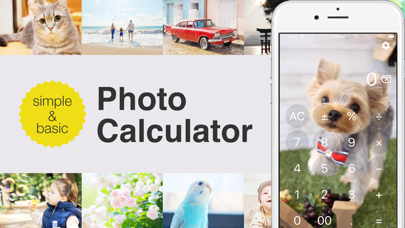
Description by kazuhiko sugimoto Written by the developer, not by AppBrain. Click to read.
It has the following features.
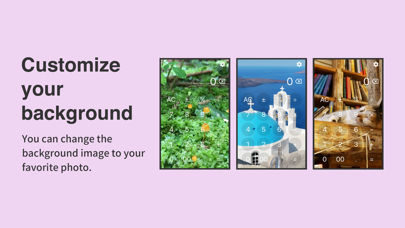
· Change background image
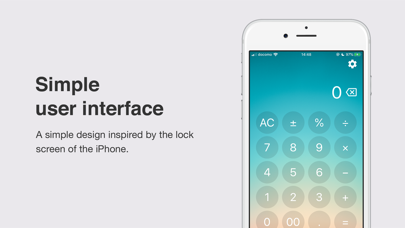
· Frosted glass effect
· Percentage calculation
· 00 input
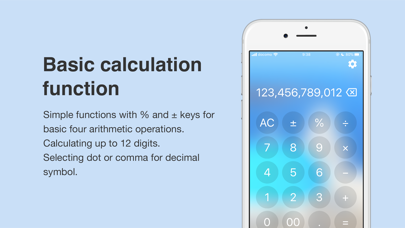
· Up to 12 digits calculation
· Backspace
[Change background image]
You can change the background with your favorite photo.
[Frosted glass effect]
If numbers or symbols are difficult to see, please enable the frosted glass effect. It will be seen like the passcode input screen of iPhone unlock.
[Percentage calculation]
This app supports to a convenient percentage calculation for calculating the discount price or the tax inclusive price of the consumption tax. It can be calculated by the following calculation formula.
· Tax included (ex: 8%)
1980 + 8 % =
· Discount (ex: 30% off)
1980 - 30 % =
[00 input]
This app has a convenient 00 key for continuous input of 0.
[Up to 12 digits calculation]
This app supports calculations with enough digits for the calculation of everyday life. You can calculate up to 12 digits for integers and up to 10 digits for decimal places.
[Backspace]
You can delete the last digit. Because backspace is also valid in calculation results, it is convenient to recalculate after deleting fractions.