AppBrain
AppBrain
  • Apps
  • Apps being viewed right now Trending apps today Most popular apps All-time most installed apps Top rated apps iPhone and iPad apps
  • Intelligence ▾
    Intelligence overview → Track any Android app or your whole market
    Track & analyze
    Keyword Tracker & OptimizerTrack & improve Play rankings App Performance ReportOne-off PDF for any app StatisticsFree Android & Play market stats
    Promote your app
    Featured Apps App Links
  • Intelligence
  • Pricing
  • Dashboard
  • Sign up
  • Log in
App Store Apps > Photo & Video > Photo Cleaner: Swipe Quick
App profile & analytics · Photo & Video · Data updated 2026-10-08
Photo Cleaner: Swipe Quick icon

Photo Cleaner: Swipe Quick

by Leadiser Limited · Free · Version 2.3.0
Availability On the App Store since July 2026 ↗
Rating on App Store
5.00/5
1 ratings
Rating
5.00
1 reviews
Best rank
–
not in the top lists
Last updated
September 21, 2026
2.3.0
AppBrain's verdict New

Photo Cleaner: Swipe Quick came out 88 days ago. It doesn't have enough ratings yet to judge what users think.

Photo Cleaner: Swipe Quick is made and published by Leadiser Limited. AppBrain is an independent app data site and isn't affiliated with Leadiser Limited. The app name, icon, screenshots and description belong to Leadiser Limited and are shown as published on the App Store.

About Photo Cleaner: Swipe Quick

Photo Cleaner: Swipe Quick is a photo & video app developed by Leadiser Limited.

User Ratings

Photo Cleaner: Swipe Quick is rated 5.00 out of 5 stars. The rating is based on one rating ratings.

App Information

Photo Cleaner: Swipe Quick is freely available from the App Store. The app size is 51.23 MB. The latest version available is 2.3.0. The last update was on September 21, 2026.

Technical Requirements

The app has a content rating of Everyone. The app has been available on the App Store since July 2026.

Description by Leadiser Limited (from the App Store)
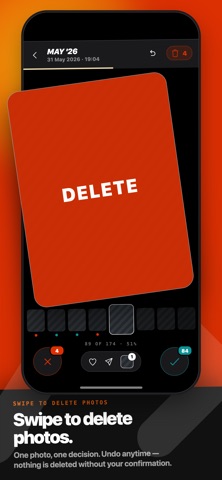
Photo cleaner for your camera roll. Swipe right to keep, left to delete. Free up storage in minutes.

Declutter thousands of photos without tapping checkboxes or scrolling endlessly.

Swipe to clean — one photo at a time, full screen, instant decisions

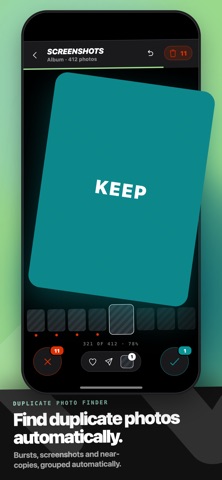
Duplicate photo finder — spot repeated and near-identical shots, delete in bulk

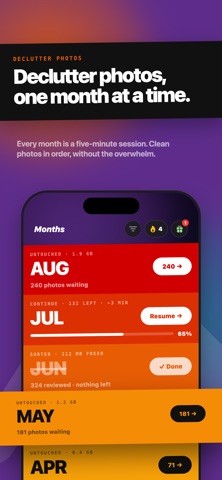
Month by month — work through your camera roll chronologically

On This Day — resurface memories from past years while you clean

Collections — sort screenshots, videos, Live Photos and favourites separately

100% Private: Swipe Quick works entirely on your device — your photos are never sent anywhere. Every deletion is confirmed before it happens. Undo any decision at any time. Photos go to Recently Deleted, not gone forever.

FAQs

1. How do you free up storage on an iPhone?
You can free up storage on an iPhone by deleting whatever holds the most megabytes and then emptying Recently Deleted, because a deleted photo keeps occupying space until that album is cleared.

You can also use a camera roll cleaner app like Swipe Quick to work through it one photo at a time instead of scrolling.

2. How do you delete thousands of photos on an iPhone?
You can delete thousands of photos on an iPhone either by drag-selecting in the Photos app, tapping Select and then dragging a finger across the grid, or by working through the library in smaller sessions using a camera roll cleaner app.

One of the swipe-and-delete apps built for that second job is Swipe Quick. It splits the camera roll into months, albums and duplicate groups, so a library of thirty thousand photos becomes a series of piles that each finish in one sitting.

3. How do you delete duplicate photos on an iPhone?
You can delete duplicate photos on an iPhone with the built-in Duplicates album, or with a duplicate photo cleaner app like Swipe Quick if you want more of them found. In the Photos app, tap Collections, scroll to Utilities and open Duplicates, then use Merge to keep one copy of each group. Detection runs only while the iPhone is locked and connected to power, so a large library can take a few days to finish indexing.

4. How do you delete screenshots on an iPhone in bulk?
You can delete screenshots on an iPhone in bulk either through the Photos app or with a camera roll cleaner app like Swipe Quick. In Photos, open Albums, scroll to Media Types and tap Screenshots, then use Select and drag across the grid. That works when you already know you want the whole lot gone. When you still need to look at each one, a swipe-based app is faster.

5. What should you delete first to free up storage?
You should delete whatever holds the most megabytes first, which is usually long videos and duplicate groups rather than single photos. Screenshots come next, because they build up in the largest numbers even though each one is small. Emptying Recently Deleted afterwards is what actually returns the space.

6. Do camera roll cleaning apps upload your photos to a server?
Not all camera roll cleaning apps upload your photos to a server, but some do, and the category is inconsistent enough that it is worth checking. The app's own privacy policy states it, and the App Store listing carries a data disclosure alongside it.

Swipe Quick uploads nothing. It asks iOS for permission to read your library and does all of the work locally, so no photo or video is ever copied to a server.

7. What is Swipe Quick?
Swipe Quick is a free photo cleaner app for the iPhone camera roll. You swipe right to keep a photo and left to mark it for deletion, working through your library month by month, by album, or by duplicate group. It finds duplicate and near-identical shots on the device, needs no account, and never uploads a photo anywhere. Nothing is deleted until you confirm.

Terms of Use: https://www.apple.com/legal/internet-services/itunes/dev/stdeula/
Show more Show less

Screenshots

Photo Cleaner: Swipe Quick Screenshot 1 of 9
Photo Cleaner: Swipe Quick Screenshot 2 of 9
Photo Cleaner: Swipe Quick Screenshot 3 of 9
Photo Cleaner: Swipe Quick Screenshot 4 of 9
Photo Cleaner: Swipe Quick Screenshot 5 of 9
Photo Cleaner: Swipe Quick Screenshot 6 of 9
Photo Cleaner: Swipe Quick Screenshot 7 of 9
Photo Cleaner: Swipe Quick Screenshot 8 of 9
Photo Cleaner: Swipe Quick Screenshot 9 of 9
Screenshots by Leadiser Limited, from the the App Store listing
Official page on the App Store

Alternatives to Photo Cleaner: Swipe Quick

SwipeSort: Photo Cleaner icon SwipeSort: Photo Cleaner
Ronny Bigler
0.0
Free
Sketch Effect Video icon Sketch Effect Video
Masanori Katsuta
0.0
$0.99
Easy Clean & Duplicates icon Easy Clean & Duplicates
Omer Kose
0.0
Free
SwipeAndDump icon SwipeAndDump
EMIL KACPER ŁOS
0.0
Free
Photo Cleaner: SwipePurge icon Photo Cleaner: SwipePurge
Julian Beck
0.0
Free
Pixtide: Photo Cleaner Swipe icon Pixtide: Photo Cleaner Swipe
Feral Online
4.1
Free
8 ratings
Swipe Delete: Photo Cleaner icon Swipe Delete: Photo Cleaner
Mustafa Kulac
0.0
Free
Photo Cleaner : Swipe Wipe‎ icon Photo Cleaner : Swipe Wipe‎
Ahmad Ali
4.8
Free
8 ratings

More from Leadiser Limited

Generational Wealth Society icon Generational Wealth Society
Leadiser Limited
0.0
Free

Changelog of Photo Cleaner: Swipe Quick

No changelog data

Developer information for Leadiser Limited

Leadiser Limited

Address:

Share Photo Cleaner: Swipe Quick

Comments on Photo Cleaner: Swipe Quick for iOS

We don't have enough comments to show example comments. Please check back later.

App Store Rankings for Photo Cleaner: Swipe Quick

This app is not ranked

Technologies used by Photo Cleaner: Swipe Quick

Frequently asked questions about Photo Cleaner: Swipe Quick

Is Photo Cleaner: Swipe Quick free?

Yes. Photo Cleaner: Swipe Quick is free on the App Store.

Is Photo Cleaner: Swipe Quick still available?

Yes. Photo Cleaner: Swipe Quick is on the App Store, and the last update we saw was on September 21, 2026.

How large is Photo Cleaner: Swipe Quick?

Photo Cleaner: Swipe Quick is 51.23 MB.

Is Photo Cleaner: Swipe Quick suitable for children?

App Store rates the content of Photo Cleaner: Swipe Quick as suitable for everyone.

How do people rate Photo Cleaner: Swipe Quick?

Photo Cleaner: Swipe Quick has one rating of 5.00 stars on the App Store.

Who made Photo Cleaner: Swipe Quick?

Photo Cleaner: Swipe Quick was developed by Leadiser Limited. It is listed in the photo & video category on the App Store.

What are the best alternatives to Photo Cleaner: Swipe Quick?

People looking at Photo Cleaner: Swipe Quick also look at these photo & video apps: SwipeSort: Photo Cleaner, Sketch Effect Video, Easy Clean & Duplicates, SwipeAndDump, Photo Cleaner: SwipePurge.

Apps other people are watching Today's trending apps Price drops on Google Play Top new apps Popular Photo & Video Apps
SwipeSort: Photo Cleaner icon SwipeSort: Photo Cleaner
Sketch Effect Video icon Sketch Effect Video
Easy Clean & Duplicates icon Easy Clean & Duplicates
SwipeAndDump icon SwipeAndDump
Photo Cleaner: SwipePurge icon Photo Cleaner: SwipePurge
Pixtide: Photo Cleaner Swipe icon Pixtide: Photo Cleaner Swipe
Swipe Delete: Photo Cleaner icon Swipe Delete: Photo Cleaner
Photo Cleaner : Swipe Wipe‎ icon Photo Cleaner : Swipe Wipe‎
Overview Alternatives Reviews Rankings Technology
AppBrain Intelligence premium content

Subscribe now to get full and unlimited access to AppBrain Intelligence. You'll have access to:

  • App Intelligence dashboard (performance timeline, competitor comparison, country rankings, insight cards)
  • Detailed ranking data per app
  • Full timeline per developer
  • Device market shares data per country
  • Unlimited keyword tracking
1 Month

$75/mo
(billed every month)

SAVE 0%
Subscribe
3 Months

$65/mo
($195 billed every 3 months)

SAVE 13%
Subscribe
1 Year

$57.50/mo
($690 billed every year)

SAVE 23%
Subscribe
Each subscription will automatically renew 3 days before the expiration date for the same time period. Subscriptions can be cancelled at any time before the renewal.

AppBrain is an app data site, we track rankings, ratings, installs for all apps and games on Google Play and the App Store. AppBrain doesn't host app files or APKs, all install links go directly to the official store. All trademarks are owned by their respective owners.

More apps

  • Top Android apps being viewed
  • Equilab: Horse & Riding App
  • View Money Empire
  • Crushon.ai – Ourdream Chatbot

App statistics

  • Android statistics
  • Google Play Developer stats
  • Trending Android Apps
  • Trending iOS apps
  • Top popular Apps
  • Buy the best Android phone
  • Buy & sell app businesses

About AppBrain

  • Contact
  • Privacy
  • Documentation
  • DMCA takedowns
  • Articles
  • Blog
  • Android app Install tracking and attribution options for the AppBrain ad network
© 2010-2026 - AppBrain