

Photo Compressor & Cleanup
Photo Compressor & Cleanup is made and published by Kiducate Ltd. AppBrain is an independent app data site and isn't affiliated with Kiducate Ltd. The app name, icon, screenshots and description belong to Kiducate Ltd. and are shown as published on the App Store.
AppBrain's verdict
- Last updated
- October 3, 2026
Rankings
App Store top chartsApp Store Rankings for Photo Compressor & Cleanup
Competitors
Similar apps and more from Kiducate Ltd.Alternatives to Photo Compressor & Cleanup


More from Kiducate Ltd.


Releases
Updates seen on the App Store- Version
- 1.5.16
- Launched
- April 2026
No changelog data
User feedback
Ratings and reviews on the App StoreComments on Photo Compressor & Cleanup for iOS
We don't have enough comments to show example comments. Please check back later.
Technology
Found in the app by AppBrain- Price
- Free
- App size
- 35.0 MB
- Content rating
- Everyone
Technologies used by Photo Compressor & Cleanup
About the app and developer
About Photo Compressor & Cleanup
Photo Compressor & Cleanup is an utilities app developed by Kiducate Ltd.
User Ratings
The app has no ratings yet.
App Information
Photo Compressor & Cleanup is freely available from the App Store. The app size is 35.00 MB. The latest version available is 1.5.16. The last update was on October 3, 2026.
Technical Requirements
The app has a content rating of Everyone. The app has been available on the App Store since April 2026.
Developer information for Kiducate Ltd.
Address:
Frequently asked questions about Photo Compressor & Cleanup
Is Photo Compressor & Cleanup free?
Yes. Photo Compressor & Cleanup is free on the App Store.
Is Photo Compressor & Cleanup still available?
Yes. Photo Compressor & Cleanup is on the App Store, and the last update we saw was on October 3, 2026.
How large is Photo Compressor & Cleanup?
Photo Compressor & Cleanup is 35.00 MB.
Is Photo Compressor & Cleanup suitable for children?
App Store rates the content of Photo Compressor & Cleanup as suitable for everyone.
Who made Photo Compressor & Cleanup?
Photo Compressor & Cleanup was developed by Kiducate Ltd. It is listed in the utilities category on the App Store.
What are the best alternatives to Photo Compressor & Cleanup?
People looking at Photo Compressor & Cleanup also look at these utilities apps: Image Compressor: Exact KB, SizeFixer: Batch Image Tools, TargetKB Photo PDF Compress, Photo Video Compressor KB, ExactPress: Compress to Size.
Store listing
By Kiducate Ltd., from the App Store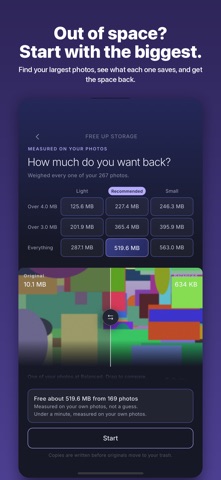



Description by Kiducate Ltd. Written by the developer, not by AppBrain. Click to read.
EXACT KB TARGETING
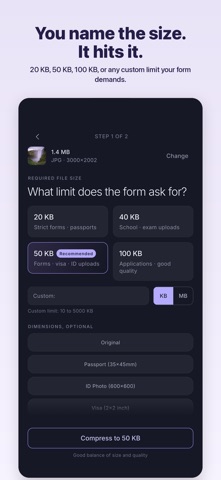
Set a precise target like 20 KB, 50 KB or 100 KB. The app finds the best quality that fits your limit. Custom targets from 10 KB to 5000 KB are supported.
RESIZE AND CROP
Set the dimensions as well as the size. Type a width and height in pixels, millimetres, centimetres or inches, or pick a passport, ID photo, UPSC or visa preset. Crop to a square, portrait or landscape shape, or drag your own. The photo is resized first, then compressed to your KB limit.
COMPRESS A PDF
Bring a document under a size limit the same way, for the portals that ask for a scanned form or a certificate under a fixed size.
CONVERT HEIC TO JPG
iPhone photos are saved as HEIC. This app converts them to JPG and compresses to your target size in one step, ready to upload anywhere.
OPENS MORE FILE TYPES
TIFF, GIF and BMP files can be opened too, alongside JPG, PNG, HEIC, HEIF and WebP.
COMPRESSION PRESETS
Choose High Quality, Balanced or Smallest File. Adjust the image dimensions too, if you want to.
MULTIPLE PHOTOS
Compress up to 20 photos at once. Both exact KB and preset modes work with batch selection.
SAVE AND SHARE
Save compressed copies to your gallery, or send them straight from the share sheet. Batch save and batch share are both supported.
PORTAL SIZE GUIDE
A built-in guide to common upload limits for government portals, visa applications and exam forms, passport photos and more. Tap any entry to use that limit straight away.
BEFORE AND AFTER
Compare the original and the compressed copy side by side, and drag the divider across the photo to see exactly what changed before you save.
FREE UP STORAGE
Out of space? The app finds the largest photos in your library, shows you exactly which ones and what each would save, and compresses them. The originals move to Recently Deleted, so you have about 30 days to bring any of them back. Scanning is free, and the saving is measured on your own photos before you decide.
YOUR SAVINGS
See how much space you have saved since you started, and what you compressed to get there.
IPHONE AND IPAD
One purchase covers both, and every screen is laid out for the size it is on.
PRIVACY
All compression happens on your device. No account is needed, and your photos and documents are never uploaded. Your originals are never changed.
REMOVE HIDDEN PHOTO DATA
Photos carry location, camera and other hidden information. Turn it off and the compressed copy leaves it behind, so what you upload is the picture and nothing else.
FREE TO TRY, ONE-TIME PURCHASE
Your first two exports are free. After that, Photos unlocks unlimited photo exports, batch processing and one-tap passport, ID and visa sizes, and Pro adds PDF compression and storage cleanup. Each is a one-time purchase with no subscription, and it stays yours on the same Apple Account.
Available in English and Arabic.
Made for: government forms, visa applications, passport photos, school and exam applications (UPSC, SSC, JEE, NEET, CAT), ID uploads, HR portals, and any form with a file size limit.