

Photo Interval
Photo Interval is made and published by Giancarlo Byrne. AppBrain is an independent app data site and isn't affiliated with Giancarlo Byrne. The app name, icon, screenshots and description belong to Giancarlo Byrne and are shown as published on the App Store.
AppBrain's verdict
- Rating on App Store
- 1.00
- 1 ratings
- Last updated
- November 18, 2025
- Size
- 2.20 MB
It doesn't have enough ratings yet to judge what users think.
User feedback
Ratings and reviews on the App StoreComments on Photo Interval for iOS
We don't have enough comments to show example comments. Please check back later.
Store listing
By Giancarlo Byrne, from the App Store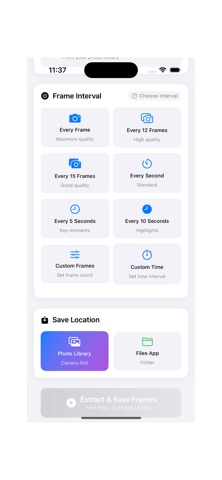

Description by Giancarlo Byrne Written by the developer, not by AppBrain. Click to read.
Extract high-quality frames from any video at customizable intervals - perfect for creating photo sequences, analyzing motion, or capturing key moments.
KEY FEATURES:
• Multiple extraction intervals: every frame, every 5/10 frames, every 1/5/10 seconds
• Custom intervals: set any frame count (1-1000) or time interval (0.1-60 seconds)
• Dual save options: Photo Library or Files app
• Real-time frame estimation and preview
• Support for all iOS video formats
• Modern, intuitive interface
• Works on iPhone and iPad
PERFECT FOR:
• Sports analysis and technique review
• Creating stop-motion sequences
• Educational content creation
• Art and photography projects
• Video research and documentation
Simply select a video, choose your interval, and extract! Preview all frames before saving to your preferred location.
Requires iOS 17.0 or later.
Safety and technology
Found in the app by AppBrain- Price
- Free
- App size
- 2.20 MB
- Content rating
- Everyone
Technologies used by Photo Interval
Releases
Updates seen on the App Store- Version
- 1.7
- Launched
- June 2025
No changelog data
Rankings
App Store top chartsApp Store Rankings for Photo Interval
About the app and developer
About Photo Interval
Photo Interval is a photo & video app developed by Giancarlo Byrne.
User Ratings
Photo Interval is rated 1.00 out of 5 stars. The rating is based on one rating ratings.
App Information
Photo Interval is freely available from the App Store. The app size is 2.20 MB. The latest version available is 1.7. The last update was on November 18, 2025.
Technical Requirements
The app has a content rating of Everyone. The app has been available on the App Store since June 2025.
Developer information for Giancarlo Byrne
Address: