Photo Print Editor is made and published by
杨胜 朱.
AppBrain is an independent app data site and isn't affiliated with 杨胜 朱.
The app name, icon, screenshots and description belong to 杨胜 朱 and are shown as
published on the App Store.
About Photo Print Editor
Photo Print Editor is a photo & video app developed by 杨胜 朱.
User Ratings
The app has no ratings yet.
App Information
Photo Print Editor is freely available from the App Store. The app size is 21.36 MB. The latest version available is 1.0.2. The last update was on August 19, 2026.
Technical Requirements
The app has a content rating of Everyone. The app has been available on the App Store since April 2025.
Description by 杨胜 朱(from the App Store)
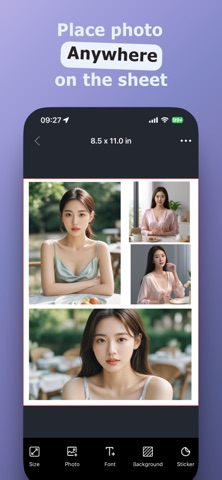
Photo Print Editor makes it easy to print images in your desired size and create stunning layouts with multiple photos on one sheet. Turn your memories into beautiful prints in minutes! Main Features: Intuitive Layout Editor: Arrange multiple photos effortlessly with our drag-and-drop interface. Resize, rotate, and adjust images to craft the perfect print.
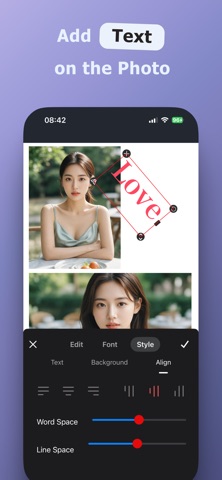
Customizable Text Options: Add personalized text with curved styles, adjustable spacing, shadows, bold formatting, and more to make every moment uniquely yours.
Print on Any Size Paper: From standard photo paper to custom dimensions, Photo Print Editor supports it all for flawless results. Whether you’re printing family photos, travel memories, or personalized gifts, Photo Print Editor has you covered. Download today and start creating beautiful prints with ease! Loved creating with Photo Print Editor? We’d appreciate your rating!
Our standard Subscription Plans: * Week Subscription * Month Subscription * Year Subscription
Subscription payments will be charged to your App Store account at confirmation of your purchase. Subscriptions will automatically renew and you will be charged unless auto-renew is turned off or unless you cancel at least 24 hours prior to the end of the current subscription or trial period. Any unused portion of a free trial period will be forfeited when you purchase a pro subscription during the free trial period. The cost of renewal depends on the Subscription Plan you choose. Subscriptions and auto-renewal may be managed by going to Account Settings after purchase or by contacting Customer Support.
Privacy Policy: http://www.qiniusoft.com/privacy.html Terms of Services: http://www.qiniusoft.com/terms.html
Each subscription will automatically renew 3 days before the expiration date for
the same time period. Subscriptions can be cancelled at any time before the renewal.