

Photo Sorter: Clean Up Storage
Photo Sorter: Clean Up Storage is made and published by Daniel Ramirez. AppBrain is an independent app data site and isn't affiliated with Daniel Ramirez. The app name, icon, screenshots and description belong to Daniel Ramirez and are shown as published on the App Store.
AppBrain's verdict
- Rating on App Store
- 3.67
- 6 ratings
- Last updated
- October 28, 2026
It doesn't have enough ratings yet to judge what users think.
Rankings
App Store top chartsApp Store Rankings for Photo Sorter: Clean Up Storage
Competitors
Similar apps and more from Daniel RamirezAlternatives to Photo Sorter: Clean Up Storage







More from Daniel Ramirez


Releases
Updates seen on the App Store- Version
- 1.0.14
- Launched
- December 2022
No changelog data
User feedback
Ratings and reviews on the App StoreComments on Photo Sorter: Clean Up Storage for iOS
We don't have enough comments to show example comments. Please check back later.
Technology
Found in the app by AppBrain- Price
- Free
- App size
- 24.3 MB
- Content rating
- Everyone
Technologies used by Photo Sorter: Clean Up Storage
About the app and developer
About Photo Sorter: Clean Up Storage
Photo Sorter: Clean Up Storage is a photo & video app developed by Daniel Ramirez.
User Ratings
Photo Sorter: Clean Up Storage is rated 3.67 out of 5 stars. The rating is based on 6 ratings.
App Information
Photo Sorter: Clean Up Storage is freely available from the App Store. The app size is 24.31 MB. The latest version available is 1.0.14. The last update was on October 28, 2026.
Technical Requirements
The app has a content rating of Everyone. The app has been available on the App Store since December 2022.
Developer information for Daniel Ramirez
Address:
Store listing
By Daniel Ramirez, from the App Store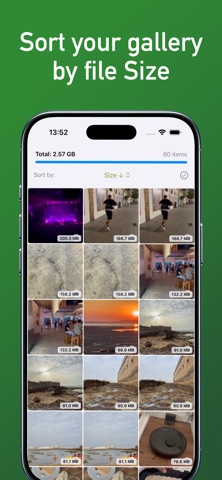
Description by Daniel Ramirez Written by the developer, not by AppBrain. Click to read.
HOW IT WORKS
• Scans your library and measures every photo, video, Live Photo and burst.
• Sort by size or by date, in either direction.
• Filter by videos, screenshots, Live Photos, bursts or files larger than 50 MB.
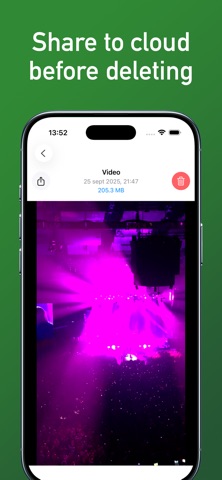
• Preview each file full screen before you delete it.
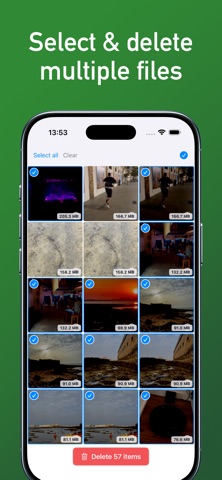
• Select many items at once, even by dragging your finger, and delete them.
• Share to iCloud, Dropbox, Google Drive or AirDrop before deleting.
• When you're done, we show you how much space you freed.
Deleted items go to "Recently Deleted" in the Photos app. Empty that album to get the space back right away; otherwise iOS removes them after 30 days.
YOUR PRIVACY
The scan runs on your iPhone. Your photos and videos are never uploaded to any server.
FREE AND PREMIUM
You can delete up to 10 items a day for free. Need more? Watch an ad to unlock more deletions that day, or go Premium to delete with no daily limit and no ads.
Premium is available as a monthly or yearly subscription. Payment is charged to your Apple Account at confirmation of purchase. The subscription renews automatically unless you cancel at least 24 hours before the end of the current period. You can manage or cancel it in your App Store account settings.
Privacy Policy: https://photocleaneriphone.com/privacy-policy.html
Terms of Use (EULA): https://photocleaneriphone.com/termsofuse.html