Download Android Apps and Games
AppBrain
  • Apps
  • Apps being viewed right now Trending apps today Most popular apps All-time most downloaded apps Top rated apps
  • Intelligence ▾
    Intelligence overview → Track any Android app or your whole market
    Track & analyze
    Keyword Tracker & OptimizerTrack & improve Play rankings App Performance ReportOne-off PDF for any app StatisticsFree Android & Play market stats
    Promote your app
    Featured Apps App Links
  • Intelligence
  • Pricing
  • Dashboard
  • Sign up
  • Log in
Last updated on: 2026-07-21
App Store Apps > Photo & Video > Photo to Infinity
Photo to Infinity icon

Photo to Infinity

6.1
Feng Su
4.34
61 reviews
Free

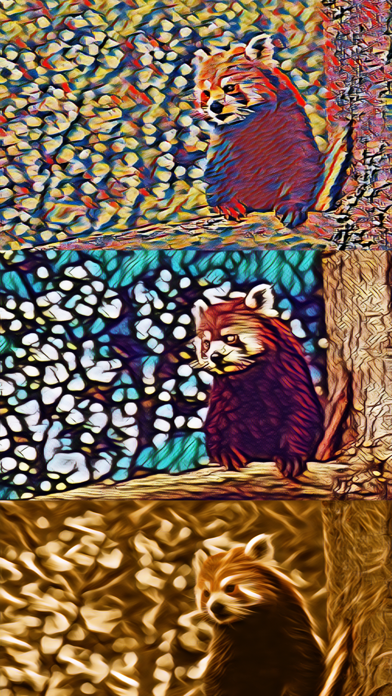
Photo to Infinity Screenshot 1 of 10
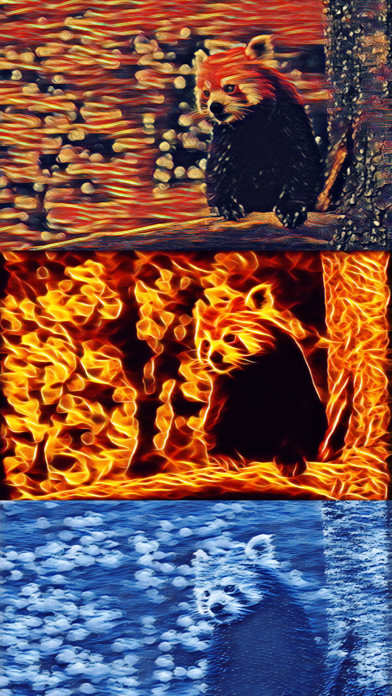
Photo to Infinity Screenshot 2 of 10
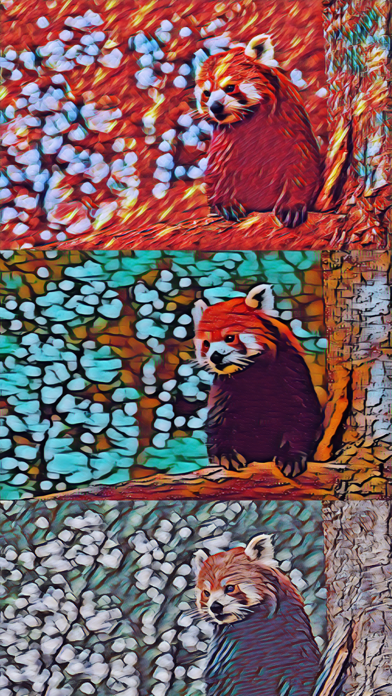
Photo to Infinity Screenshot 3 of 10
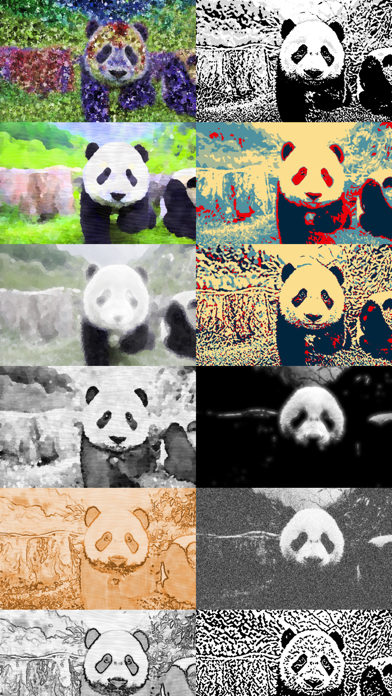
Photo to Infinity Screenshot 4 of 10
Photo to Infinity Screenshot 5 of 10
Photo to Infinity Screenshot 6 of 10
Photo to Infinity Screenshot 7 of 10
Photo to Infinity Screenshot 8 of 10
Photo to Infinity Screenshot 9 of 10
Photo to Infinity Screenshot 10 of 10
4.34 · 61 reviews
Download from the App Store

About Photo to Infinity

Photo to Infinity is an overall app developed by Feng Su.

Download Statistics

User Ratings

Photo to Infinity is rated 4.34 out of 5 stars. The rating is based on 61 ratings.

App Information

Photo to Infinity is FREE to download. The APK download size is 515.23 MB. The latest version available is 6.1. The last update was on April 20, 2021.

Technical Requirements

The app has a content rating of Everyone. The app has been available on Google Play April 2016.

Description
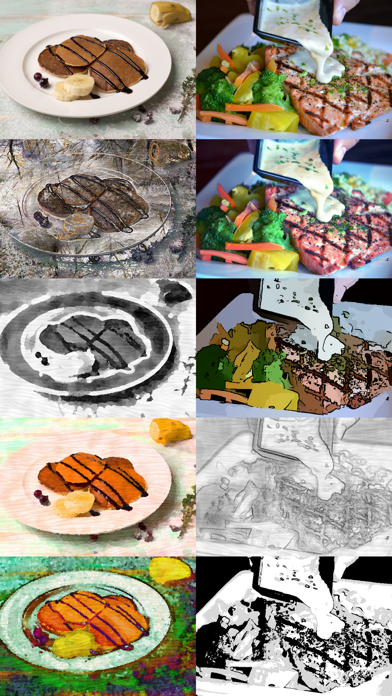
Photo to Infinity is a treasure full of photo to art filters. Powered by Deep Learning AI, it contains approximately 1600 unique customisable photo and camera effects, about 1200 of which are AI styles. All 1600 photo effects are free to use!

Packs:
- Create (classic): create masterpieces based on classic paintings (sample list below)
- Create (random): create masterpieces based on random images
- Mimic (texture)*: mimic textures from classic paintings
- Mimic (filter)*: mimic colors from classic paintings
- Transform*: transform into, well, anything you want really (sample list below)
- Censor (emoji): censor with emoji
- Censor (retouch): censor by blurring or transforming
- Retouch: retouch to sharpen or smooth
- Balance*: rebalance color compositions
- Blend: blend and save various regions

* also supported in real-time camera mode

Sample list of AI styles (Create packs):
- The Starry Night by Vincent van Gogh
- The Scream by Edvard Munch
- Mona Lisa by Leonardo da Vinci
- The Card Players by Paul Cézanne
- Water Lilies by Claude Monet
- The Kiss by Gustav Klimt
- The Great Wave off Kanagawa by Katsushika Hokusai
- Eiffel Tower by Robert Delaunay
- Composition by Piet Mondrian
- Improvisation by Wassily Kandinsky
- and much more...

Sample list of Transform effects:
- Cartoon
- Watercolor
- Manga
- Horror
- Stone Carving
- Terrain
- Cyborg^
- Matrix
- Vintage^
- Hallucination
- and much more...

^ contains bonus features in real-time camera mode

More info on AI options:
- Omega AI: full style, default AI with high texture complexity
- Alpha AI: lite style, faster alternate AI with slightly different configuration
- Left brain: prioritize logic (stable setting), AI will always choose the most suitable texture each time, the procedure is non-random (deterministic, identical output)
- Right brain: prioritize creativity (experimental setting), AI will attempt to vary the texture slightly each time, the procedure is pseudorandom (stochastic, unique output)

More info on general options:
- auto apply: apply the effects automatically or manually (by tapping the apply effect button at bottom)
- crop photo: square crops the photo
- replay video: play video at the end of recording
- maximum zoom: also affects the size of selectable area in retouch and blend
- anti-aliasing: smooth sharp regions (if adaptive, only smooth sharp edges)
- resolution: also affects abstractness of some effects (more abstract when low)
- texture quality: coarse vs fine texture

Recommended device (for optimal performance):
- AI styles: iPhone 8/iPad 6 or better
- Others: iPhone 7/iPad 5 or better

Minimum requirement:
- iPhone 5S/iPad Air 1

Want to support the app? Upgrade to Supporter Edition:
- Remove ads (also slightly improved loading speed)
- Unlock highest quality setting: 12mp (resolution) and 5-star (texture quality)
- Unlock more options: adaptive (anti-aliasing) and 16x (maximum zoom)
- Unlock real-time camera mode (contain bonus features, currently supporting Balance, Transform and Mimic packs)
- Or simply enjoy the app, buy me a coffee?
Show more Show less

More data about Photo to Infinity

Price Free to download
Rating 4.34 based on 61 ratings
Ranking Not ranked
Version 6.1
App download size 515.2 MB
Suitable for Everyone

Alternative downloads for the Photo to Infinity app

Higher rated
Pastiche: image to art icon Pastiche: image to art
Sumat Purewal
4.7
Free
164 ratings
MadArt - Photo to Artwork icon MadArt - Photo to Artwork
Abhinandan Chakraborty
3.7
Free
16 ratings
Higher rated
Fotorist: Art Photo Editor icon Fotorist: Art Photo Editor
Luan Tran Minh
4.7
Free
173 ratings
2to1: Sketch, Color, Style icon 2to1: Sketch, Color, Style
sekleung chang
4.3
Free
99 ratings
DeepStyle icon DeepStyle
Jason Salavon Studio
4.4
Free
46 ratings
Higher rated
PaintSnap: Photo to Painting icon PaintSnap: Photo to Painting
Inspired Bits LLC
4.8
Free
334 ratings
Photo To Artwork icon Photo To Artwork
Vineeta Yadav
3.1
Free
98 ratings
More active
Vincent Art icon Vincent Art
晶雷 端
0.0
Free

Changelog of Photo to Infinity

No changelog data

Developer information for Feng Su

Feng Su

Address:

Share Photo to Infinity

Comments on Photo to Infinity for iOS

We don't have enough comments to show example comments. Please check back later.

App Store Rankings for Photo to Infinity

This app is not ranked

Technologies used by Photo to Infinity

Pastiche: image to art icon Pastiche: image to art
MadArt - Photo to Artwork icon MadArt - Photo to Artwork
Fotorist: Art Photo Editor icon Fotorist: Art Photo Editor
2to1: Sketch, Color, Style icon 2to1: Sketch, Color, Style
DeepStyle icon DeepStyle
PaintSnap: Photo to Painting icon PaintSnap: Photo to Painting
Photo To Artwork icon Photo To Artwork
Vincent Art icon Vincent Art

Back to top
AppBrain Intelligence premium content

Subscribe now to get full and unlimited access to AppBrain Intelligence. You'll have access to:

  • App Intelligence dashboard (performance timeline, competitor comparison, country rankings, insight cards)
  • Detailed ranking data per app
  • Full timeline per developer
  • Device market shares data per country
  • Unlimited keyword tracking
1 Month

$75/mo
(billed every month)

SAVE 0%
Subscribe
3 Months

$65/mo
($195 billed every 3 months)

SAVE 13%
Subscribe
1 Year

$57.50/mo
($690 billed every year)

SAVE 23%
Subscribe
Each subscription will automatically renew 3 days before the expiration date for the same time period. Subscriptions can be cancelled at any time before the renewal.

AppBrain is a directory focused on discovering great apps and games. We give statistics, rankings and search options that Google Play and the App Store don't have. All trademarks are owned by their respective owners. AppBrain doesn't offer APKs or binaries, and always lets users install the official version from Google Play or the App Store.

More apps

  • Top Android apps being viewed
  • PDF Reader: All PDF Viewer for Android
  • DevInfoOverlay for Android
  • Mega Ramp Car Racing Master 3D

Android Statistics

  • Android statistics
  • Google Play Developer stats
  • Trending Android Apps
  • Top popular Apps
  • Buy the best Android phone

About AppBrain

  • Contact
  • Privacy
  • Documentation
  • DMCA takedowns
  • Articles
  • Blog
  • Free webpage for your Android app
© 2010-2026 - AppBrain