Photo to PDF: PDFify
Photo to PDF: PDFify is made and published by 华清 沈. AppBrain is an independent app data site and isn't affiliated with 华清 沈. The app name, icon, screenshots and description belong to 华清 沈 and are shown as published on the App Store.
AppBrain's verdict
- Last updated
- July 5, 2026
Rankings
App Store top chartsApp Store Rankings for Photo to PDF: PDFify
Competitors
Similar apps and more from 华清 沈Alternatives to Photo to PDF: PDFify
More from 华清 沈
Releases
Updates seen on the App Store- Version
- 1.1.0
- Launched
- February 2026
No changelog data
User feedback
Ratings and reviews on the App StoreComments on Photo to PDF: PDFify for iOS
We don't have enough comments to show example comments. Please check back later.
Technology
Found in the app by AppBrain- Price
- Free
- App size
- 15.1 MB
- Content rating
- Everyone
Technologies used by Photo to PDF: PDFify
About the app and developer
About Photo to PDF: PDFify
Photo to PDF: PDFify is a productivity app developed by 华清 沈.
User Ratings
The app has no ratings yet.
App Information
Photo to PDF: PDFify is freely available from the App Store. The app size is 15.08 MB. The latest version available is 1.1.0. The last update was on July 5, 2026.
Technical Requirements
The app has a content rating of Everyone. The app has been available on the App Store since February 2026.
Developer information for 华清 沈
Address:
Store listing
By 华清 沈, from the App StoreDescription by 华清 沈 Written by the developer, not by AppBrain. Click to read.
CONVERT & COMBINE
• Turn photos, screenshots, and scans into a PDF in one tap
• Combine up to 30 images into a single document
• Drag to reorder pages before exporting
IMPORT FROM ANYWHERE
• Photo Library, Files, or the built-in document scanner
• Supports JPG, PNG, HEIC, and all common image formats
PRINT-READY PAGES
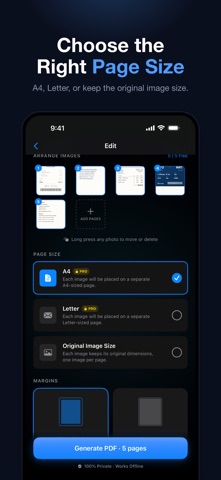
• A4 and US Letter page sizes
• Auto orientation: landscape photos automatically get landscape pages
• Standard or narrow margins — your choice
CLEAN EXPORTS
• No watermark, on every plan
• Share via AirDrop, email, or any app
• Save to Files or print with one tap
100% PRIVATE & OFFLINE
• Everything is processed locally on your iPhone or iPad
• No account required. No tracking. Your images never leave your device.
FREE & PRO
• Free: unlimited PDFs, up to 5 pages each, original image size, no watermark
• Pro: A4 & Letter sizes, up to 30 pages per PDF, margin options
PDFify Pro is available as a weekly or yearly auto-renewable subscription. Payment will be charged to your Apple ID account at confirmation of purchase. Subscription automatically renews unless canceled at least 24 hours before the end of the current period. Manage or cancel anytime in your Apple ID Account Settings.
Privacy Policy: https://aipromptant.com/pdfify/privacy-policy
Terms of Use: https://aipromptant.com/pdfify/terms-of-service