


AppBrain's verdict
- Rating on App Store
- 1.00
- 1 ratings
- Last updated
- June 19, 2025
- Size
- 13.0 MB
It doesn't have enough ratings yet to judge what users think.
User feedback
Ratings and reviews on the App StoreComments on Photo to PDF - Scan & Convert for iOS
We don't have enough comments to show example comments. Please check back later.
Store listing
By Kevin Rupareliya, from the App StoreDescription by Kevin Rupareliya Written by the developer, not by AppBrain. Click to read.
Convert photos & scans to PDF fast and offline
Turn Photos into PDFs in Seconds – Fast, Secure & Hassle-Free!
Looking for the easiest way to convert your images into PDFs? Whether you're scanning documents, saving memories, or organizing work files, Photo to PDF Maker helps you create high-quality PDFs from your iPhone in just a few taps.
Perfect for students, professionals, or anyone who needs to convert images, screenshots, or scanned papers into organized PDF files – all directly on your device.
Key Features:
► Convert Images to PDF Instantly Select photos from your gallery or use the built-in camera to capture new images, then convert them to PDF with a single tap.
► Scan Documents with Camera Easily scan paper documents using your iPhone camera. Auto-enhance, crop, and convert to clean, professional PDFs on the go.
► Fast, Offline & Secure All conversions happen offline on your device. No internet? No problem. Your files stay private and secure.
► Organize with Custom Folders & File Names Stay organized with smart folder creation and custom file naming. Manage multiple documents without the mess.
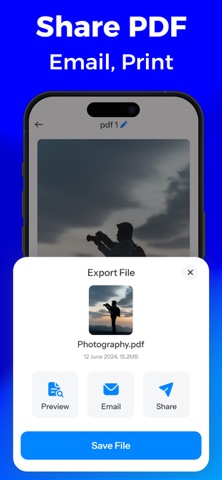
► Share, Mail or Print in One Tap Send your PDFs via Mail, iMessage, AirDrop, or any app. You can also print documents right from the app.
► Simple and Intuitive Design Built for speed and simplicity. No complex menus—just a clean, user-friendly interface that anyone can use.
Why Choose Photo to PDF Maker? • Lightweight & lightning-fast • No registration required • Perfect for photos, receipts, IDs, notes, and scanned papers • Ideal PDF solution for mobile users
PDFs are created with watermark in the free version. Upgrade to PRO to unlock watermark-free exports and enjoy an ad-free experience.
Download now and convert your images to professional PDFs anytime, anywhere – with just your iPhone!
Privacy policy : https://photostopdfprivacy.blogspot.com
Terms of use : https://sites.google.com/view/kr-terms-of-use/home
Safety and technology
Found in the app by AppBrain- Price
- Free
- App size
- 13.0 MB
- Content rating
- Everyone
Technologies used by Photo to PDF - Scan & Convert
Releases
Updates seen on the App Store- Version
- 1.1
- Launched
- June 2025
No changelog data
Alternatives
Similar apps and more from Kevin RupareliyaAlternatives to Photo to PDF - Scan & Convert

 PDFMaker: JPG to PDF converter


More from Kevin Rupareliya



Rankings
App Store top chartsApp Store Rankings for Photo to PDF - Scan & Convert
About the app and developer
About Photo to PDF - Scan & Convert
Photo to PDF - Scan & Convert is a productivity app developed by Kevin Rupareliya.
User Ratings
Photo to PDF - Scan & Convert is rated 1.00 out of 5 stars. The rating is based on one rating ratings.
App Information
Photo to PDF - Scan & Convert is freely available from the App Store. The app size is 13.05 MB. The latest version available is 1.1. The last update was on June 19, 2025.
Technical Requirements
The app has a content rating of Everyone. The app has been available on the App Store since June 2025.
Photo to PDF - Scan & Convert is made and published by Kevin Rupareliya. AppBrain is an independent app data site and isn't affiliated with Kevin Rupareliya. The app name, icon, screenshots and description belong to Kevin Rupareliya and are shown as published on the App Store.
Developer information for Kevin Rupareliya
Address: