

Photo Together App
Photo Together App is made and published by YingHung CHen. AppBrain is an independent app data site and isn't affiliated with YingHung CHen. The app name, icon, screenshots and description belong to YingHung CHen and are shown as published on the App Store.
AppBrain's verdict
- Last updated
- August 24, 2026
Rankings
App Store top chartsApp Store Rankings for Photo Together App
Competitors
Similar apps and more from YingHung CHenAlternatives to Photo Together App


Releases
Updates seen on the App Store- Version
- 1.0.11
- Launched
- June 2026
No changelog data
User feedback
Ratings and reviews on the App StoreComments on Photo Together App for iOS
We don't have enough comments to show example comments. Please check back later.
Technology
Found in the app by AppBrain- Price
- Free
- App size
- 109.0 MB
- Content rating
- Medium
Technologies used by Photo Together App
About the app and developer
About Photo Together App
Photo Together App is a social networking app developed by YingHung CHen.
User Ratings
The app has no ratings yet.
App Information
Photo Together App is freely available from the App Store. The app size is 109.01 MB. The latest version available is 1.0.11. The last update was on August 24, 2026.
Technical Requirements
The app has a content rating of Medium Maturity. The app has been available on the App Store since June 2026.
Developer information for YingHung CHen
Address:
Store listing
By YingHung CHen, from the App Store

Description by YingHung CHen Written by the developer, not by AppBrain. Click to read.
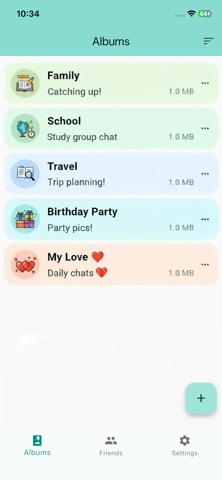
Photo Together App is a private sharing app that lets you create shared albums with friends and family, exchange photos, videos, and
files directly between your devices, and chat in real time — all without uploading your memories to a public cloud.
Built on peer-to-peer technology, your files travel directly from device to device whenever possible. When the other person
is offline, messages are safely held until they come back online, and a push notification lets them know something new is waiting.
============
KEY FEATURES
============
• Shared Albums — Create albums with friends or family and collect photos, videos, and files together in one place.
• Direct peer-to-peer Transfer — Send full-resolution photos, large videos, and any file type directly to your friends without quality loss.
• Mobile-to-Desktop Workflow — Instantly send photos and files from your phone to your own desktop for editing,
archiving, or backup. No cloud upload, no server-side storage limit — the only limit is the free space on your own device.
• Real-Time Chat — Talk inside each album with text messages alongside your media.
• Smart Offline Delivery — If your friend is offline, messages are queued and pushed to their device the moment they reconnect.
• Cross-Platform — Use the same account across all your devices.
• Multi-Device Account — Sign in on multiple devices and keep everything in sync.
• QR Code Friends — Add new friends instantly by scanning a QR code, no phone numbers or emails required.
• Custom Album Locations (Pro) — Choose exactly where each album is stored on your device.
============
DESIGNED FOR PRIVACY
============
Your photos and files are not stored on a public photo cloud. All network traffic is encrypted with TLS. Direct device-to-device
transfers are end-to-end encrypted — only the sender and recipient can read them. When the recipient is offline, messages are
temporarily relayed through our server (encrypted in transit) and delivered as soon as they reconnect.
============
PERFECT FOR
============
• Couples sharing daily moments
• Families collecting photos from a trip
• Close friends keeping a private group album
• Photographers and creators moving full-quality shots from phone to desktop for editing
• Anyone who wants to back up phone media to their own computer without going through a cloud service
• People who prefer their personal media to stay off public clouds
============
GET STARTED
============
1. Sign in with your account
2. Add a friend by scanning their QR code, or sign in on your own desktop to link your devices
3. Create a shared album and start sending photos, videos, and files
4. Chat together as your album grows
Start sharing the moments that matter — privately, instantly, and in full quality.
============
Terms of Use (EULA): https://www.apple.com/legal/internet-services/itunes/dev/stdeula/