Collage Maker: Photo & Video
Collage Maker: Photo & Video is made and published by Future Software Solutions S.R.L. AppBrain is an independent app data site and isn't affiliated with Future Software Solutions S.R.L. The app name, icon, screenshots and description belong to Future Software Solutions S.R.L. and are shown as published on the App Store.
AppBrain's verdict
- Rating on App Store
- 4.97
- 35 ratings
- Last updated
- October 19, 2026
It doesn't have enough ratings yet to judge what users think.
Rankings
App Store top chartsApp Store Rankings for Collage Maker: Photo & Video
Competitors
Similar apps and more from Future Software Solutions S.R.L.Alternatives to Collage Maker: Photo & Video
More from Future Software Solutions S.R.L.
Releases
Updates seen on the App Store- Version
- 3.0.2
- Launched
- August 2025
No changelog data
User feedback
Ratings and reviews on the App StoreComments on Collage Maker: Photo & Video for iOS
We don't have enough comments to show example comments. Please check back later.
Technology
Found in the app by AppBrain- Price
- Free
- App size
- 32.6 MB
- Content rating
- Everyone
Technologies used by Collage Maker: Photo & Video
About the app and developer
About Collage Maker: Photo & Video
Collage Maker: Photo & Video is a photo & video app developed by Future Software Solutions S.R.L.
User Ratings
Collage Maker: Photo & Video is rated 4.97 out of 5 stars. The rating is based on 35 ratings.
App Information
Collage Maker: Photo & Video is freely available from the App Store. The app size is 32.63 MB. The latest version available is 3.0.2. The last update was on October 19, 2026.
Technical Requirements
The app has a content rating of Everyone. The app has been available on the App Store since August 2025.
Developer information for Future Software Solutions S.R.L.
Future Software Solutions S.R.L.
Address:
Frequently asked questions about Collage Maker: Photo & Video
Is Collage Maker: Photo & Video free?
Yes. Collage Maker: Photo & Video is free on the App Store.
Is Collage Maker: Photo & Video still available?
Yes. Collage Maker: Photo & Video is on the App Store, and the last update we saw was on October 19, 2026.
How large is Collage Maker: Photo & Video?
Collage Maker: Photo & Video is 32.63 MB.
Is Collage Maker: Photo & Video suitable for children?
App Store rates the content of Collage Maker: Photo & Video as suitable for everyone.
How do people rate Collage Maker: Photo & Video?
Collage Maker: Photo & Video scores 4.97 out of 5 stars, from 35 ratings on the App Store.
Who made Collage Maker: Photo & Video?
Collage Maker: Photo & Video was developed by Future Software Solutions S.R.L. It is listed in the photo & video category on the App Store.
What are the best alternatives to Collage Maker: Photo & Video?
People looking at Collage Maker: Photo & Video also look at these photo & video apps: Pixelo : AI Image Upscaler, Decart, MyFilmRoll: Film Log & Tracker, Collage Maker | Photo Editor *, Light Paint - Creator Camera.
Store listing
By Future Software Solutions S.R.L., from the App StoreDescription by Future Software Solutions S.R.L. Written by the developer, not by AppBrain. Click to read.
LAYOUTS
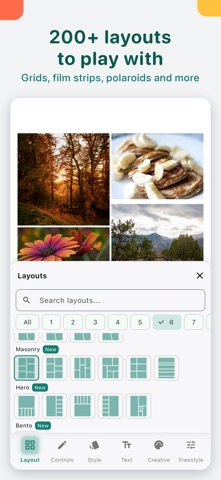
- 219 layouts: classic grids plus hearts, stars, honeycomb, masonry, bento, film strip, polaroid, puzzle, rings and waves.
- The picker shows real previews, has search and opens on your photo count.
- Freestyle mode when you want to place photos anywhere.
QUICK TO FILL
- Add many photos at once. They fill the cells in order, and photos that don't fit wait in Extras below the collage.
- Switch to a bigger or smaller layout and photos move in or out of Extras on their own.
- Press and hold a photo and drag it onto another to swap. Crop and filter move with it. Works for videos too.
- Replace one photo, reset its position, or use Fit whole photo so nobody gets cut off.
EVERY SIZE
- Square, 4:5, 3:4, 2:3, 9:16 for stories and wallpapers, 16:9 and 1.91:1.
- Print sizes from 4×6 to A4, and custom sizes, with Premium.
MAKE IT YOURS
- Borders: spacing, rounded corners on every shape, outer margin, border width and color, for all photos or just one.
- Backgrounds: a color, a gradient with any angle, a gradient picked from your photos, one of your photos blurred, or your own image.
- 12 frames around the whole collage: Minimal, Double line, Polaroid, Film, Shadow card, Torn paper and Washi tape, plus seasonal frames for spring, summer, autumn, Halloween and the winter holidays.
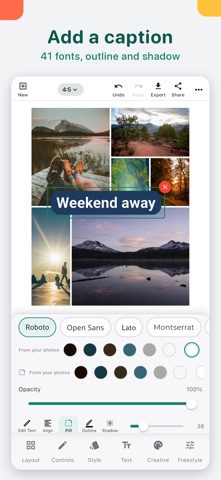
- Text with 41 fonts, color, alignment, a pill background, outline and shadow.
- Stickers and emoji with search, recents, size and opacity.
- Cut-outs: turn the subject of a photo, like your dog or your kid, into a sticker (iOS 17 or later; 3 per collage free, unlimited with Premium).
EDIT THE PHOTOS
- Filters and Adjust (brightness, contrast, saturation and more), for one photo or all of them at once.
- Retouch for natural skin smoothing that keeps eyes and lips sharp.
VIDEO COLLAGES
- Mix photos and videos in the same layouts and frames. Swap them and keep extra clips in Extras.
HOW PREMIUM WORKS
Editing is free. You get 5 free exports. After that, a one-time Premium unlock gives you unlimited exports, print and custom sizes, and unlimited cut-outs. No subscription.
No account needed.