

PhotoFlic
PhotoFlic is made and published by Joseph Morganelli. AppBrain is an independent app data site and isn't affiliated with Joseph Morganelli. The app name, icon, screenshots and description belong to Joseph Morganelli and are shown as published on the App Store.
AppBrain's verdict
- Last updated
- January 5, 2026
- Size
- 10.0 MB
User feedback
Ratings and reviews on the App StoreComments on PhotoFlic for iOS
We don't have enough comments to show example comments. Please check back later.
Store listing
By Joseph Morganelli, from the App Store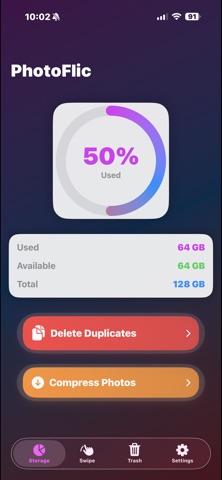


Description by Joseph Morganelli Written by the developer, not by AppBrain. Click to read.
STORAGE OVERVIEW
Get a clear picture of your photo library's storage usage at a glance. Our beautiful circular progress indicator shows exactly how much space your photos are using, with detailed breakdowns of used, available, and total storage.
DELETE DUPLICATES
Tired of scrolling through multiple copies of the same photo? PhotoFlic's intelligent duplicate detection finds photos with matching dimensions, similar file sizes, and close creation times, perfect for identifying burst photos and accidental duplicates. Features include smart detection that automatically groups duplicate photos, easy checkbox selection, a "select all but first" feature for quick cleanup, the ability to hide groups you want to keep, and batch deletion with a single system prompt.
SWIPE MODE
Review your entire photo library one photo at a time with our intuitive Swipe Mode. Choose between two interaction styles: Swipe Left/Right (swipe left to delete, swipe right to keep) or Thumbs Up/Down (tap thumbs down to delete, thumbs up to keep). Customize which media types appear, toggle Photos and Videos on or off independently. Swipe Mode works with both photos and videos, so you can organize your entire media library in one place. Videos display with a play button, tap to play, no auto-play interruptions.
COMPRESS PHOTOS
Save significant storage space by compressing your photos without losing visual quality. PhotoFlic's compression feature is smart, customizable, and remembers which photos you've already compressed. Choose exactly which photos to compress, with the app tracking which ones you've already processed. Customize your compression with options to keep the same size, choose target size (Small, Medium, Large, or Original), and select compression level (Low, Medium, or High). All compressed photos maintain their original aspect ratio. Preview before compressing a single photo, or get a summary for multiple photos. Compress multiple photos at once with real-time progress tracking.
TRASH MANAGEMENT
Safely manage your deleted photos with PhotoFlic's trash system. All photos deleted through the app are moved to your Photo Library's "Recently Deleted" album, giving you 30 days to recover anything deleted by mistake. The Trash view provides easy access to permanently delete items when you're ready.
KEY FEATURES
• Beautiful, Colorful Interface: Enjoy a fun and vibrant design that makes photo cleanup enjoyable
• Works with Photos & Videos: Organize both photos and videos in one app
• Smart Duplicate Detection: Advanced algorithms find duplicates based on dimensions, file size, and creation time
• Flexible Swipe Modes: Choose between swipe gestures or thumbs up/down buttons
• Customizable Compression: Fine-tune compression settings to match your needs
• Privacy Focused: All processing happens on your device. Your photos never leave your phone.
• iPad Optimized: Fully optimized for iPad with adaptive layouts and larger grids
• Settings Persistence: Your preferences are saved and remembered across app sessions
• Batch Operations: Delete or compress multiple items efficiently
• Progress Tracking: See real-time progress for compression operations
DESIGNED FOR EVERYONE
PhotoFlic's intuitive interface makes photo cleanup accessible to everyone. Whether you're a photography enthusiast with thousands of photos or someone who just wants to free up space, PhotoFlic makes the process simple and enjoyable. The app features a colorful, gradient-based design that's both modern and fun.
Safety and technology
Found in the app by AppBrain- Price
- $4.99
- App size
- 10.0 MB
- Content rating
- Everyone
Technologies used by PhotoFlic
Releases
Updates seen on the App Store- Version
- 1.50
- Launched
- January 2026
No changelog data
Alternatives
Similar apps and more from Joseph MorganelliMore from Joseph Morganelli


Rankings
App Store top chartsApp Store Rankings for PhotoFlic
About the app and developer
About PhotoFlic
PhotoFlic is an utilities app developed by Joseph Morganelli.
What is the rating of PhotoFlic?
PhotoFlic has no ratings yet.
Is PhotoFlic free?
PhotoFlic costs $4.99. The app size is 10.04 MB. The latest version available is 1.50. The last update was on January 5, 2026.
What are the requirements for PhotoFlic?
The app has a content rating of Everyone. The app has been available on the App Store since January 2026.
Developer information for Joseph Morganelli
Address: