

PhotoLink widget
PhotoLink widget is made and published by Ianis Plumit. AppBrain is an independent app data site and isn't affiliated with Ianis Plumit. The app name, icon, screenshots and description belong to Ianis Plumit and are shown as published on the App Store.
AppBrain's verdict
Established- Rating on App Store
- 4.35
- 92 ratings
- Last updated
- September 29, 2026
- Size
- 13.8 MB
It doesn't have enough ratings yet to judge what users think.
User feedback
Ratings and reviews on the App StoreComments on PhotoLink widget for iOS
We don't have enough comments to show example comments. Please check back later.
Store listing
By Ianis Plumit, from the App Store


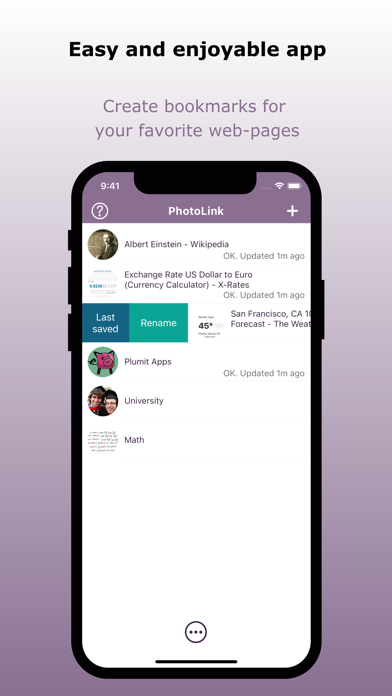

Description by Ianis Plumit Written by the developer, not by AppBrain. Click to read.
PhotoLink lets you turn photos, web pages, schedules, notes and useful information into your own Home Screen widgets.
Keep the things you use every day right on your Home Screen — your work schedule, a favorite website, a shopping list, a reminder, the weather forecast, exchange rates, or a photo you love.
Create widgets that fit the way you use your iPhone:
• Add your favorite photos
• Display any web page directly on your Home Screen
• Keep schedules and timetables visible
• Create simple notes and to-do lists
• Save useful websites and bookmarks
• Check weather and forecasts
• View currency exchange rates
• Display text, quotes, formulas and other useful information
• Organize widgets into folders
• Rotate multiple items automatically
Web pages on your Home Screen
Have a website you check every day?
Add it to PhotoLink and keep it available directly from your Home Screen. Use it for work information, timetables, dashboards, news, reference pages, shopping lists, or any other website you want to keep within reach.
Use PhotoLink for
• Work schedules and timetables
• Calendars and agendas
• To-do lists and reminders
• Shopping lists
• Favorite websites and bookmarks
• Weather and forecasts
• Currency exchange rates
• Important notes and reference information
• Photos and memories
Make your Home Screen yours
Instead of opening an app every time you need information, put that information where you can see it.
Create your own widgets and keep the information that matters most right on your Home Screen.
PhotoLink — your information, always within reach.
Safety and technology
Found in the app by AppBrain- Price
- Free
- App size
- 13.8 MB
- Content rating
- High
Technologies used by PhotoLink widget
Releases
Updates seen on the App Store- Version
- 7.0
- Launched
- December 2015
No changelog data
Alternatives
Similar apps and more from Ianis PlumitAlternatives to PhotoLink widget





More from Ianis Plumit




Rankings
App Store top chartsApp Store Rankings for PhotoLink widget
About the app and developer
About PhotoLink widget
PhotoLink widget is a productivity app developed by Ianis Plumit.
User Ratings
PhotoLink widget is rated 4.35 out of 5 stars. The rating is based on 92 ratings.
App Information
PhotoLink widget is freely available from the App Store. The app size is 13.80 MB. The latest version available is 7.0. The last update was on September 29, 2026.
Technical Requirements
The app has a content rating of High Maturity. The app has been available on the App Store since December 2015.
Developer information for Ianis Plumit
Address:
Frequently asked questions about PhotoLink widget
Is PhotoLink widget free?
Yes. PhotoLink widget is free on the App Store.
Is PhotoLink widget still available?
Yes. PhotoLink widget is on the App Store, and the last update we saw was on September 29, 2026.
How large is PhotoLink widget?
PhotoLink widget is 13.80 MB.
Is PhotoLink widget suitable for children?
App Store gives PhotoLink widget a high maturity rating. It is meant for adults.
How do people rate PhotoLink widget?
PhotoLink widget scores 4.35 out of 5 stars, from 92 ratings on the App Store.
Who made PhotoLink widget?
PhotoLink widget was developed by Ianis Plumit. It is listed in the productivity category on the App Store.
What are the best alternatives to PhotoLink widget?
People looking at PhotoLink widget also look at these productivity apps: Widget Web 27, Glimpse 2, Photo Widgets: on Home Screen, Ai Launcher - Icon Shortcuts, Magic Launcher Widgets.