

PhotoSheet is made and published by Photility. AppBrain is an independent app data site and isn't affiliated with Photility. The app name, icon, screenshots and description belong to Photility and are shown as published on the App Store.
AppBrain's verdict
- Last updated
- May 11, 2021
Rankings
App Store top chartsApp Store Rankings for PhotoSheet
This app is not ranked
Competitors
Similar apps and more from PhotilityMore from Photility


Releases
Updates seen on the App Store- Version
- 1.2.2
- Launched
- January 2017
No changelog data
User feedback
Ratings and reviews on the App StoreComments on PhotoSheet for iOS
We don't have enough comments to show example comments. Please check back later.
Technology
Found in the app by AppBrain- Price
- $6.99
- App size
- 8.20 MB
- Content rating
- Everyone
Technologies used by PhotoSheet
About the app and developer
About PhotoSheet
PhotoSheet is a lifestyle app developed by Photility.
What is the rating of PhotoSheet?
PhotoSheet has no ratings yet.
Is PhotoSheet free?
PhotoSheet costs $6.99. The app size is 8.20 MB. The latest version available is 1.2.2. The last update was on May 11, 2021.
What are the requirements for PhotoSheet?
The app has a content rating of Everyone. The app has been available on the App Store since January 2017.
Developer information for Photility
Address:
Store listing
By Photility, from the App Store


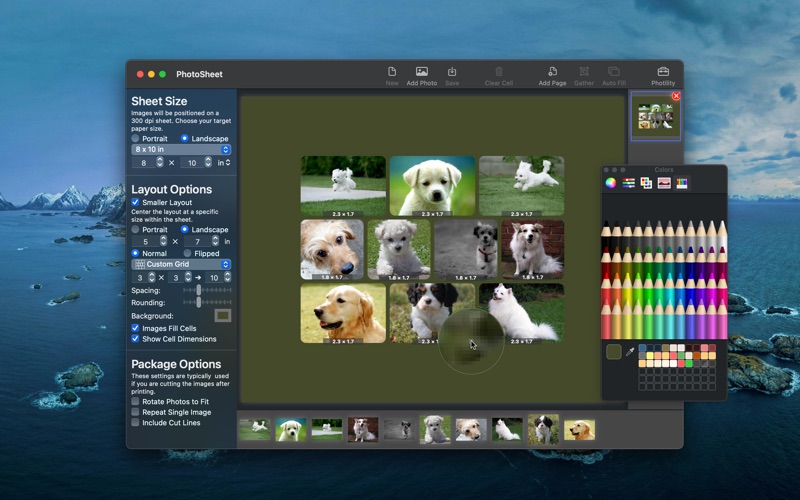
Screenshots by Photility, from the the App Store listing
Description by Photility Written by the developer, not by AppBrain. Click to read.
Combine several separate images into a single image with a layout of your choosing.
• Print your own wallet prints at a fraction of the cost
• Create prints that are perfectly sized for the photo frames in your home
• Create simple collage images for quick scrapbook pages or photo frames
• Expand your creative options with flexible page layouts
• Use PhotoSheet as part of your photo editing workflow, adding your own journaling and embellishments.
Cheaper Wallet Photos
• Save money on wallet photos. If you've ever uploaded photos to a photo printing service, you've seen the option for wallet prints. Typically wallets will be printed as 4 images on a 4x6 or 5x7 sheet. Photo printers charge a premium for this service. By putting the images on a 4x6 image and sending that to the printing service the individual wallet-size images cost a fraction of their regular rate.
Great for scrapbooking
• Make your scrapbook pages more interesting! PhotoSheet gives you control over the size and layout of images for the scrapbook layout you're working on. There are a host of sheet layouts offering space for up to 100 images!
• Tweak the layout! You can change the scale and position of individual images within the layout.
• Make a sheet of 16 1" x 1.5" images that fit inside slide mounts. Or make a 4x6 print containing two 2.5" x 3" images reminiscent of Polaroid prints.
• Adjust the spacing and add rounded corners to create the vintage photo print look.
Custom Prints
• Prepare images to fill those photo collage picture frames in your home. If you have too many photos to fit in the frame, this software is handy for fitting multiple pictures into a single slot in the frame. See what the sheet will look like, rearrange the photos on the sheet, and control the rotation of individual photos.
• Create a dramatic effect by centering a 5x5 layout on an 8x8 sheet with a custom background color.
Package Prints
• Fill a single sheet with copies of a single image, great for wallet photos or giving package prints to friends.
• Automatically rotate photos to make the best use of individual slots in the layout. A great option if you are planning on cutting out the photo after printing. Optionally include cut lines in the image to improve accuracy.
• Fill several sheets with photos using the same layout.
Easy to use
• Imperial and Metric paper sizes! All of the A's and B's and P's are there for your choosing! If your favorite paper size is not in the list, don't dismay: you can enter any sheet size you like, in inches or centimeters!
• PhotoSheet remembers your settings from one session to the next! If you frequently use the same layout or sheet size, you'll love this.
• The film strip holds all of the photos you're working with, and page views help you build multiple pages using the same layout! Create package prints for several photos at once!
• Choose a different layout and automatically fill the open spaces with unused photos, or gather images together to use fewer pages!
• Use two fingers on your trackpad or the scroll gesture on your mouse to reposition images in their cells. Hold the Option key to zoom.
• "Show cell dimensions" to see exactly how large each image will be in the layout.
• Use the "Smaller Layout" setting to control layout size independently from sheet size.
• Use the eyedropper tool to easily match the background color to primary or secondary colors in the images!
• Print your own wallet prints at a fraction of the cost
• Create prints that are perfectly sized for the photo frames in your home
• Create simple collage images for quick scrapbook pages or photo frames
• Expand your creative options with flexible page layouts
• Use PhotoSheet as part of your photo editing workflow, adding your own journaling and embellishments.
Cheaper Wallet Photos
• Save money on wallet photos. If you've ever uploaded photos to a photo printing service, you've seen the option for wallet prints. Typically wallets will be printed as 4 images on a 4x6 or 5x7 sheet. Photo printers charge a premium for this service. By putting the images on a 4x6 image and sending that to the printing service the individual wallet-size images cost a fraction of their regular rate.
Great for scrapbooking
• Make your scrapbook pages more interesting! PhotoSheet gives you control over the size and layout of images for the scrapbook layout you're working on. There are a host of sheet layouts offering space for up to 100 images!
• Tweak the layout! You can change the scale and position of individual images within the layout.
• Make a sheet of 16 1" x 1.5" images that fit inside slide mounts. Or make a 4x6 print containing two 2.5" x 3" images reminiscent of Polaroid prints.
• Adjust the spacing and add rounded corners to create the vintage photo print look.
Custom Prints
• Prepare images to fill those photo collage picture frames in your home. If you have too many photos to fit in the frame, this software is handy for fitting multiple pictures into a single slot in the frame. See what the sheet will look like, rearrange the photos on the sheet, and control the rotation of individual photos.
• Create a dramatic effect by centering a 5x5 layout on an 8x8 sheet with a custom background color.
Package Prints
• Fill a single sheet with copies of a single image, great for wallet photos or giving package prints to friends.
• Automatically rotate photos to make the best use of individual slots in the layout. A great option if you are planning on cutting out the photo after printing. Optionally include cut lines in the image to improve accuracy.
• Fill several sheets with photos using the same layout.
Easy to use
• Imperial and Metric paper sizes! All of the A's and B's and P's are there for your choosing! If your favorite paper size is not in the list, don't dismay: you can enter any sheet size you like, in inches or centimeters!
• PhotoSheet remembers your settings from one session to the next! If you frequently use the same layout or sheet size, you'll love this.
• The film strip holds all of the photos you're working with, and page views help you build multiple pages using the same layout! Create package prints for several photos at once!
• Choose a different layout and automatically fill the open spaces with unused photos, or gather images together to use fewer pages!
• Use two fingers on your trackpad or the scroll gesture on your mouse to reposition images in their cells. Hold the Option key to zoom.
• "Show cell dimensions" to see exactly how large each image will be in the layout.
• Use the "Smaller Layout" setting to control layout size independently from sheet size.
• Use the eyedropper tool to easily match the background color to primary or secondary colors in the images!