



AppBrain's verdict
- Last updated
- July 11, 2026
- Size
- 41.6 MB
User feedback
Ratings and reviews on the App StoreComments on PhotoSweeper for iOS
We don't have enough comments to show example comments. Please check back later.
Store listing
By Maksym Cherniaiev, from the App StoreDescription by Maksym Cherniaiev Written by the developer, not by AppBrain. Click to read.
“Swift, easy to use, thorough, analyzes specific libraries, can search according to various criteria, offers choices in photo handling” - TheNextWeb
"PhotoSweeper packs a powerful punch in de-cluttering any size collection. 9/10" - Mac.AppStorm
"PhotoSweeper is a simple and efficient utility for organizing photos. 4.5/5" - Macworld
“I like PhotoSweeper because you can tweak it to compare with different criteria… not a one-trick-pony.” - MacRumors forum user
"This tool does a great job of finding duplicates, not just exact duplicates, but photos that have been rotated, resized, or are even just very similar. It also has a great set of default rules for figuring out which image to keep automatically, which can save hours." - Mac App Store Review
PhotoSweeper is perfect for you if:
• You often take a series of shots to get the perfect image and want to remove the extras.
• You edit photos in apps like Photoshop or Capture One and create multiple versions or backups.
• You have photos spread across folders, external drives, and libraries like Apple Photos, Lightroom Classic, or Capture One.
• Your photo library feels messy, disorganized, or too full, and you want to reclaim space by removing unnecessary files.
Key Features
• Deep Integration with Popular Photo Libraries
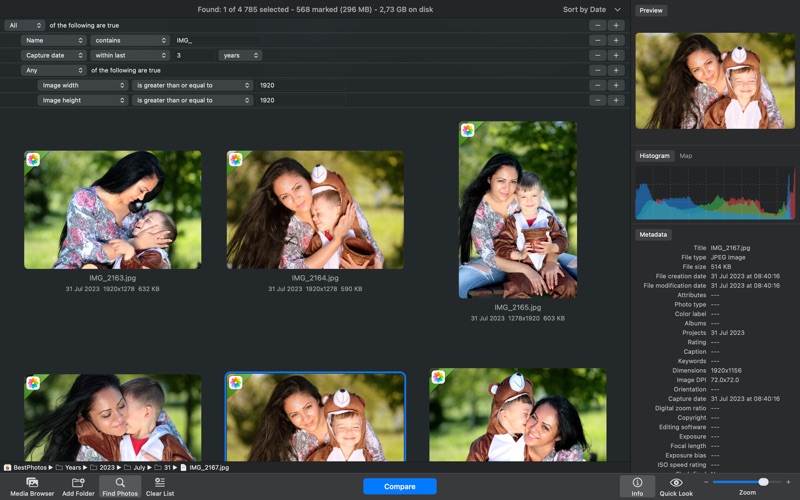
Works seamlessly with Apple Photos, Lightroom Classic, and Capture One. You can also scan any folder or external drive, with no need to move or reorganize your files beforehand.
• Fast and Accurate Comparison Engine
Under the hood is a lightning-fast engine that detects both exact duplicates and visually similar images. It goes beyond filenames by analyzing content, composition, and capture time. You can fine-tune the matching level to catch everything from identical copies to burst shots and edits.
• Flexible, User-Friendly Workflow
Clean up your library with ease. Similar photos are grouped side by side for quick visual comparison. Use Auto Mark to automatically select the best image in each group, or choose manually. Lock important photos, view EXIF data, preview with Quick Look, and apply customizable marking rules.
• AI-Powered Photo Scoring
Evaluates the visual quality of photos using AI and displays a visual badge on each image. Use the “Quality Score” auto mark rule to automatically keep the best shots.
• Smart Cleanup with Safety in Mind
You're always in control. Review all marked photos before deleting. Nothing is permanently erased. Photos go to the system Trash, are marked “Rejected” in Lightroom, or moved to a special album in Photos so you can recover them later if needed.
• Optimized for Performance / Handles Large Libraries
Whether you have thousands or hundreds of thousands of photos, PhotoSweeper runs fast and smooth. It's optimized for macOS and runs natively on Apple Silicon for top performance on your Mac.
Why Choose PhotoSweeper?
• Works with Photos, Lightroom Classic, Capture One, folders, and more
• Detects both exact duplicates and similar-looking photos
• Lets you compare side-by-side with clear previews and detailed info
• Features Auto Mark, customizable rules, and flexible cleanup options
• Supports RAW, JPEG, HEIC, PNG, TIFF, and other popular formats
• Designed for both casual users and professionals
• Keeps your photo collection tidy, organized, and free of clutter
Declutter your photo library, free up disk space, and enjoy your best memories without the noise. With PhotoSweeper, cleaning up your Mac has never been so smart and satisfying.
Need help or want to learn more? Check out the full user manual at http://overmacs.com, or drop us a line at support@overmacs.com — we’re happy to help!
Safety and technology
Found in the app by AppBrain- Price
- $14.99
- App size
- 41.6 MB
- Content rating
- Everyone
Technologies used by PhotoSweeper
Releases
Updates seen on the App Store- Version
- 5.5.5
- Launched
- October 2011
No changelog data
Alternatives
Similar apps and more from Maksym CherniaievMore from Maksym Cherniaiev

Rankings
App Store top chartsApp Store Rankings for PhotoSweeper
About the app and developer
About PhotoSweeper
PhotoSweeper is a photo & video app developed by Maksym Cherniaiev.
User Ratings
The app has no ratings yet.
App Information
PhotoSweeper costs $14.99. The app size is 41.64 MB. The latest version available is 5.5.5. The last update was on July 11, 2026.
Technical Requirements
The app has a content rating of Everyone. The app has been available on the App Store since October 2011.
PhotoSweeper is made and published by Maksym Cherniaiev. AppBrain is an independent app data site and isn't affiliated with Maksym Cherniaiev. The app name, icon, screenshots and description belong to Maksym Cherniaiev and are shown as published on the App Store.
Developer information for Maksym Cherniaiev
Address:
Frequently asked questions about PhotoSweeper
Is PhotoSweeper free?
No. PhotoSweeper costs $14.99 on the App Store.
Is PhotoSweeper still available?
Yes. PhotoSweeper is on the App Store, and the last update we saw was on July 11, 2026.
How large is PhotoSweeper?
PhotoSweeper is 41.64 MB.
Is PhotoSweeper suitable for children?
App Store rates the content of PhotoSweeper as suitable for everyone.
Who made PhotoSweeper?
PhotoSweeper was developed by Maksym Cherniaiev. It is listed in the photo & video category on the App Store.