


AppBrain's verdict
- Last updated
- November 6, 2025
- Size
- 11.9 MB
User feedback
Ratings and reviews on the App StoreComments on PhotoToPDF: Image to PDF for iOS
We don't have enough comments to show example comments. Please check back later.
Store listing
By Yassine IMGHARNE, from the App StoreDescription by Yassine IMGHARNE Written by the developer, not by AppBrain. Click to read.
PhotoToPDF is the ultimate Image to PDF converter, built to help you scan, convert, and sign files effortlessly — right from your iPhone.
Whether it’s a receipt, a form, a contract, or a handwritten note, PhotoToPDF makes it easy to convert to PDF, sign documents, and share securely — anytime, anywhere.
Fast. Simple. Free.
With PhotoToPDF, you can:
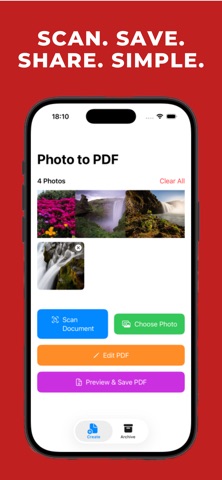
- Convert images to PDF instantly
- Turn JPG to PDF, JPEG to PDF, or PNG to PDF
- Scan documents using your camera with Scanner to PDF
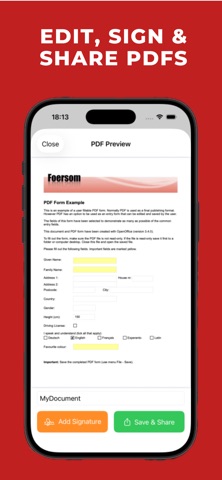
- Add your signature with PDF Signature
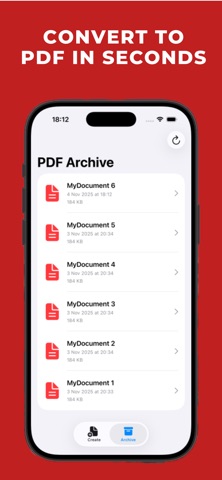
- Export, save, or share PDFs with one tap
- All features are 100% free — no watermarks, no subscriptions, no limits.
Powerful Image & PDF Converter :
- Easily transform your photos, scans, or screenshots into high-quality PDFs:
- Image to PDF Converter for JPG, JPEG, and PNG files
- Combine multiple images into one PDF
- Automatic edge detection for clean, professional results
- Adjust brightness, contrast, and orientation before exporting
- Works offline — convert anytime, anywhere
- Whether you need a pdf converter photo to pdf or a pdf maker free, this app does it all.
Sign Documents Free :
- Skip the printer — sign digitally in seconds.
- Add handwritten or digital signatures directly on PDFs
- Save your signature for quick reuse
- Perfect for contracts, forms, invoices, and agreements
- Your doc sign and docsign solution — fast and secure
Scanner to PDF :
- Turn your camera into a professional scanner to PDF tool:
- Capture documents, receipts, or notes with precision
- Auto crop and enhance scans for clarity
- Save as PDF instantly
- Great for business, school, or personal use
- Your portable scanner is now in your pocket.
PDF Export & Sharing Made Easy :
- Once your file is ready, share or store it effortlessly:
- Save to Files locally
- Share PDFs via email, AirDrop, or messaging apps
- Rename, organize, and manage all your files
- All features available free of charge
- PhotoToPDF doubles as a pdf creator free, pdf maker free, and image converter — all in one intuitive app.
Why Users Love PhotoToPDF :
- 100% Free — No subscriptions or hidden costs
- Easy-to-use interface for fast conversions
- Reliable pdf converter photo to pdf experience
- Supports all major image formats (JPG, JPEG, PNG)
- Built-in pdf signature and doc sign tool
- Works offline for convenience anywhere
PhotoToPDF is perfect for students, professionals, freelancers, and anyone who needs quick, reliable document management on the go.
Key Features :
- Scanner to PDF — turn photos into documents
- Image to PDF Converter — supports JPG, PNG, and JPEG
- PDF Signature / Doc Sign — sign and send instantly
- PDF Export & Share — organize and share files easily
- All Features Free — no watermarks, no fees
Your All-in-One PDF Solution :
From photos to forms, PhotoToPDF makes document creation simple.
Scan, sign, convert, and share — all with one free app.
Download PhotoToPDF today and experience the fastest, easiest, and most powerful image to PDF converter for iPhone!
Safety and technology
Found in the app by AppBrain- Price
- Free
- App size
- 11.9 MB
- Content rating
- Everyone
Technologies used by PhotoToPDF: Image to PDF
Releases
Updates seen on the App Store- Version
- 1.0
- Launched
- November 2025
No changelog data
Alternatives
Similar apps and more from Yassine IMGHARNEMore from Yassine IMGHARNE


Rankings
App Store top chartsApp Store Rankings for PhotoToPDF: Image to PDF
About the app and developer
About PhotoToPDF: Image to PDF
PhotoToPDF: Image to PDF is an utilities app developed by Yassine IMGHARNE.
User Ratings
The app has no ratings yet.
App Information
PhotoToPDF: Image to PDF is freely available from the App Store. The app size is 11.90 MB. The latest version available is 1.0. The last update was on November 6, 2025.
Technical Requirements
The app has a content rating of Everyone. The app has been available on the App Store since November 2025.
PhotoToPDF: Image to PDF is made and published by Yassine IMGHARNE. AppBrain is an independent app data site and isn't affiliated with Yassine IMGHARNE. The app name, icon, screenshots and description belong to Yassine IMGHARNE and are shown as published on the App Store.
Developer information for Yassine IMGHARNE
Address:
Frequently asked questions about PhotoToPDF: Image to PDF
Is PhotoToPDF: Image to PDF free?
Yes. PhotoToPDF: Image to PDF is free on the App Store.
Is PhotoToPDF: Image to PDF still available?
Yes. PhotoToPDF: Image to PDF is on the App Store, and the last update we saw was on November 6, 2025.
How large is PhotoToPDF: Image to PDF?
PhotoToPDF: Image to PDF is 11.90 MB.
Is PhotoToPDF: Image to PDF suitable for children?
App Store rates the content of PhotoToPDF: Image to PDF as suitable for everyone.
Who made PhotoToPDF: Image to PDF?
PhotoToPDF: Image to PDF was developed by Yassine IMGHARNE. It is listed in the utilities category on the App Store.