AppBrain
AppBrain
  • Apps
  • Apps being viewed right now Trending apps today Most popular apps All-time most installed apps Top rated apps iPhone and iPad apps
  • Intelligence ▾
    Intelligence overview → Track any Android app or your whole market
    Track & analyze
    Keyword Tracker & OptimizerTrack & improve Play rankings App Performance ReportOne-off PDF for any app StatisticsFree Android & Play market stats
    Promote your app
    Featured Apps App Links
  • Intelligence
  • Pricing
  • Dashboard
  • Sign up
  • Log in
App Store Apps > Photo & Video > PhotoVideoBackup: SSD Transfer
PhotoVideoBackup: SSD Transfer icon

PhotoVideoBackup: SSD Transfer

2.7.0
Gerard DUVAL
0.00
0 reviews
Free

PhotoVideoBackup: SSD Transfer Screenshot 1 of 10
PhotoVideoBackup: SSD Transfer Screenshot 2 of 10
PhotoVideoBackup: SSD Transfer Screenshot 3 of 10
PhotoVideoBackup: SSD Transfer Screenshot 4 of 10
PhotoVideoBackup: SSD Transfer Screenshot 5 of 10
PhotoVideoBackup: SSD Transfer Screenshot 6 of 10
PhotoVideoBackup: SSD Transfer Screenshot 7 of 10
PhotoVideoBackup: SSD Transfer Screenshot 8 of 10
PhotoVideoBackup: SSD Transfer Screenshot 9 of 10
PhotoVideoBackup: SSD Transfer Screenshot 10 of 10
Screenshots by Gerard DUVAL, from the the App Store listing
View on the App Store

AppBrain's verdict

Last updated
November 18, 2026
Size
5.30 MB
Official page on the App Store

User feedback

Ratings and reviews on the App Store

Comments on PhotoVideoBackup: SSD Transfer for iOS

We don't have enough comments to show example comments. Please check back later.

Store listing

By Gerard DUVAL, from the App Store
Description by Gerard DUVAL Written by the developer, not by AppBrain. Click to read.
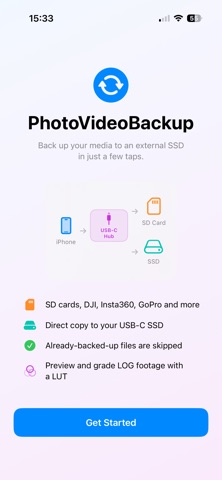
PhotoVideoBackup backs up your photos and videos from your iPhone straight to the place you choose: an external SSD or SD card over USB-C, a NAS on your network, or a folder in iCloud Drive. No account, no subscription, no middleman.

BACKUPS, SIMPLE
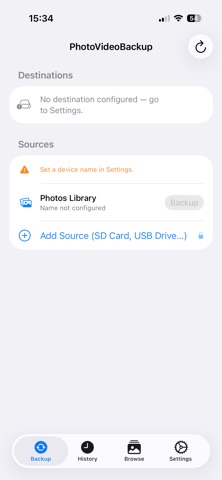
Create a backup once: pick what to back up and where, then run it with one tap. Each backup remembers its own source, its destinations and its options. Start from a ready-made template:
- Photo library to an external drive
- Photo library to a NAS
- Photo library to iCloud Drive
- Camera or SD card to an external drive
- External drive to iCloud Drive
- Photo library to a drive and a NAS

SAFE BY DESIGN
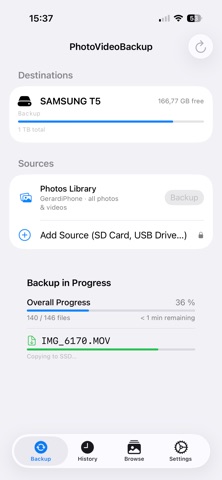
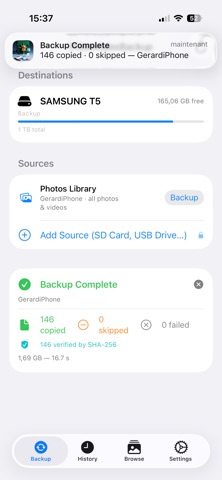
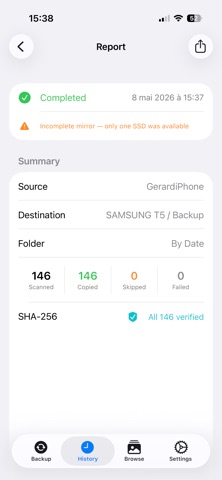
- Every copied file is verified with SHA-256 before it counts as backed up.
- Files already backed up are recognised and never copied twice, even if you renamed or edited them afterwards. Nothing is ever overwritten.
- If a drive is unplugged mid-backup, the others keep going and you can resume later.
- Works when your iPhone is almost full: files are streamed to the destination instead of being copied to the phone first.
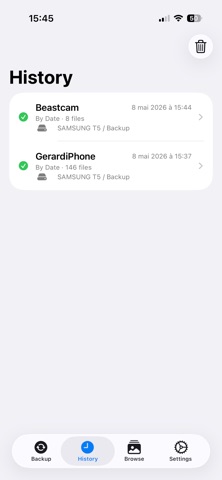
- A full report of every backup: copied, skipped, failed, duration, per destination.

ORGANISE AS YOU GO
- Choose the folder structure: flat, by month, by date or by year and month.
- Name files automatically with your own pattern (date, time, device name) as they are backed up.
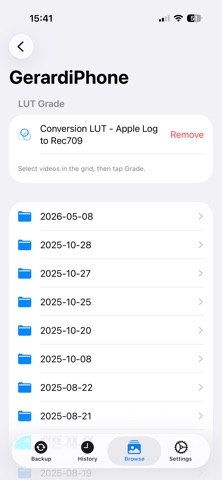
- Browse your backups in the app, preview photos and videos, and share them.

FREE
- Back up your Photos library to one destination (a folder on a drive or iCloud Drive).
- Progress, report and history, browsing and previews.

PRO (one-time purchase, no subscription)
- Several backups, each with its own settings.
- A second destination to mirror every backup.
- NAS over SMB, on your network or remotely.
- SD cards, USB drives, DJI, GoPro, Insta360 and other cameras as sources.
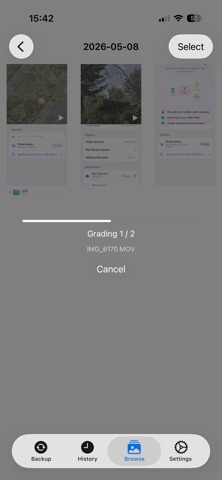
- LUT grading: apply a .cube LUT to LOG footage and export H.265.

Also available in 12 languages: English, French, German, Spanish, Italian, Portuguese, Chinese (Simplified), Russian, Japanese, Korean, Hindi and Arabic.

PRIVACY
PhotoVideoBackup does not collect, transmit or store any of your data. Everything stays between your iPhone and your destinations.

Safety and technology

Found in the app by AppBrain
Price
Free
App size
5.30 MB
Content rating
Everyone

Technologies used by PhotoVideoBackup: SSD Transfer

Releases

Updates seen on the App Store
Version
2.7.0
Launched
April 2026

No changelog data

Alternatives

Similar apps and more from Gerard DUVAL

Alternatives to PhotoVideoBackup: SSD Transfer

OffloadPro icon OffloadPro
CHANDRA SEKHAR KASARABADA
0.0
Free
MMAP Cam icon MMAP Cam
omer argin
0.0
Free
ImagesMetaDataRemover icon ImagesMetaDataRemover
Aliaksandr Melnikau
4.0
$1.99
1 ratings
Effect 01 icon Effect 01
David Pina
5.0
Free
2 ratings
ProjectCam - Photo Folders icon ProjectCam - Photo Folders
Ryunosuke Shibuya
4.6
Free
9 ratings
DuoLens: Dual Video Recorder icon DuoLens: Dual Video Recorder
Dung Vu
0.0
Free
Happy Photo Exporter icon Happy Photo Exporter
Oliver Frisius
4.0
Free
9 ratings
phottr. – Product Photos icon phottr. – Product Photos
Phottr, s.r.o.
0.0
Free

Rankings

App Store top charts

App Store Rankings for PhotoVideoBackup: SSD Transfer

This app is not ranked

About the app and developer

About PhotoVideoBackup: SSD Transfer

PhotoVideoBackup: SSD Transfer is a photo & video app developed by Gerard DUVAL.

What is the rating of PhotoVideoBackup: SSD Transfer?

PhotoVideoBackup: SSD Transfer has no ratings yet.

Is PhotoVideoBackup: SSD Transfer free?

PhotoVideoBackup: SSD Transfer is free. The app size is 5.30 MB. The latest version available is 2.7.0. The last update was on November 18, 2026.

What are the requirements for PhotoVideoBackup: SSD Transfer?

The app has a content rating of Everyone. The app has been available on the App Store since April 2026.

PhotoVideoBackup: SSD Transfer is made and published by Gerard DUVAL. AppBrain is an independent app data site and isn't affiliated with Gerard DUVAL. The app name, icon, screenshots and description belong to Gerard DUVAL and are shown as published on the App Store.

Developer information for Gerard DUVAL

Gerard DUVAL

Address:

Share PhotoVideoBackup: SSD Transfer

Popular Photo & Video Apps Top new apps Apps other people are watching Price drops on Google Play Today's trending apps
OffloadPro icon OffloadPro
MMAP Cam icon MMAP Cam
ImagesMetaDataRemover icon ImagesMetaDataRemover
Effect 01 icon Effect 01
ProjectCam - Photo Folders icon ProjectCam - Photo Folders
DuoLens: Dual Video Recorder icon DuoLens: Dual Video Recorder
Happy Photo Exporter icon Happy Photo Exporter
phottr. – Product Photos icon phottr. – Product Photos
Overview Alternatives Reviews Rankings Technology
AppBrain Intelligence premium content

Subscribe now to get full and unlimited access to AppBrain Intelligence. You'll have access to:

  • App Intelligence dashboard (performance timeline, competitor comparison, country rankings, insight cards)
  • Detailed ranking data per app
  • Full timeline per developer
  • Device market shares data per country
  • Unlimited keyword tracking
  • AI assistant access via MCP (Claude, Cursor or any MCP client)
1 Month

$75/mo
(billed every month)

SAVE 0%
Subscribe
3 Months

$65/mo
($195 billed every 3 months)

SAVE 13%
Subscribe
1 Year

$57.50/mo
($690 billed every year)

SAVE 23%
Subscribe
Each subscription will automatically renew 3 days before the expiration date for the same time period. Subscriptions can be cancelled at any time before the renewal.

AppBrain is an app data site, we track rankings, ratings, installs for all apps and games on Google Play and the App Store. AppBrain doesn't host app files or APKs, all install links go directly to the official store. All trademarks are owned by their respective owners.

More apps

  • Top Android apps being viewed
  • Mine Fortune
  • Tour Tracker Pro Cycling
  • Hungry Balls

App statistics

  • Android statistics
  • Google Play Developer stats
  • Trending Android Apps
  • Trending iOS apps
  • Top popular Apps
  • Buy the best Android phone
  • Buy & sell app businesses

About AppBrain

  • Contact
  • Privacy
  • Documentation
  • DMCA takedowns
  • Blog
  • Discover trending web games
© 2010-2026 - AppBrain