
Phraseboard - Paste Keyboard
Phraseboard - Paste Keyboard is made and published by Daniel Soffer. AppBrain is an independent app data site and isn't affiliated with Daniel Soffer. The app name, icon, screenshots and description belong to Daniel Soffer and are shown as published on the App Store.
AppBrain's verdict
Established- Rating on App Store
- 4.50
- 20 ratings
- Last updated
- December 25, 2023
- Size
- 103.4 MB
It doesn't have enough ratings yet to judge what users think.
User feedback
Ratings and reviews on the App StoreComments on Phraseboard - Paste Keyboard for iOS
We don't have enough comments to show example comments. Please check back later.
Store listing
By Daniel Soffer, from the App Store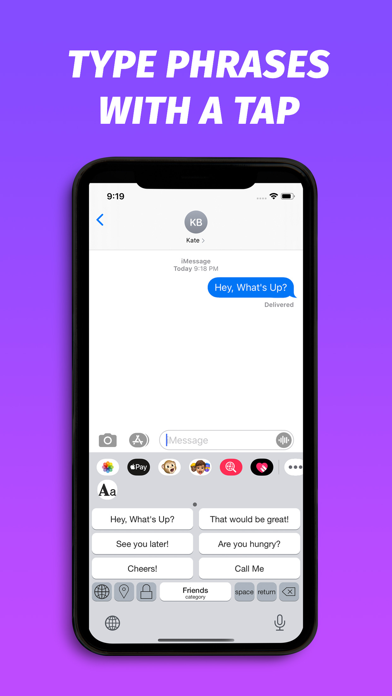


Description by Daniel Soffer Written by the developer, not by AppBrain. Click to read.
If you find yourself struggling with typing similar text multiple times like email, address, phone number and customer responses, then this free auto paste keyboard app is perfect for you to save your time. Simply go to the categories menu to prepare several phrase templates that you use frequently. When you need to fill those sentences just tap on the keyboard icon to switch to Phraseboard Keyboard Lite to fill them easy and fast.
Tired of typing the same response over and over all the time? Phraseboard customizes and categorizes your keyboard with easy to access phrases.
Add a category and a few common phrases and immediately use the in any app like Facebook, Twitter, Instagram or simply send by email, LINE or as SMS.
Customize your phrases and keyboard with unique fonts and colors!
100+ Creative fonts to choose from!
If you have used apps like gboard keyboard or swift key keyboard you will love our app!
Download the ultimate quick response personal keyboard app now for free!
Features:
• Full keyboard with creative fonts.
• Swap quickly between phrase keyboard and full keyboard.
• Create your most common phrases and sort them by categories.
• Use your phrases in any App right in your keyboard.
• Change the font of phrases to match the look and feel of your choice.*
• Design your keyboard styles including button and background colors.*
• Set custom photos as keyboard background.
• Save your styles and pick from curated themes in the styles manager.
• Choose which fonts are enabled and manage their order.
• Change keyboard and button size
• Use all types of Emojis to express your creativity.
• Simply tap a button to send off a quick reply.
• Great tool for business professionals and social media creators!
Also:
• Send GIFs and images in any app.
• Share your location with a single tap.
• Switch between various fonts without changing phrases.*
• Choose from a large collection of fonts.*
• Customize font size.*
• Customize font color.*
• Protect your phrases using the Secure category.
• Add phrases directly from Notification Center using the Phraseboard Widget.
• Sync you’re phrases in all your devices using iCloud.
• Use directly inside your favorite social media app like Instagram, Facebook or Twitter.
• Use directly in iMessage, SMS or Apps.
• Create auto reply text that helps with quick and easy typing.
• Communicate with confidence using phrase shortcuts.
• Easily auto paste and copy paste text and images directly in your keyboard.
(*) Requires an active subscription
REMEMBER: In order to show your phrases on the keyboard and use the media features you must allow OPEN ACCESS. To allow it please go to Settings > Keyboard, click on Phraseboard and turn the switch ON.
( Phraseboard ONLY needs open access to be able to show your custom phrases on the keyboard. We never save or log any of your keystrokes).
Phraseboard Premium Subscription Information
Joining Phraseboard Premium enables a 3-day free trail followed by a monthly membership fee.
• Subscription automatically renews unless auto-renew is turned off at least 24-hours before the end of the current period.
• Account will be charged for renewal within 24-hours prior to the end of the current period.
• Subscriptions may be managed by the user and auto-renewal may be turned off by going to the user's Account Settings after purchase.
• Any unused portion of a free trial period, if offered, will be forfeited when the user purchases a subscription, where applicable.
Get up to 5 phrases for free or upgrade to Pro to get unlimited phrases, unlock over 100 fonts and share your phrases.
Privacy Policy : https://phraseboard.wixsite.com/phraseboard/untitled-c82w
Terms of Service : https://phraseboard.wixsite.com/phraseboard/terms
Safety and technology
Found in the app by AppBrain- Price
- Free
- App size
- 103.4 MB
- Content rating
- Everyone
Technologies used by Phraseboard - Paste Keyboard
Releases
Updates seen on the App Store- Version
- 1.6
- Launched
- May 2021
No changelog data
Alternatives
Similar apps and more from Daniel SofferAlternatives to Phraseboard - Paste Keyboard





More from Daniel Soffer

Rankings
App Store top chartsApp Store Rankings for Phraseboard - Paste Keyboard
About the app and developer
About Phraseboard - Paste Keyboard
Phraseboard - Paste Keyboard is an utilities app developed by Daniel Soffer.
User Ratings
Phraseboard - Paste Keyboard is rated 4.50 out of 5 stars. The rating is based on 20 ratings.
App Information
Phraseboard - Paste Keyboard is freely available from the App Store. The app size is 103.39 MB. The latest version available is 1.6. The last update was on December 25, 2023.
Technical Requirements
The app has a content rating of Everyone. The app has been available on the App Store since May 2021.
Developer information for Daniel Soffer
Address: