


AppBrain's verdict
- Last updated
- April 12, 2026
- Size
- 5.75 MB
User feedback
Ratings and reviews on the App StoreComments on PI 84 Graphing & Fraction Calc for iOS
We don't have enough comments to show example comments. Please check back later.
Store listing
By Leo Rivas-Micoud, from the App StoreDescription by Leo Rivas-Micoud Written by the developer, not by AppBrain. Click to read.
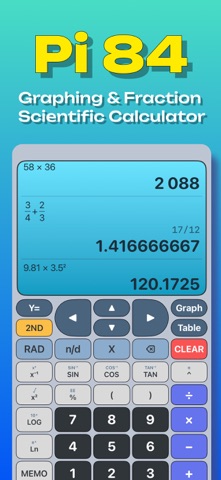
Pi 84 is a free scientific graphing calculator built for high school and college students. It handles everything from everyday arithmetic to graphing functions to fraction calculations — with a clean, modern interface designed for touch screens, not 1990s hardware.
NO MORE $120 CALCULATORS
Why carry a bulky, expensive graphing calculator when your iPhone can do it better? Pi 84 gives you the power of a full scientific and graphing calculator — for free. Whether you're in Algebra I or Calculus II, Pi 84 has you covered.
GRAPHING MADE SIMPLE
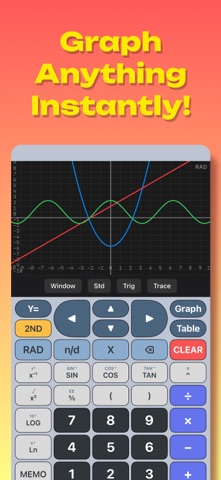
Plot functions instantly with smooth, interactive 2D graphs. Pinch to zoom, drag to pan, and trace along curves with your finger. Graphing on a touch screen is how it was always meant to be — fast, visual, and intuitive.
- Plot multiple functions simultaneously
- Pinch-to-zoom and drag-to-pan
- Trace points along curves
- Find intersections and key points visually
FRACTIONS WITHOUT THE HEADACHE
Pi 84 handles fraction calculations natively. Add, subtract, multiply, and divide fractions with ease. Results display as both simplified fractions and decimals, so you can work in whichever format your assignment requires. No more converting by hand.
MEMORY DRAWER — YOUR VISUAL CLIPBOARD
Forget fumbling with M+, M-, and MR keys. Pi 84's Memory Drawer lets you save as many numbers as you want and access them anytime. Tap to store a result, and it appears in a visual drawer you can pull open whenever you need it. It's like having an unlimited clipboard for your calculations — something no other graphing calculator app offers.
FULL SCIENTIFIC CALCULATOR
Everything you need for math and science coursework:
- Trigonometric functions (sin, cos, tan and inverses)
- Logarithmic and exponential functions
- Powers, roots, and factorials
- Constants including π and e
- Angle mode switching (degrees, radians)
- Scientific notation for large and small numbers
DESIGNED FOR STUDENTS
Pi 84 was built from the ground up with students in mind. The interface is clean and uncluttered, buttons are easy to tap, and everything is where you'd expect it to be. No manual needed — if you've used a scientific calculator before, you already know how to use Pi 84.
Works great for:
- High school math (Algebra, Geometry, Pre-Calculus)
- College courses (Calculus, Statistics, Physics, Engineering)
- Standardized test preparation
- Homework and study sessions
FREE TO USE
Pi 84 is completely free to download and use. All scientific, graphing, and fraction features are available at no cost.
Download Pi 84 today and leave the bulky calculator at home.
Safety and technology
Found in the app by AppBrain- Price
- Free
- App size
- 5.75 MB
- Content rating
- Everyone
Technologies used by PI 84 Graphing & Fraction Calc
Releases
Updates seen on the App Store- Version
- 1.0
- Launched
- April 2026
No changelog data
Alternatives
Similar apps and more from Leo Rivas-MicoudMore from Leo Rivas-Micoud



Rankings
App Store top chartsApp Store Rankings for PI 84 Graphing & Fraction Calc
About the app and developer
About PI 84 Graphing & Fraction Calc
PI 84 Graphing & Fraction Calc is an utilities app developed by Leo Rivas-Micoud.
What is the rating of PI 84 Graphing & Fraction Calc?
PI 84 Graphing & Fraction Calc has no ratings yet.
Is PI 84 Graphing & Fraction Calc free?
PI 84 Graphing & Fraction Calc is free. The app size is 5.75 MB. The latest version available is 1.0. The last update was on April 12, 2026.
What are the requirements for PI 84 Graphing & Fraction Calc?
The app has a content rating of Everyone. The app has been available on the App Store since April 2026.
PI 84 Graphing & Fraction Calc is made and published by Leo Rivas-Micoud. AppBrain is an independent app data site and isn't affiliated with Leo Rivas-Micoud. The app name, icon, screenshots and description belong to Leo Rivas-Micoud and are shown as published on the App Store.
Developer information for Leo Rivas-Micoud
Address: