

Pi-cture it!
Pi-cture it! is made and published by BlueNeo LLC. AppBrain is an independent app data site and isn't affiliated with BlueNeo LLC. The app name, icon, screenshots and description belong to BlueNeo LLC and are shown as published on the App Store.
AppBrain's verdict
- Last updated
- December 5, 2025
Rankings
App Store top chartsApp Store Rankings for Pi-cture it!
Releases
Updates seen on the App Store- Version
- 1.0
- Launched
- December 2025
No changelog data
User feedback
Ratings and reviews on the App StoreComments on Pi-cture it! for iOS
We don't have enough comments to show example comments. Please check back later.
Technology
Found in the app by AppBrain- Price
- Free
- App size
- 9.66 MB
- Content rating
- Everyone
Technologies used by Pi-cture it!
About the app and developer
About Pi-cture it!
Pi-cture it! is an entertainment app developed by BlueNeo LLC.
User Ratings
The app has no ratings yet.
App Information
Pi-cture it! is freely available from the App Store. The app size is 9.66 MB. The latest version available is 1.0. The last update was on December 5, 2025.
Technical Requirements
The app has a content rating of Everyone. The app has been available on the App Store since December 2025.
Developer information for BlueNeo LLC
Address:
Frequently asked questions about Pi-cture it!
Is Pi-cture it! free?
Yes. Pi-cture it! is free on the App Store.
Is Pi-cture it! still available?
Yes. Pi-cture it! is on the App Store, and the last update we saw was on December 5, 2025.
How large is Pi-cture it!?
Pi-cture it! is 9.66 MB.
Is Pi-cture it! suitable for children?
App Store rates the content of Pi-cture it! as suitable for everyone.
Who made Pi-cture it!?
Pi-cture it! was developed by BlueNeo LLC. It is listed in the entertainment category on the App Store.
Store listing
By BlueNeo LLC, from the App Store


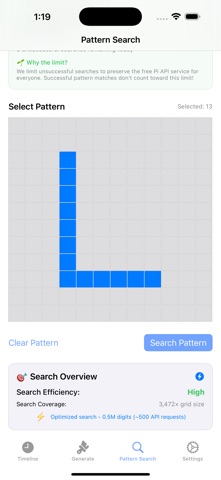

Description by BlueNeo LLC Written by the developer, not by AppBrain. Click to read.
Pi-cture It transforms the infinite digits of Pi into stunning pixel art. Turn numbers into color, explore patterns, and create unique images based on any position in Pi — even birthdays or lucky numbers.
Generate Pi Images
• Pick any starting digit in Pi
• Create square images up to 31×31
• Each digit becomes a color pixel
• Use “Distance” to skip digits for new patterns
• Save and share your Pi art
Search for Patterns
• Draw your own pattern on a grid
• Search billions of Pi digits to find where it appears
• Optional video that shows the search in action
• Explore how often certain sequences show up
Customize Colors
• Assign colors to digits 0–9
• Even/Odd two-tone mode
• Instantly switch color schemes
Timeline & History
• All creations saved automatically
• View details about each image
• Export to Photos or share with friends
Educational & Fun
• Explore the randomness of Pi visually
• Great for math lovers, educators, and digital artists
• Create personalized number-based art
Turn numbers into art. Discover patterns in chaos. Explore the infinite beauty of Pi.