

Piano MIDI is made and published by Murat Saygin. AppBrain is an independent app data site and isn't affiliated with Murat Saygin. The app name, icon, screenshots and description belong to Murat Saygin and are shown as published on the App Store.
AppBrain's verdict
- Last updated
- October 10, 2026
Rankings
App Store top chartsApp Store Rankings for Piano MIDI
Competitors
Similar apps and more from Murat SayginMore from Murat Saygin


Releases
Updates seen on the App Store- Version
- 9.5
- Launched
- October 2025
No changelog data
User feedback
Ratings and reviews on the App StoreComments on Piano MIDI for iOS
We don't have enough comments to show example comments. Please check back later.
Technology
Found in the app by AppBrain- Price
- $3.99
- App size
- 29.9 MB
- Content rating
- Everyone
Technologies used by Piano MIDI
About the app and developer
About Piano MIDI
Piano MIDI is a music app developed by Murat Saygin.
What is the rating of Piano MIDI?
Piano MIDI has no ratings yet.
Is Piano MIDI free?
Piano MIDI costs $3.99. The app size is 29.95 MB. The latest version available is 9.5. The last update was on October 10, 2026.
What are the requirements for Piano MIDI?
The app has a content rating of Everyone. The app has been available on the App Store since October 2025.
Developer information for Murat Saygin
Address:
Frequently asked questions about Piano MIDI
Is Piano MIDI free?
No. Piano MIDI costs $3.99 on the App Store.
Is Piano MIDI still available?
Yes. Piano MIDI is on the App Store, and the last update we saw was on October 10, 2026.
How large is Piano MIDI?
Piano MIDI is 29.95 MB.
Is Piano MIDI suitable for children?
App Store rates the content of Piano MIDI as suitable for everyone.
Who made Piano MIDI?
Piano MIDI was developed by Murat Saygin. It is listed in the music category on the App Store.
Store listing
By Murat Saygin, from the App Store



Description by Murat Saygin Written by the developer, not by AppBrain. Click to read.
Piano Composer gives you a clean, responsive workspace to capture, edit, learn, and shape your musical ideas anywhere. Every recording is stored with embedded music metadata, so your compositions can be recognized when reopened — ready to view, edit, and play again.
CREATE & PLAY:
Play and record across 84 keys — the full piano range
Play up to 10 notes at once
Record compositions with up to 20,000 notes
Choose between Simple Timing and Full Timing
Use virtually unlimited BPM values for precise rhythm
Record rests for cleaner compositions
Pedal playback with sustain options from 1 to 5 seconds
Repeat compositions up to 5 times
Turn background audio playback on or off
Export your tracks as M4A, WAV, or MIDI
LEARN:
Learn with three different learning modes:
Keyboard Mode — learn and practice directly on the piano keyboard
KlassikKids — discover classical music through a child-friendly learning experience
Pro Learning Mode — a more advanced way to learn and practice
EDIT MODE:
Navigate octaves with +1, +10, −1, and −10 controls
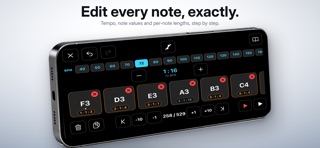
Duplicate, delete, or modify any note
Adjust note duration and timing
Arrange 2-, 3-, 4-, 5-, 6-note, and octave chords
Add and edit simultaneous notes directly in your compositions
Use different editing and playback views, including Slide Mode
SCOREEEDITOR:
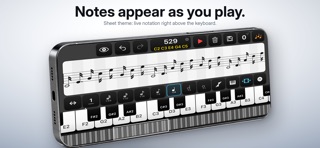
Turn your music into a visual score
Load and work with your music like a real sheet-music editor
Review your composition visually and make corrections
Export your score as a printable PDF
NOTEBOOK MODE:
Review your complete composition visually
Quickly find sections that need correction
Use your compositions as a music player
CLASSICAL MUSIC LIBRARY:
200+ classical piano pieces for listening, learning, practice, inspiration, and editing
PERFECT FOR:
Piano learning and practice
Melody sketching
Songwriting and composition
Music lessons
Classical music discovery
Game and film music ideas