

PianoFX: Easy Piano Learning
PianoFX: Easy Piano Learning is made and published by VAN CHIEN NGUYEN. AppBrain is an independent app data site and isn't affiliated with VAN CHIEN NGUYEN. The app name, icon, screenshots and description belong to VAN CHIEN NGUYEN and are shown as published on the App Store.
AppBrain's verdict
- Rating on App Store
- 5.00
- 4 ratings
- Last updated
- October 13, 2026
It doesn't have enough ratings yet to judge what users think.
Rankings
App Store top chartsApp Store Rankings for PianoFX: Easy Piano Learning
Competitors
Similar apps and more from VAN CHIEN NGUYENAlternatives to PianoFX: Easy Piano Learning


More from VAN CHIEN NGUYEN


Releases
Updates seen on the App Store- Version
- 1.0.9
- Launched
- July 2026
No changelog data
User feedback
Ratings and reviews on the App StoreComments on PianoFX: Easy Piano Learning for iOS
We don't have enough comments to show example comments. Please check back later.
Technology
Found in the app by AppBrain- Price
- Free
- App size
- 109.3 MB
- Content rating
- Everyone
Technologies used by PianoFX: Easy Piano Learning
About the app and developer
About PianoFX: Easy Piano Learning
PianoFX: Easy Piano Learning is a music app developed by VAN CHIEN NGUYEN.
What is the rating of PianoFX: Easy Piano Learning?
PianoFX: Easy Piano Learning is rated 5.00 out of 5 stars, based on 4 ratings.
Is PianoFX: Easy Piano Learning free?
PianoFX: Easy Piano Learning is free. The app size is 109.34 MB. The latest version available is 1.0.9. The last update was on October 13, 2026.
What are the requirements for PianoFX: Easy Piano Learning?
The app has a content rating of Everyone. The app has been available on the App Store since July 2026.
Developer information for VAN CHIEN NGUYEN
Address:
Frequently asked questions about PianoFX: Easy Piano Learning
Is PianoFX: Easy Piano Learning free?
Yes. PianoFX: Easy Piano Learning is free on the App Store.
Is PianoFX: Easy Piano Learning still available?
Yes. PianoFX: Easy Piano Learning is on the App Store, and the last update we saw was on October 13, 2026.
How large is PianoFX: Easy Piano Learning?
PianoFX: Easy Piano Learning is 109.34 MB.
Is PianoFX: Easy Piano Learning suitable for children?
App Store rates the content of PianoFX: Easy Piano Learning as suitable for everyone.
How do people rate PianoFX: Easy Piano Learning?
PianoFX: Easy Piano Learning scores 5.00 out of 5 stars, from 4 ratings on the App Store.
Who made PianoFX: Easy Piano Learning?
PianoFX: Easy Piano Learning was developed by VAN CHIEN NGUYEN. It is listed in the music category on the App Store.
What are the best alternatives to PianoFX: Easy Piano Learning?
People looking at PianoFX: Easy Piano Learning also look at these music apps: SnapNotes: Falling Notes, Piano Pulse, Falling Notes Piano Trainer, Piano ´, Ivory - Piano Sheet Music,MIDI.
Store listing
By VAN CHIEN NGUYEN, from the App Store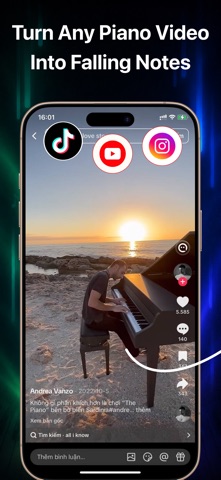


Description by VAN CHIEN NGUYEN Written by the developer, not by AppBrain. Click to read.
Learn the piano songs you love with visual falling notes—no sheet music required.
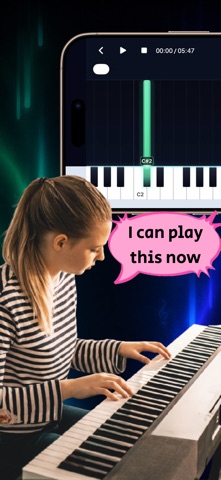
PianoFX turns piano performances into interactive tutorials you can watch, practice, and replay at your own pace. Import a video from your device, paste a supported YouTube, TikTok, or Instagram link, or open a MIDI file. PianoFX transforms the notes into an easy-to-follow piano roll displayed directly above the keyboard.
Whether you are learning your first song, working through a difficult passage, or creating a piano tutorial to share, PianoFX gives you the tools to practice your way.
LEARN FROM YOUR OWN VIDEOS
You are not limited to a fixed song catalog. Choose a piano performance you want to learn and turn it into a personalized falling-notes tutorial.
IMPORT VIDEOS, LINKS, OR MIDI
Choose a saved video from Photos or Files, paste a supported video link, or import a .mid or .midi file to start practicing.
PRACTICE AT YOUR OWN PACE
Slow down difficult passages, move anywhere on the timeline, and repeat a selected section until it feels natural.
CREATE AND SHARE PIANO VIDEOS
Export your falling-notes tutorial as an HD video with audio. Choose landscape 16:9 for YouTube or portrait 9:16 for TikTok, Reels, and Shorts, then save it to Photos or share it directly.
FEATURES
• Automatically convert piano videos into falling-notes tutorials
• Import videos from Photos, Files, Downloads, or Drive
• Paste supported YouTube, TikTok, and Instagram links
• Import standard MIDI files
• Practice with an interactive piano roll and keyboard
• Adjust playback speed from 0.5× to 1.25×
• Create A–B loops for focused practice
• Seek to any point in the song
• Switch between sustained and compact note displays
• Follow color-coded notes and keyboard highlights
• Practice in portrait or landscape orientation
• Browse a library of ready-to-practice songs
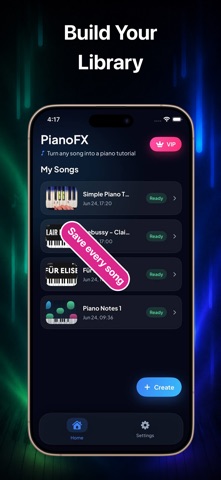
• Save converted songs in My Songs
• Export HD falling-notes videos with audio
• Save exported videos to Photos or share them
HOW IT WORKS
1. Import a piano video, paste a supported link, or choose a MIDI file.
2. PianoFX prepares your visual falling-notes tutorial.
3. Play, slow down, loop difficult sections, and practice at your own pace.
PERFECT FOR
• Beginners who prefer visual learning
• Intermediate and advanced piano players
• Learning songs without sheet music
• Practicing difficult sections
• Piano teachers and students
• Musicians creating piano tutorial videos
No sheet music. No fixed lesson path.
Choose what you want to learn and let PianoFX turn it into a visual piano tutorial.
Download PianoFX and start practicing today.
PREMIUM
Upgrade to Premium to unlock the complete PianoFX experience, including:
• Unlimited piano video transcriptions
• Unlimited access to Practice Mode
• Playback speed controls
• A–B section looping
• Timeline seeking
• MIDI import
• HD video export
• All future Premium features
Subscription plans and prices are displayed in the app before purchase.
IMPORTANT NOTE
PianoFX is a learning and practice tool.
When you import a supported video link, its audio is processed to detect piano notes and create an interactive falling-notes tutorial. The original video and its visual content are not included in the generated tutorial or made available for playback in Practice Mode.
PianoFX does not claim ownership of third-party content. You are responsible for ensuring that you have the rights or permission necessary to import, process, export, or share any content used with the app.
Terms of Use:
https://sites.google.com/view/piano-tutorial-maker/term-of-use
Privacy Policy:
https://sites.google.com/view/piano-tutorial-maker/privacy-policy