PianoTrace: Learn Piano is a music app developed by 世宇 李.
User Ratings
The app has no ratings yet.
App Information
PianoTrace: Learn Piano is freely available from the App Store. The app size is 208.68 MB. The latest version available is 2.0.1. The last update was on November 2, 2026.
Technical Requirements
The app has a content rating of Everyone. The app has been available on the App Store since May 2026.
PianoTrace: Learn Piano is made and published by
世宇 李.
AppBrain is an independent app data site and isn't affiliated with 世宇 李.
The app name, icon, screenshots and description belong to 世宇 李 and are shown as published on the App Store.
Description by 世宇 李(from the App Store)
PianoTrace is a piano course and practice coach in one. Learn from your very first note, then work through real pieces with note-by-note feedback from your digital piano or MIDI keyboard.
LEARN PIANO FROM ZERO The Preparatory course has 12 units and 38 lessons. No experience needed. - Find your way around the keyboard: middle C, beats, note values, rests and the staff. - See how keys, notes and fingers connect through diagrams, demonstrations and hands-on exercises. - Move on to alternating hands, simple harmony, position changes and accidentals, then play short phrases and pieces. - Build skills that carry over to new music: reading, rhythm, listening, coordination and good practice habits.
FEEDBACK ON EVERY NOTE Connect a digital piano or MIDI keyboard, and PianoTrace compares your playing with the score. - Pitch, rhythm, legato, staccato, dynamics, pedal and continuity. - Review results by measure and by note, with suggestions for what to practice next.
2,800+ CLASSICAL SCORES - Chopin, Bach, Mozart, Beethoven, Schumann and more than 130 composers in all. - Search by composer, work number and difficulty. - Import your own MusicXML (.musicxml, .xml) and MXL files.
SEE THE HARD PARTS FIRST Difficulty analysis rates each score on seven dimensions (rhythm, reading, speed and continuity, shifts and leaps, chords and spans, coordination between hands, and expression) and points to the passages that will challenge you.
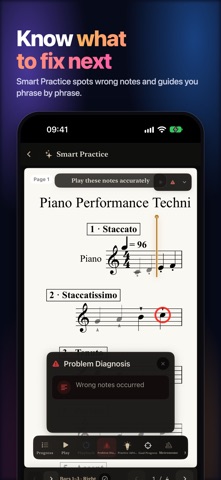
KNOW WHAT TO FIX NEXT Smart Practice breaks a piece into phrases and takes you from hands separately to hands together to the full performance. It spots wrong notes, gives you one task at a time and remembers where you left off.
A METRONOME MADE FOR PRACTICE Practice freely without a score. Set tempo, accents and subdivisions, with multiple time signatures and polyrhythms, and balance piano and metronome volume separately.
WHAT YOU NEED - Lessons, demonstrations, the library and difficulty overviews work on their own, and some exercises have an on-screen keyboard. - Performance feedback and Smart Practice need a digital piano or MIDI keyboard. PianoTrace reads MIDI; it does not listen to an acoustic piano through the microphone. - Difficulty describes what a score demands. It is not an exam grade or a prediction of learning time.
FREE AND PRO The first two units of the Preparatory course are free. PianoTrace Pro unlocks the full course, in-depth difficulty analysis, Smart Practice, detailed annotations and iCloud sync. Choose a subscription or a one-time lifetime purchase.
Terms of Use (EULA): https://www.apple.com/legal/internet-services/itunes/dev/stdeula/ Privacy Policy: https://tempopro.lishiyu.net/en/privacy/
Each subscription will automatically renew 3 days before the expiration date for
the same time period. Subscriptions can be cancelled at any time before the renewal.