

Picasso App Screenshot Studio
Picasso App Screenshot Studio is made and published by ASO Ventures LLC. AppBrain is an independent app data site and isn't affiliated with ASO Ventures LLC. The app name, icon, screenshots and description belong to ASO Ventures LLC and are shown as published on the App Store.
AppBrain's verdict
- Rating on App Store
- 4.17
- 47 ratings
- Last updated
- October 12, 2026
It doesn't have enough ratings yet to judge what users think.
Rankings
App Store top chartsApp Store Rankings for Picasso App Screenshot Studio
Competitors
Similar apps and more from ASO Ventures LLCAlternatives to Picasso App Screenshot Studio








More from ASO Ventures LLC

Releases
Updates seen on the App Store- Version
- 4.0
- Launched
- December 2023
No changelog data
User feedback
Ratings and reviews on the App StoreComments on Picasso App Screenshot Studio for iOS
We don't have enough comments to show example comments. Please check back later.
Technology
Found in the app by AppBrain- Price
- Free
- App size
- 166.4 MB
- Content rating
- Everyone
Technologies used by Picasso App Screenshot Studio
About the app and developer
About Picasso App Screenshot Studio
Picasso App Screenshot Studio is an overall app developed by ASO Ventures LLC.
User Ratings
Picasso App Screenshot Studio is rated 4.17 out of 5 stars. The rating is based on 47 ratings.
App Information
Picasso App Screenshot Studio is freely available from the App Store. The app size is 166.44 MB. The latest version available is 4.0. The last update was on October 12, 2026.
Technical Requirements
The app has a content rating of Everyone. The app has been available on the App Store since December 2023.
Developer information for ASO Ventures LLC
Address:
Store listing
By ASO Ventures LLC, from the App Store


Description by ASO Ventures LLC Written by the developer, not by AppBrain. Click to read.
60% of users decide whether to download your app based on the screenshots. With Picasso, you can showcase your app to its fullest and increase your conversion rate. Available for iPhone, iPad, and Mac, Picasso offers everything you need to make your app stand out!
** Simple Interface **
Picasso has been optimized for Apple's platforms, taking advantage of everything your device has to offer. And with iCloud, you can edit a document on one device, and seamlessly pick it up on another.
** Device Framing **
Support for over framing 40 devices, including iPhones, iPads, Macs, and Apple Watches. Screenshots are automatically wrapped in the appropriate device frame down to the last pixel. You won't find a better app to frame your screenshots.
** Drag-and-Drop Editor **
Full drag and drop support helps streamline the editing process.
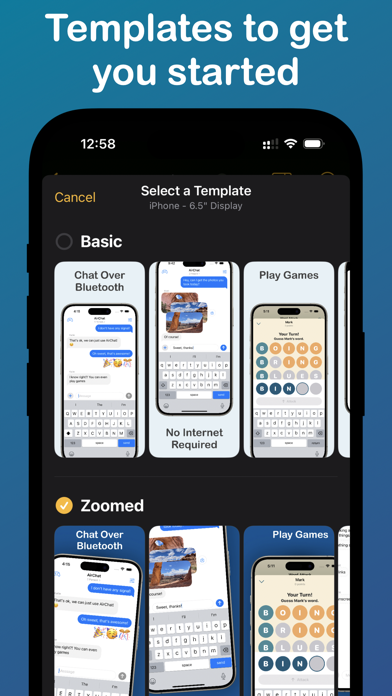
** Templates **
Choose from several templates to hit the ground running! No design skills needed.
** Easy Export **
Picasso makes exporting easy by giving you a preview of your screenshots, as well as automatic naming and ordering, making it a cinch to upload to the App Store.
** Accurate Previews **
See exactly how your screenshots will appear in the App Store, cutting out unnecessary iteration and toil.
** Power Features **
Keyboard shortcuts make navigating the app fast.
-- Picasso Pro Features (In-App Purchase required) --
** Upload Directly to App Store Connect **
Once an app is linked with an App Store Connect API Key, you can upload your screenshots directly to App Store Connect.
** Localization Support **
Simply drag an .xcstrings file into Picasso to localize your screenshots for any language!
** Add Images to Screenshots **
The ability to add any image to a screenshot.
** Gradients and Blurs **
Use captivating gradients and blurs to style your screenshots.
** Span Items across Screenshots **
Span items across multiple screenshots, and Picasso will make sure the spacing is correct.
Terms of Service: https://getpicasso.com/terms
Privacy Policy: https://getpicasso.com/privacy