

PickerRoy is made and published by 舒翔 胡. AppBrain is an independent app data site and isn't affiliated with 舒翔 胡. The app name, icon, screenshots and description belong to 舒翔 胡 and are shown as published on the App Store.
AppBrain's verdict
- Last updated
- September 28, 2026
- Size
- 3.54 MB
User feedback
Ratings and reviews on the App StoreComments on PickerRoy for iOS
We don't have enough comments to show example comments. Please check back later.
Store listing
By 舒翔 胡, from the App Store


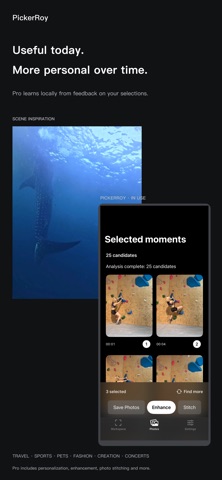
Screenshots by 舒翔 胡, from the the App Store listing
Description by 舒翔 胡 Written by the developer, not by AppBrain. Click to read.
Smartly pick great photos from your videos.
Turn travel, sports, pets and everyday footage into moments worth keeping. PickerRoy analyzes videos on your device, recommends candidate frames and lets you preview, select and export your favorites. Change the aspect ratio even after analysis to recrop your results.
SEVEN DAYS OF FULL-FEATURE ACCESS
From first activation of the 3.1 on-device trial mechanism, all features are available for seven consecutive days. No subscription is required and you are not charged automatically. Basic features remain available afterward; only Pro features prompt for a subscription. Existing paid entitlements remain valid.
LIVE PHOTO TO JPG — PRO
Batch-select Live Photos and start processing when ready. Extract up to 12 candidate frames per second, capped at 36 per Live Photo. Select individual frames or select all, then save independent JPGs. Your original Live Photos stay unchanged.
VIDEO TO GIF / LIVE PHOTO — PRO
Create 1-, 3- or 5-second GIFs or native Live Photos around selected video moments. Short footage uses the available duration.
START FREE, CHOOSE PRO
Free: up to 3 videos totaling 3 minutes per batch, center cropping and direct export.
Pro adds local personalization from your feedback, subject-aware framing, scene analysis, natural enhancement, photo stitching and the new Live Photo and motion-export features. Stitch up to 10 selected photos in selection order.
Natural enhancement is now a saved preference in Settings. Enable it to apply enhancement to exported still photos, extracted Live Photo JPGs and stitched images; disable it for normal exports. Enhancement adjusts color, contrast and sharpness, but cannot recreate missing source detail. You always make the final selection.
LOCAL BY DESIGN
No ads. No PickerRoy registration. No footage uploads to developer servers. Analysis, personalization and image processing run on your device. Cloud-only media must first be downloaded; purchases, restores and refreshing subscription records require an Apple connection.
PRO OPTIONS
Monthly and yearly plans are auto-renewing subscriptions. Lifetime is a one-time non-consumable purchase. Prices and billing periods are shown before purchase in your local currency. Manage or cancel subscriptions in Apple subscription settings. Buying Lifetime does not automatically cancel an existing subscription.
Terms of Use: https://www.apple.com/legal/internet-services/itunes/dev/stdeula/
Privacy Policy: https://github.com/kkrouhu/PickerRoy/blob/main/docs/app-store/PRIVACY_POLICY_en-US.md
Turn travel, sports, pets and everyday footage into moments worth keeping. PickerRoy analyzes videos on your device, recommends candidate frames and lets you preview, select and export your favorites. Change the aspect ratio even after analysis to recrop your results.
SEVEN DAYS OF FULL-FEATURE ACCESS
From first activation of the 3.1 on-device trial mechanism, all features are available for seven consecutive days. No subscription is required and you are not charged automatically. Basic features remain available afterward; only Pro features prompt for a subscription. Existing paid entitlements remain valid.
LIVE PHOTO TO JPG — PRO
Batch-select Live Photos and start processing when ready. Extract up to 12 candidate frames per second, capped at 36 per Live Photo. Select individual frames or select all, then save independent JPGs. Your original Live Photos stay unchanged.
VIDEO TO GIF / LIVE PHOTO — PRO
Create 1-, 3- or 5-second GIFs or native Live Photos around selected video moments. Short footage uses the available duration.
START FREE, CHOOSE PRO
Free: up to 3 videos totaling 3 minutes per batch, center cropping and direct export.
Pro adds local personalization from your feedback, subject-aware framing, scene analysis, natural enhancement, photo stitching and the new Live Photo and motion-export features. Stitch up to 10 selected photos in selection order.
Natural enhancement is now a saved preference in Settings. Enable it to apply enhancement to exported still photos, extracted Live Photo JPGs and stitched images; disable it for normal exports. Enhancement adjusts color, contrast and sharpness, but cannot recreate missing source detail. You always make the final selection.
LOCAL BY DESIGN
No ads. No PickerRoy registration. No footage uploads to developer servers. Analysis, personalization and image processing run on your device. Cloud-only media must first be downloaded; purchases, restores and refreshing subscription records require an Apple connection.
PRO OPTIONS
Monthly and yearly plans are auto-renewing subscriptions. Lifetime is a one-time non-consumable purchase. Prices and billing periods are shown before purchase in your local currency. Manage or cancel subscriptions in Apple subscription settings. Buying Lifetime does not automatically cancel an existing subscription.
Terms of Use: https://www.apple.com/legal/internet-services/itunes/dev/stdeula/
Privacy Policy: https://github.com/kkrouhu/PickerRoy/blob/main/docs/app-store/PRIVACY_POLICY_en-US.md
Safety and technology
Found in the app by AppBrain- Price
- Free
- App size
- 3.54 MB
- Content rating
- Everyone
Technologies used by PickerRoy
Releases
Updates seen on the App Store- Version
- 3.2.0
- Launched
- September 2026
No changelog data
Alternatives
Similar apps and more from 舒翔 胡Alternatives to PickerRoy


Rankings
App Store top chartsApp Store Rankings for PickerRoy
This app is not ranked
About the app and developer
About PickerRoy
PickerRoy is a photo & video app developed by 舒翔 胡.
User Ratings
The app has no ratings yet.
App Information
PickerRoy is freely available from the App Store. The app size is 3.54 MB. The latest version available is 3.2.0. The last update was on September 28, 2026.
Technical Requirements
The app has a content rating of Everyone. The app has been available on the App Store since September 2026.
Developer information for 舒翔 胡
Address: