

PicStow: Private Photo Backup
PicStow: Private Photo Backup is made and published by Priyanshu Maurya. AppBrain is an independent app data site and isn't affiliated with Priyanshu Maurya. The app name, icon, screenshots and description belong to Priyanshu Maurya and are shown as published on the App Store.
AppBrain's verdict
New- Rating on App Store
- 5.00
- 1 ratings
- Last updated
- September 26, 2026
PicStow: Private Photo Backup came out 39 days ago. It doesn't have enough ratings yet to judge what users think.
Rankings
App Store top chartsApp Store Rankings for PicStow: Private Photo Backup
Competitors
Similar apps and more from Priyanshu MauryaAlternatives to PicStow: Private Photo Backup


Also available on Google Play

Releases
Updates seen on the App Store- Version
- 30
- Launched
- September 2026
No changelog data
User feedback
Ratings and reviews on the App StoreComments on PicStow: Private Photo Backup for iOS
We don't have enough comments to show example comments. Please check back later.
Technology
Found in the app by AppBrain- Price
- Free
- App size
- 43.0 MB
- Content rating
- Everyone
Technologies used by PicStow: Private Photo Backup
About the app and developer
About PicStow: Private Photo Backup
PicStow: Private Photo Backup is a photo & video app developed by Priyanshu Maurya.
What is the rating of PicStow: Private Photo Backup?
PicStow: Private Photo Backup is rated 5.00 out of 5 stars, based on one rating ratings.
Is PicStow: Private Photo Backup free?
PicStow: Private Photo Backup is free. The app size is 42.99 MB. The latest version available is 30. The last update was on September 26, 2026.
What are the requirements for PicStow: Private Photo Backup?
The app has a content rating of Everyone. The app has been available on the App Store since September 2026.
Developer information for Priyanshu Maurya
Address:
Store listing
By Priyanshu Maurya, from the App Store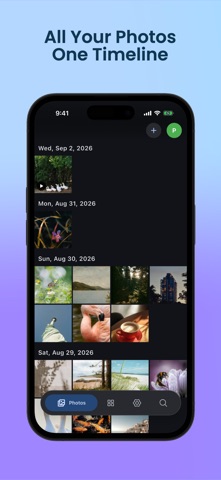


Description by Priyanshu Maurya Written by the developer, not by AppBrain. Click to read.
Your media is transferred directly between your device and your Google Drive. PicStow does not upload your photos or videos to a separate PicStow media server.
KEY FEATURES
• Browse device and cloud media in one timeline
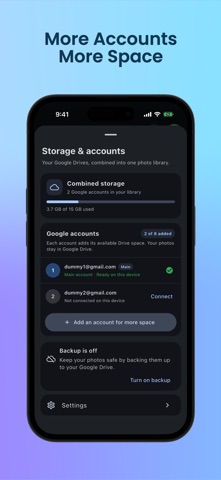
• Connect up to eight Google Drive accounts
• Preserve photos and videos in original quality
• Choose which accounts participate in backup
• Select device albums for photo and video backup
• Organize memories with Favorites, Albums, Documents, Places, and Moments
• Search and browse your photo library
• Monitor combined storage across connected accounts
• View, download, share, and manage your media
• Keep control of files stored in your Google Drive
PRIVATE BY DESIGN
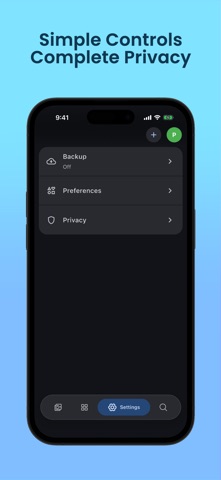
PicStow requests access only when required for features you choose. Your photos and videos remain in Google Drive accounts you control. Google credentials are protected using platform-secure storage, including the iOS Keychain.
You can disconnect Google accounts, clear local PicStow data, or revoke access at any time. Disconnecting PicStow does not automatically delete your photos from Google Drive.
A Google account and Google Drive storage are required. Available storage, network behavior, and retention remain subject to your Google account and Google’s terms.