

PictBatch
by Hiroshi Ota
· Photo & Video
· Free
On the App Store since September 2026
· Data updated
PictBatch is made and published by Hiroshi Ota. AppBrain is an independent app data site and isn't affiliated with Hiroshi Ota. The app name, icon, screenshots and description belong to Hiroshi Ota and are shown as published on the App Store.
AppBrain's verdict
- Last updated
- September 18, 2026
- Size
- 67.8 MB
User feedback
Ratings and reviews on the App StoreComments on PictBatch for iOS
We don't have enough comments to show example comments. Please check back later.
Store listing
By Hiroshi Ota, from the App Store


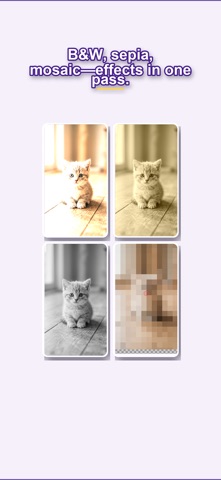

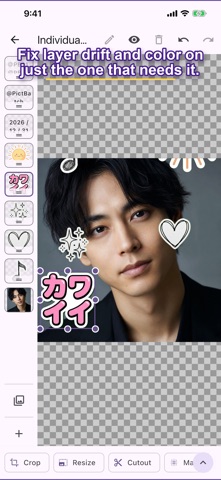

Screenshots by Hiroshi Ota, from the the App Store listing
Description by Hiroshi Ota Written by the developer, not by AppBrain. Click to read.
Stop editing photos one by one.
PictBatch is a batch photo editor: import a stack, edit once, and export everything together.
Need matching sizes for social, a quick background cutout, or the same logo and mosaic on every shot? Do the work on a single image—PictBatch applies it to the rest.
WHAT YOU CAN DO
• Batch import & export: PNG, JPEG, WebP, plus BMP* and GIF*
• Shared + per-image edits: one look for the whole set, or a tweak on a single photo
• Crop & resize: trim and scale the stack together
• Background cutout: on-device AI* or manual masking when you want control
• Privacy masks: mosaic or blur the bits that shouldn’t be public
• Color, rotate & flip: brightness and orientation in one pass
• Paint & fill: quick markups with the paint tools
• Layer order: reorder overlays without fuss
• Text: fixed copy or automatic sequential numbers
• Stickers: built-in stamps, or turn your own images into custom stickers
GREAT FOR
• Social posts: line up account IDs and watermarks in the same spot
• Online shops: unify margins, aspect ratio, and color on product photos
• Catalogs & decks: drop sequential numbers and logos across a whole set
* AI cutout runs entirely on your device. Photos are not sent to a remote server.
* BMP and GIF are import-only. GIF uses the first frame only.
How to use:
https://pictbatch.pages.dev/en/guide
PictBatch is a batch photo editor: import a stack, edit once, and export everything together.
Need matching sizes for social, a quick background cutout, or the same logo and mosaic on every shot? Do the work on a single image—PictBatch applies it to the rest.
WHAT YOU CAN DO
• Batch import & export: PNG, JPEG, WebP, plus BMP* and GIF*
• Shared + per-image edits: one look for the whole set, or a tweak on a single photo
• Crop & resize: trim and scale the stack together
• Background cutout: on-device AI* or manual masking when you want control
• Privacy masks: mosaic or blur the bits that shouldn’t be public
• Color, rotate & flip: brightness and orientation in one pass
• Paint & fill: quick markups with the paint tools
• Layer order: reorder overlays without fuss
• Text: fixed copy or automatic sequential numbers
• Stickers: built-in stamps, or turn your own images into custom stickers
GREAT FOR
• Social posts: line up account IDs and watermarks in the same spot
• Online shops: unify margins, aspect ratio, and color on product photos
• Catalogs & decks: drop sequential numbers and logos across a whole set
* AI cutout runs entirely on your device. Photos are not sent to a remote server.
* BMP and GIF are import-only. GIF uses the first frame only.
How to use:
https://pictbatch.pages.dev/en/guide
Safety and technology
Found in the app by AppBrain- Price
- Free
- App size
- 67.8 MB
- Content rating
- Everyone
Technologies used by PictBatch
Releases
Updates seen on the App Store- Version
- 0.1.0
- Launched
- September 2026
No changelog data
Alternatives
Similar apps and more from Hiroshi OtaAlternatives to PictBatch


More from Hiroshi Ota

Rankings
App Store top chartsApp Store Rankings for PictBatch
This app is not ranked
About the app and developer
About PictBatch
PictBatch is a photo & video app developed by Hiroshi Ota.
What is the rating of PictBatch?
PictBatch has no ratings yet.
Is PictBatch free?
PictBatch is free. The app size is 67.85 MB. The latest version available is 0.1.0. The last update was on September 18, 2026.
What are the requirements for PictBatch?
The app has a content rating of Everyone. The app has been available on the App Store since September 2026.
Developer information for Hiroshi Ota
Address: