

Pictool - Long Screenshot
Pictool - Long Screenshot is made and published by 冉 姜. AppBrain is an independent app data site and isn't affiliated with 冉 姜. The app name, icon, screenshots and description belong to 冉 姜 and are shown as published on the App Store.
AppBrain's verdict
- Rating on App Store
- 4.00
- 1 ratings
- Last updated
- May 5, 2026
It doesn't have enough ratings yet to judge what users think.
Rankings
App Store top chartsApp Store Rankings for Pictool - Long Screenshot
Competitors
Similar apps and more from 冉 姜Alternatives to Pictool - Long Screenshot


Releases
Updates seen on the App Store- Version
- 1.2
- Launched
- April 2026
No changelog data
User feedback
Ratings and reviews on the App StoreComments on Pictool - Long Screenshot for iOS
We don't have enough comments to show example comments. Please check back later.
Technology
Found in the app by AppBrain- Price
- Free
- App size
- 29.0 MB
- Content rating
- High
Technologies used by Pictool - Long Screenshot
About the app and developer
About Pictool - Long Screenshot
Pictool - Long Screenshot is an utilities app developed by 冉 姜.
User Ratings
Pictool - Long Screenshot is rated 4.00 out of 5 stars. The rating is based on one rating ratings.
App Information
Pictool - Long Screenshot is freely available from the App Store. The app size is 29.00 MB. The latest version available is 1.2. The last update was on May 5, 2026.
Technical Requirements
The app has a content rating of High Maturity. The app has been available on the App Store since April 2026.
Developer information for 冉 姜
Address:
Store listing
By 冉 姜, from the App Store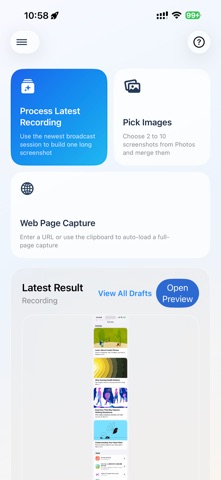


Description by 冉 姜 Written by the developer, not by AppBrain. Click to read.
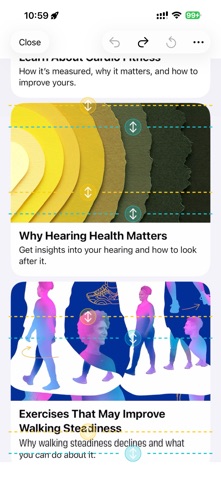
You can record a scrolling page and return to the app to generate a long screenshot automatically. You can also manually stitch multiple images from Photos, or capture a full web page. Generated results are saved as drafts so you can preview, trim, share, and export them later.
Key features:
- Automatic long screenshots from screen recordings
- Manual multi-image stitching
- Web page capture
- Manual seam adjustment after generation
- Draft management, preview, sharing, and export
- Built-in FAQ and illustrated tutorial
Great for:
- Chat history capture
- Saving web content
- Product detail pages
- Notes, comments, and article archiving
The free version lets users generate and preview results in the app. Recording-based long screenshots include 3 free exports per day, and users can watch ads to earn extra exports. Manual stitching and web capture remain exportable for free. Pictool Pro unlocks unlimited exports.