AppBrain
AppBrain
  • Apps
  • Apps being viewed right now Trending apps today Most popular apps All-time most installed apps Top rated apps iPhone and iPad apps
  • Intelligence ▾
    Intelligence overview → Track any Android app or your whole market
    Track & analyze
    Keyword Tracker & OptimizerTrack & improve Play rankings App Performance ReportOne-off PDF for any app StatisticsFree Android & Play market stats
    Promote your app
    Featured Apps App Links
  • Intelligence
  • Pricing
  • Dashboard
  • Sign up
  • Log in
App Store Apps > Utilities > PID Command & Ctrl
PID Command & Ctrl icon

PID Command & Ctrl

by AG Neovo · Utilities · Free
On the App Store since January 2020 · Data updated 2026-10-14
App Store

PID Command & Ctrl is made and published by AG Neovo. AppBrain is an independent app data site and isn't affiliated with AG Neovo. The app name, icon, screenshots and description belong to AG Neovo and are shown as published on the App Store.

AppBrain's verdict

Last updated
August 12, 2021
Size
2.37 MB

User feedback

Ratings and reviews on the App Store

Comments on PID Command & Ctrl for iOS

We don't have enough comments to show example comments. Please check back later.

Store listing

By AG Neovo, from the App Store
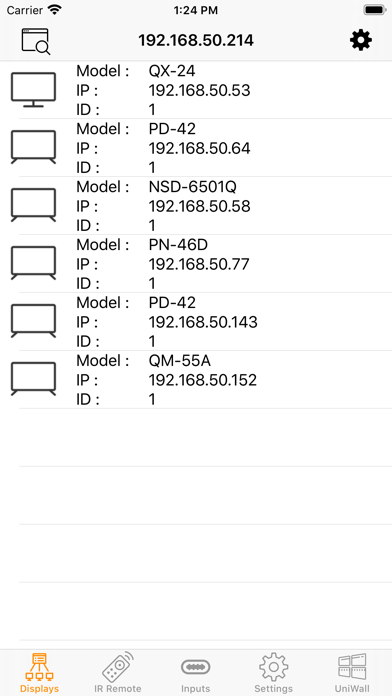
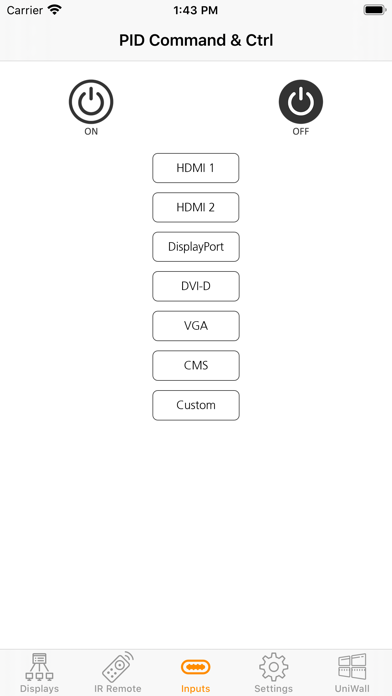
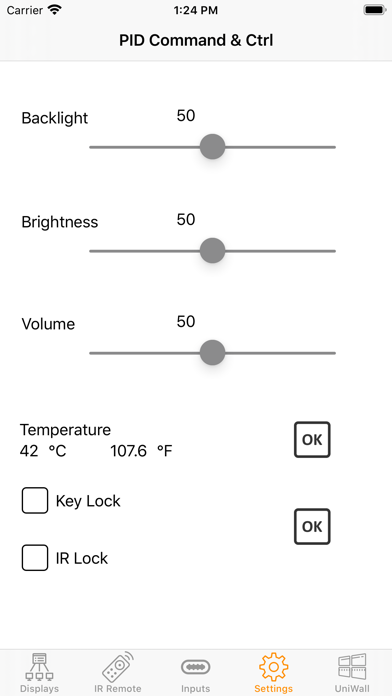
PID Command & Ctrl Screenshot 1 of 4
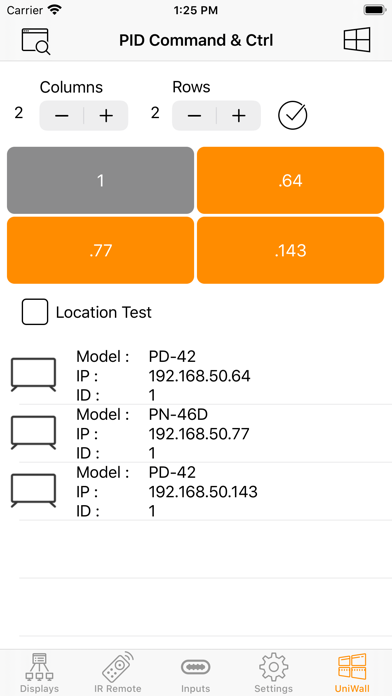
PID Command & Ctrl Screenshot 2 of 4
PID Command & Ctrl Screenshot 3 of 4
PID Command & Ctrl Screenshot 4 of 4
Screenshots by AG Neovo, from the the App Store listing
Description by AG Neovo Written by the developer, not by AppBrain. Click to read.
PID Command & Ctrl allows users to control, configure and test AG Neovo Public Information Displays located in the same network simply and intuitively. It also can be used to create video walls within minutes and assist system integrators with setting up displays.

Display Control
Provides a simple and intuitive interface for remote management, OSD-related settings, and easy control on deployed displays through Wi-Fi or LAN. Setup and maintain large-scale digital signage installations remotely and securely.

UniWall
The native UniWall feature allows AG Neovo displays to create up to 5x5 video walls without third-party equipment. With PID Command & Ctrl you can easily and quickly configure a video wall within 5 minutes, simply set the number of rows and columns and assign the correct position to each display.

This application is compatible only with AG Neovo Displays. The following models are supported: PN-Series, PD-Series, PM-Series, QX-Series, QD-Series, QM-Series, VW-Series, and RX-Series (RX-32E, RX-42E, RX-55E only).
Official page on the App Store

Safety and technology

Found in the app by AppBrain
Price
Free
App size
2.37 MB
Content rating
Everyone

Technologies used by PID Command & Ctrl

Releases

Updates seen on the App Store
Version
1.0.1
Launched
January 2020

No changelog data

Alternatives

Similar apps and more from AG Neovo

Alternatives to PID Command & Ctrl
PIDTune icon PIDTune
Richard H Street
5.0
$4.99
2 ratings
Megatuner icon Megatuner
Christer Dalen
0.0
Free
Lambda Tuner icon Lambda Tuner
Johan Bjors
3.3
$3.99
3 ratings
Palmear icon Palmear
Palmear Ltd.
0.0
Free
PR electronics PPS icon PR electronics PPS
PR electronics A/S
5.0
Free
7 ratings
PrusaLinkiOS icon PrusaLinkiOS
George Waters
4.3
Free
19 ratings
Convert - Unit Converter App icon Convert - Unit Converter App
Kyle Ferrigan
5.0
Free
3 ratings
uBarista icon uBarista
eveloar GmbH
4.8
Free
6 ratings

Rankings

App Store top charts

App Store Rankings for PID Command & Ctrl

This app is not ranked

About the app and developer

About PID Command & Ctrl

PID Command & Ctrl is an utilities app developed by AG Neovo.

User Ratings

The app has no ratings yet.

App Information

PID Command & Ctrl is freely available from the App Store. The app size is 2.37 MB. The latest version available is 1.0.1. The last update was on August 12, 2021.

Technical Requirements

The app has a content rating of Everyone. The app has been available on the App Store since January 2020.

Developer information for AG Neovo

AG Neovo

Address:

Share PID Command & Ctrl

Top new apps Apps other people are watching Price drops on Google Play Popular Utilities Apps Today's trending apps
PIDTune icon PIDTune
Megatuner icon Megatuner
Lambda Tuner icon Lambda Tuner
Palmear icon Palmear
PR electronics PPS icon PR electronics PPS
PrusaLinkiOS icon PrusaLinkiOS
Convert - Unit Converter App icon Convert - Unit Converter App
uBarista icon uBarista
Overview Alternatives Reviews Rankings Technology
AppBrain Intelligence premium content

Subscribe now to get full and unlimited access to AppBrain Intelligence. You'll have access to:

  • App Intelligence dashboard (performance timeline, competitor comparison, country rankings, insight cards)
  • Detailed ranking data per app
  • Full timeline per developer
  • Device market shares data per country
  • Unlimited keyword tracking
1 Month

$75/mo
(billed every month)

SAVE 0%
Subscribe
3 Months

$65/mo
($195 billed every 3 months)

SAVE 13%
Subscribe
1 Year

$57.50/mo
($690 billed every year)

SAVE 23%
Subscribe
Each subscription will automatically renew 3 days before the expiration date for the same time period. Subscriptions can be cancelled at any time before the renewal.

AppBrain is an app data site, we track rankings, ratings, installs for all apps and games on Google Play and the App Store. AppBrain doesn't host app files or APKs, all install links go directly to the official store. All trademarks are owned by their respective owners. As an Amazon Associate AppBrain earns from qualifying purchases.

More apps

  • Top Android apps being viewed
  • Arc: AI Screen Assistant
  • My CUPRA App
  • Melody Circus Riches

App statistics

  • Android statistics
  • Google Play Developer stats
  • Trending Android Apps
  • Trending iOS apps
  • Top popular Apps
  • Buy the best Android phone
  • Buy & sell app businesses

About AppBrain

  • Contact
  • Privacy
  • Documentation
  • DMCA takedowns
  • Blog
  • Top Free Games Apps for your iPhone or iPad
© 2010-2026 - AppBrain