

Pikkolo - Image Compress
Pikkolo - Image Compress is made and published by Pizero. AppBrain is an independent app data site and isn't affiliated with Pizero. The app name, icon, screenshots and description belong to Pizero and are shown as published on the App Store.
AppBrain's verdict
- Last updated
- April 7, 2026
Rankings
App Store top chartsApp Store Rankings for Pikkolo - Image Compress
Competitors
Similar apps and more from PizeroAlternatives to Pikkolo - Image Compress


More from Pizero


Releases
Updates seen on the App Store- Version
- 1.0.3
- Launched
- January 2026
No changelog data
User feedback
Ratings and reviews on the App StoreComments on Pikkolo - Image Compress for iOS
We don't have enough comments to show example comments. Please check back later.
Technology
Found in the app by AppBrain- Price
- Free
- App size
- 3.81 MB
- Content rating
- Everyone
Technologies used by Pikkolo - Image Compress
About the app and developer
About Pikkolo - Image Compress
Pikkolo - Image Compress is an utilities app developed by Pizero.
User Ratings
The app has no ratings yet.
App Information
Pikkolo - Image Compress is freely available from the App Store. The app size is 3.81 MB. The latest version available is 1.0.3. The last update was on April 7, 2026.
Technical Requirements
The app has a content rating of Everyone. The app has been available on the App Store since January 2026.
Developer information for Pizero
Address:
Frequently asked questions about Pikkolo - Image Compress
Is Pikkolo - Image Compress free?
Yes. Pikkolo - Image Compress is free on the App Store.
Is Pikkolo - Image Compress still available?
Yes. Pikkolo - Image Compress is on the App Store, and the last update we saw was on April 7, 2026.
How large is Pikkolo - Image Compress?
Pikkolo - Image Compress is 3.81 MB.
Is Pikkolo - Image Compress suitable for children?
App Store rates the content of Pikkolo - Image Compress as suitable for everyone.
Who made Pikkolo - Image Compress?
Pikkolo - Image Compress was developed by Pizero. It is listed in the utilities category on the App Store.
What are the best alternatives to Pikkolo - Image Compress?
People looking at Pikkolo - Image Compress also look at these utilities apps: VidSize: Video Compressor, Final Size: Image Compressor, eSign - PDF Signature Maker, Fontify - Fonts Keyboard, Snap Swipe - Photo Cleaner.
Store listing
By Pizero, from the App Store


Description by Pizero Written by the developer, not by AppBrain. Click to read.
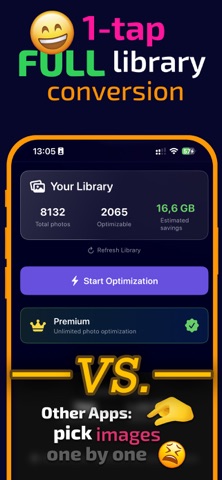
Pikkolo converts automatically your JPEG and PNG photos to the modern HEIC format, saving 40-60% storage space with no visible quality loss. Your photos look identical — just smaller.
HOW IT WORKS
1) Scan your photo library automatically and estimates possible savings
2) One-tap, automatic conversion of JPEG/PNG to space-efficient HEIC
3) Preserves all metadata, location, and date
4) Shows exactly how much space you saved
ONE TAP OPTIMIZATION
No complicated settings. No manual selection. Just tap "Start Optimization" and watch your storage free up.
100% PRIVATE
All processing happens entirely on your device. Your photos never leave your iPhone — no uploads, no cloud, no tracking.
SMART & SAFE
• Checks available space before processing
• Processes in batches on low storage
• Automatically rolls back if something goes wrong
• Skips photos that wouldn't save space
GO UNLIMITED
Remove all limits with a yearly subscription or a one-time lifetime purchase. Optimize your entire library — thousands of photos — and keep it optimized forever.
Pikkolo is perfect for anyone running low on storage. Stop deleting memories. Start optimizing them.
For this product, standard Apple EULA terms and conditions apply: https://www.apple.com/legal/internet-services/itunes/dev/stdeula/