


AppBrain's verdict
- Rating on App Store
- 4.50
- 16 ratings
- Last updated
- October 5, 2026
- Size
- 99.2 MB
It doesn't have enough ratings yet to judge what users think.
User feedback
Ratings and reviews on the App StoreComments on Pikolor - Coloring Book Maker for iOS
We don't have enough comments to show example comments. Please check back later.
Store listing
By AKO CLOUD, from the App StoreDescription by AKO CLOUD Written by the developer, not by AppBrain. Click to read.
Pikolor is the AI coloring book maker designed for kids and families. Transform any picture - pets, portraits, favorite characters - into beautiful coloring pages you can print or color on screen. Watch your child's face light up when they see their own photo become a coloring page!
FROM PHOTO TO COLORING PAGE
Simply snap a photo or pick one from your gallery. Pikolor's AI instantly transforms it into a clean, ready-to-color outline or a hand-drawn pencil sketch. Print your printable coloring pages for screen-free fun, or let your kids color directly in the app with easy-to-use tools.
MULTIPLE CREATIVE STYLES
Coloring outlines:
- Simple & Detailed – Bold outlines for little ones, fine lines for kids 6+ and adults
- Minimalist & Stencil – Clean, simple outlines for easy coloring
- Mandala, Zentangle & Paper Cut – Relaxing, intricate patterns
Fun cartoon & character styles:
- Cartoon, 3D Cartoon & Comic Hero – Turn photos into playful characters
- GTA Style – Become an open-world video game character
- Manga, Chibi, Kawaii & Caricature – Cute anime-style and expressive looks
- Doodle, Pop Art & Retro Comic – Bold, fun and quirky
Artistic looks:
- Pencil Sketch, Charcoal, Crosshatch & Colored Pencil – Hand-drawn feel
- Watercolor, Stained Glass, Crochet & Paper Layers – Unique textured art
- Pixel Art – 8-bit retro style, perfect for perler beads and cross-stitch crafts
Plus full-color versions (Color Manga, Cartoon Color, Color Doodle & more) and new styles added regularly!
COLOR, DRAW & PRINT
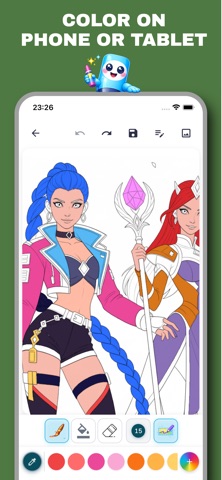
- Color on screen with kid-friendly brushes and palettes
- Print high-quality coloring pages at home or export as PDF
- Save your artwork and share with family
- Works offline once pages are generated
DESIGNED FOR KIDS, LOVED BY PARENTS
- No ads – Zero distractions while coloring
- No data collected – COPPA compliant and privacy-first
- Parental controls protect all purchases
- Simple interface kids can use independently
PERFECT FOR
- Rainy day coloring activities and travel entertainment
- Pet photo coloring pages and family photo coloring books
- Birthday parties and playdates
- Classroom art projects
- Personalized gifts for grandparents
- Screen-free creative time (just print!)
- Stress relief and relaxing adult coloring (mandala, zentangle)
- Perler bead and cross-stitch patterns
WHY FAMILIES CHOOSE PIKOLOR
Unlike complex drawing apps, Pikolor is made specifically for children. No confusing menus, no inappropriate content - just pure creative fun. Parents love that kids can use it safely and independently.
Turn your favorite memories into coloring adventures. Download Pikolor and start creating!
Privacy Policy: https://pikolor.app/privacy
Terms of Use: https://pikolor.app/terms
Safety and technology
Found in the app by AppBrain- Price
- Free
- App size
- 99.2 MB
- Content rating
- Everyone
Technologies used by Pikolor - Coloring Book Maker
Releases
Updates seen on the App Store- Version
- 1.0.14+17
- Launched
- April 2026
No changelog data
Alternatives
Similar apps and more from AKO CLOUD


Rankings
App Store top chartsApp Store Rankings for Pikolor - Coloring Book Maker
About the app and developer
About Pikolor - Coloring Book Maker
Pikolor - Coloring Book Maker is an entertainment app developed by AKO CLOUD.
User Ratings
Pikolor - Coloring Book Maker is rated 4.50 out of 5 stars. The rating is based on 16 ratings.
App Information
Pikolor - Coloring Book Maker is freely available from the App Store. The app size is 99.16 MB. The latest version available is 1.0.14+17. The last update was on October 5, 2026.
Technical Requirements
The app has a content rating of Everyone. The app has been available on the App Store since April 2026.
Pikolor - Coloring Book Maker is made and published by AKO CLOUD. AppBrain is an independent app data site and isn't affiliated with AKO CLOUD. The app name, icon, screenshots and description belong to AKO CLOUD and are shown as published on the App Store.
Developer information for AKO CLOUD
Address:
Frequently asked questions about Pikolor - Coloring Book Maker
Is Pikolor - Coloring Book Maker free?
Yes. Pikolor - Coloring Book Maker is free on the App Store.
Is Pikolor - Coloring Book Maker still available?
Yes. Pikolor - Coloring Book Maker is on the App Store, and the last update we saw was on October 5, 2026.
How large is Pikolor - Coloring Book Maker?
Pikolor - Coloring Book Maker is 99.16 MB.
Is Pikolor - Coloring Book Maker suitable for children?
App Store rates the content of Pikolor - Coloring Book Maker as suitable for everyone.
How do people rate Pikolor - Coloring Book Maker?
Pikolor - Coloring Book Maker scores 4.50 out of 5 stars, from 16 ratings on the App Store.
Who made Pikolor - Coloring Book Maker?
Pikolor - Coloring Book Maker was developed by AKO CLOUD. It is listed in the entertainment category on the App Store.
What are the best alternatives to Pikolor - Coloring Book Maker?
People looking at Pikolor - Coloring Book Maker also look at these entertainment apps: Colorfly: Coloring Book Maker, ColoriAI : Print Coloring Page, Spiral Art: Portrait Drawing, iColor: Coloring Book Maker, Color AI - Coloring Book Maker.