




AppBrain's verdict
- Last updated
- November 6, 2026
- Size
- 88.8 MB
User feedback
Ratings and reviews on the App StoreComments on PilotFlight: Flight Planner for iOS
We don't have enough comments to show example comments. Please check back later.
Store listing
By Yigit Can Akinci, from the App StoreDescription by Yigit Can Akinci Written by the developer, not by AppBrain. Click to read.
PLAN EVERY STAGE
• Build routes with ICAO airports, saved waypoints or coordinates. Add, drag, reorder or delete intermediate points; review distance, ETE and altitude.
• Planning Desk builds a wind-corrected pilot log, sector assumptions and fuel policy from pilot-entered data, with text and printable-PDF export.
• Weight & Balance checks pilot-entered aircraft loading against a CG envelope; verify all limits against approved documents.
• Flight Kit stores your PDFs and aircraft checklists locally, previews GPX route imports and exports routes/tracks as GPX or the logbook as CSV. The app supplies no certified documents or checklists.
• Airfields & Radio combines route/nearby airports, runways and available TWR/APP/COM frequencies.
• Airspace & Profile shows imported boundaries, route crossings and comparable MSL bands.
• Procedures & Charts manages source-dependent SID, STAR, approaches, holds, runway guidance, navaids, reporting points, information, frequencies and regional NOTAMs.
LIVE MAP, TERRAIN AND FLIGHT DECK
• See ownship, planned route, Direct-To/live guidance and breadcrumb track on satellite, hybrid or terrain backgrounds, with optional 3D relief.
• Map Tools controls available airspace, worldwide SIGMET, PIREP, source-dependent NOTAM, procedure, navigation, information and frequency layers.
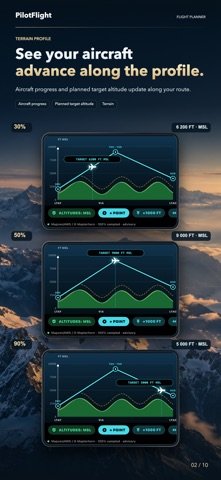
• View sampled terrain beneath the active route, compare it with planned MSL altitude and a chosen vertical margin, and shape altitude by leg or with movable points. Results appear only where samples are available.
• Use the refined HSI/CDI navigation display with BRG, DTK and XTK, plus GPS altitude, groundspeed, vertical speed, ETE and ETA when supported sensor data is available.
BRIEF, FLY AND REVIEW
Read exact-station METAR/TAF when available; assess runway wind, personal minimums and hazard context. Record or recover a flight, replay tracks or rehearse routes in Flight Review, export GPX and keep notes and a local logbook.
READY BEYOND THE SIGNAL
Download worldwide offline basemaps and change the background inside Live Map while retaining the active route and guidance. Imported or previously refreshed layers use only the last verified data held on the device. Ten editable tools—including wind triangle, density altitude, fuel/endurance, top of descent, glide and turn performance—work locally.
DATA AVAILABILITY
Weather and worldwide SIGMET use official AviationWeather.gov/Aviation Weather Center services. NOTAM display is not a complete briefing: FAA supplies a U.S. graphical TFR subset; other NOTAM, procedure, information, frequency and airspace layers depend on installed, imported or configured sources. Coverage and currency vary. An empty layer never means all clear.
PAID ACCESS
All features require auto-renewable PilotFlight Pro; no free tier. Choose monthly or yearly. Eligible new subscribers receive one month free. Unless canceled at least 24 hours before the trial or period ends, the plan starts or renews at Apple’s displayed local price. Manage in Apple Account settings.
IMPORTANT
PilotFlight is a supplemental planning and situational-awareness aid, not a certified primary flight/navigation instrument or a substitute for approved charts, AIP data, official weather/NOTAM briefings, ATC instructions, aircraft documentation or pilot judgment. Flight Deck does not provide a certified attitude reference or indicated airspeed. Always verify current approved sources before flight.
25 interface languages. Offline Tutorial: English narration and subtitles in 25 languages. Send routes to the optional, separately available PilotFlight Apple Watch app.
Terms of Use (Apple Standard EULA):
https://www.apple.com/legal/internet-services/itunes/dev/stdeula/
Privacy Policy:
https://akincijet.com/pilotflight-ipad-privacy.php?lang=en
Safety and technology
Found in the app by AppBrain- Price
- Free
- App size
- 88.8 MB
- Content rating
- Everyone
Technologies used by PilotFlight: Flight Planner
Releases
Updates seen on the App Store- Version
- 1.4.1
- Launched
- August 2026
No changelog data
Alternatives
Similar apps and more from Yigit Can AkinciAlternatives to PilotFlight: Flight Planner


More from Yigit Can Akinci


Rankings
App Store top chartsApp Store Rankings for PilotFlight: Flight Planner
About the app and developer
About PilotFlight: Flight Planner
PilotFlight: Flight Planner is a navigation app developed by Yigit Can Akinci.
What is the rating of PilotFlight: Flight Planner?
PilotFlight: Flight Planner has no ratings yet.
Is PilotFlight: Flight Planner free?
PilotFlight: Flight Planner is free. The app size is 88.85 MB. The latest version available is 1.4.1. The last update was on November 6, 2026.
What are the requirements for PilotFlight: Flight Planner?
The app has a content rating of Everyone. The app has been available on the App Store since August 2026.
PilotFlight: Flight Planner is made and published by Yigit Can Akinci. AppBrain is an independent app data site and isn't affiliated with Yigit Can Akinci. The app name, icon, screenshots and description belong to Yigit Can Akinci and are shown as published on the App Store.
Developer information for Yigit Can Akinci
Address: